I got this code below working on local (using source code) perfectly fine. But when I published it on IIS7 the PDF is not showing anymore.. Is there a problem with the IIS or ?. . . I spent many days on this problem.
Dim strPath = Server.MapPath("~ReportsGeneratedReport.pdf")

my_rpt.ExportToDisk(ExportFormatType.PortableDocFormat, strPath)
Dim file = New System.IO.FileInfo(strPath)
Dim Process = New Process()
If file.Exists Then
    Process.StartInfo.UseShellExecute = True
    Process.StartInfo.FileName = strPath
    Process.Start()
Else
    'No Report found
End If
As you can notice in the picture below you see the AdobeReader is running but its not displaying on my screen.
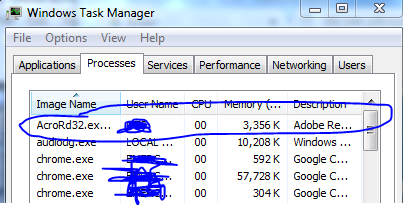
Answers:
Thank you for visiting the Q&A section on Magenaut. Please note that all the answers may not help you solve the issue immediately. So please treat them as advisements. If you found the post helpful (or not), leave a comment & I’ll get back to you as soon as possible.
Method 1
When you say “not showing” I am assuming you want the PDF to be opened on the client, not the server. Normally you would send the file to the browser. Process.Start() will start a process server-side, so even if the AppPool is allowed to start a process, it will only open the pdf on the server.
Below is how you send a file from the server to the client.
string strPath = Server.MapPath("~/reports/GeneratedReport.pdf");

//read the file from disk and convert to a byte array
byte[] bin = File.ReadAllBytes(strPath);

//clear the buffer stream
Response.ClearHeaders();
Response.Clear();
Response.Buffer = true;

//set the correct contenttype
Response.ContentType = "application/pdf";

//set the correct length of the data being send
Response.AddHeader("content-length", bin.Length.ToString());

//set the filename for the file
Response.AddHeader("content-disposition", "attachment; filename="GeneratedReport.pdf"");

//send the byte array to the browser
Response.OutputStream.Write(bin, 0, bin.Length);

//cleanup
Response.Flush();
HttpContext.Current.ApplicationInstance.CompleteRequest();
VB
Dim strPath As String = Server.MapPath("~/reports/GeneratedReport.pdf")

'read the file from disk and convert to a byte array
Dim bin() As Byte = File.ReadAllBytes(strPath)

'clear the buffer stream
Response.ClearHeaders
Response.Clear
Response.Buffer = true

'set the correct contenttype
Response.ContentType = "application/pdf"

'set the correct length of the data being send
Response.AddHeader("content-length", bin.Length.ToString)

'set the filename for the file
Response.AddHeader("content-disposition", "attachment; filename=""GeneratedReport.pdf"""")", send the byte array to the browser, Response.OutputStream.Write(bin, 0, bin.Length))

'cleanup
Response.Flush
HttpContext.Current.ApplicationInstance.CompleteRequest
Method 2
If you want to show a PDF on your site, here are a few javascript tools you can use that can help you accomplish this:
https://github.com/mozilla/pdf.js/
Personally, I have not used either of these tools, but they seem like they would be sufficient for what you are trying to accomplish.
All methods was sourced from stackoverflow.com or stackexchange.com, is licensed under cc by-sa 2.5, cc by-sa 3.0 and cc by-sa 4.0