I have been googling/SO:ing this issue for a while and many seem to be sharing this, but I haven’t found any successful solution to my problem.
Using MVC3 and Razor.
-
Master page contains:
<script src="@Url.Content("~/Scripts/jquery-1.5.min.js")" type="text/javascript"></script><script src="@Url.Content("~/Scripts/MicrosoftAjax.js")" type="text/javascript"></script><script src="@Url.Content("~/Scripts/MicrosoftMvcAjax.js")" type="text/javascript"></script> -
AjaxTest.cshtml contains:
<div id="AjaxTestDiv">content</div>@Ajax.ActionLink("Update", "AjaxTester", new AjaxOptions { UpdateTargetId = "AjaxTestDiv" }) -
AjaxTester action method:
public string AjaxTester()
{
    if (Request.IsAjaxRequest())
    {
        return DateTime.Now.ToString();
    }
    else
    {
        return "FAIL";
    }
}
I always get the “FAIL” returned, to a blank page, not in the targeted div.
Edit: Also note that if I remove the if (Request.IsAjaxRequest()), I still don’t get back anything to the targeted div, but instead a blank page.
Edit2: Looking at the HTML generated, this is my link:
<a data-ajax="true" data-ajax-method="POST" data-ajax-mode="replace"
data-ajax-update="#AjaxTestDiv" href="/Area/AjaxTester" rel="nofollow noreferrer noopener">Update</a>
Have tried switching the method to GET, to no avail.
Answers:
Thank you for visiting the Q&A section on Magenaut. Please note that all the answers may not help you solve the issue immediately. So please treat them as advisements. If you found the post helpful (or not), leave a comment & I’ll get back to you as soon as possible.
Method 1
By default ASP.NET MVC 3 uses unobtrusive jquery with all the Ajax.* helpers. So start by getting rid off all MicrosoftAjax scripts (this useless c**p) and put the following instead:
<script src="@Url.Content("~/Scripts/jquery-1.5.min.js")" type="text/javascript"></script>
<script src="@Url.Content("~/Scripts/jquery.unobtrusive-ajax.min.js")" type="text/javascript"></script>
and then simply activate unobtrusive AJAX in your web.config (if not already done):
<appSettings>
    <add key="ClientValidationEnabled" value="true"/>
    <add key="UnobtrusiveJavaScriptEnabled" value="true"/>
</appSettings>
Now jquery is going to unobtrusively AJAXify all the links containing those HTML 5 data-* attributes.
Or even better IMHO:
In your view simply:
@Html.ActionLink("Update", "AjaxTester", new { id = "mylink" })
and in a separate javascript file AJAXify this anchor:
$(function() {
    $('#mylink').click(function() {
        $('#AjaxTestDiv').load(this.href);
        return false;
    });
});
Method 2
Another IE-specific issue that can keep ActionLink from functioning correctly is covered here: ASP.NET MVC – Prevent Cache on Ajax.ActionLinks
Basically, IE sometimes caches Ajax GET requests, so setting the AjaxOption’s HttpMethod to POST is a less fragile way to construct an ActionLink:
@Ajax.ActionLink(
       item.Name + " (Ajax link test)",
         "MyActionName",
         routeValues: new { id = item.Id },
         ajaxOptions: new AjaxOptions()
         {
              UpdateTargetId = "divToUpdate",
              InsertionMode = InsertionMode.Replace,
              HttpMethod = "POST"
         })
Method 3
For those still facing this issue:
You should have below files in your project somewhere:
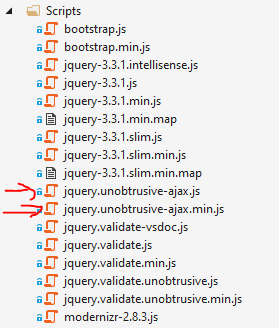
If not, below is the nuget package, either download this from nuget manager in your visual studio project or package manager console:
https://www.nuget.org/packages/Microsoft.jQuery.Unobtrusive.Validation/3.2.11/
Give reference of above added file after the jquery.min.js latest version in either your respective view or layout file:

Method 4
Add the jquery.unobtrusive-ajax.js package in your project and it should work in the expected way.
Include the current script form
CDN: https://www.cdnpkg.com/jquery-ajax-unobtrusive
<script src="@Url.Content("https://cdnjs.cloudflare.com/ajax/libs/jquery-ajax-unobtrusive/3.2.6/jquery.unobtrusive-ajax.js")" type="text/javascript"></script>
or install package
NuGet:
https://www.nuget.org/packages/Microsoft.jQuery.Unobtrusive.Ajax/3.2.6
and apply installed bundle.
Note that jquery.unobtrusive-ajax.js and jquery.validate.unobtrusive.js are not equal.
In my case this package was not installed and ajax.action link worked like html.actionLink and rendered entire view instead of inserting partial view in the target div.
All methods was sourced from stackoverflow.com or stackexchange.com, is licensed under cc by-sa 2.5, cc by-sa 3.0 and cc by-sa 4.0