I am using Ajax Modal pop up extender to block the UI while postback is going on. This modal pop up shows even if the page is not valid i.e even some of the required field values are missing, modal pop up always comes up. I dont want the modal pop up to show if the page is not valid Below is the code:
<script>
      function showProgress() {

            if (typeof (Page_ClientValidate) == 'function') {
                Page_ClientValidate();
            }

            if (Page_IsValid) {
                $find('mdlPopup').show();
            }


    }
</script>
Inside my form, I have this code:
 <form id="form1" runat="server">
        <asp:ScriptManager ID="srcMan" runat="server"></asp:ScriptManager>
        <div>
             <asp:TextBox ID="txtFirstName" runat="server"></asp:TextBox>
            <asp:Button runat="server" Text="Send" CssClass="input-button"
                OnClick="btn_Click" Width="167px" OnClientClick="showProgress();" />
            <ajaxToolkit:ModalPopupExtender ID="mdlPopup" runat="server" TargetControlID="pnlPopup"
                PopupControlID="pnlPopup" BackgroundCssClass="modalBackground" />
    <asp:Panel ID="pnlPopup" runat="server" CssClass="updateProgress">
        <div id="imageDiv">
            <div style="float: left; margin: 9px">
                <img src="loader.gif" width="32px" height="32px" /></div>
            <div style="padding-top: 17.5px; font-family: Arial,Helvetica,sans-serif; font-size: 12px;">
               Please wait...
            </div>
        </div>
    </asp:Panel>

        </div>
    </form>
I have the following required validator on my page:
<asp:RequiredFieldValidator Display="None" ID="Validator1" runat="server" ErrorMessage="First Name is required" ControlToValidate="txtFirstName"></asp:RequiredFieldValidator>
when I click on the send button and even if the First Name text box is not filled with value, I see the modalpopup. Is their any way, I can block the modalpop to execute if the page is not valid. Below is the code inside the send button:
protected  void btn_Click(object sender, System.EventArgs e)
    {
        if (Page.IsValid)
        {
           // my code here
        }
    }
Below is my entire code:
<%@ Page Language="C#" AutoEventWireup="true" CodeBehind="WebForm3.aspx.cs" Inherits="SendBulkEmail.WebForm3" %>

<!DOCTYPE html>

<html xmlns="http://www.w3.org/1999/xhtml">
<head runat="server">
    <title></title>
    <script type="text/javascript">
        function showProgress() {
            if (Page_ClientValidate("Validate")) {
                $find('mdlPopup').show();
            }


    }
    </script>


</head>
<body>
    <form id="form1" runat="server">
        <asp:ScriptManager ID="srcMan" runat="server"></asp:ScriptManager>
        <div>
            <asp:TextBox ID="txtFirstName" runat="server"></asp:TextBox>
            <asp:Button runat="server" ID="Button2" Text="Send" CssClass="input-button"
                OnClick="btn_Click" Width="167px" OnClientClick="showProgress();" />
            <ajaxToolkit:ModalPopupExtender ID="mdlPopup" runat="server" TargetControlID="pnlPopup"
                PopupControlID="pnlPopup" BackgroundCssClass="modalBackground" />
    <asp:Panel ID="pnlPopup" runat="server" CssClass="updateProgress">
        <div id="imageDiv">
            <div style="float: left; margin: 9px">
                <img src="loader.gif" width="32px" height="32px" /></div>
            <div style="padding-top: 17.5px; font-family: Arial,Helvetica,sans-serif; font-size: 12px;">
                Sending file. Please wait...
            </div>
        </div>
    </asp:Panel>

        </div>
        <asp:RequiredFieldValidator Display="Dynamic" ValidationGroup="Validate"  ID="Validator1" runat="server" ErrorMessage="First Name is required" ControlToValidate="txtFirstName"></asp:RequiredFieldValidator>

    </form>
</body>
</html>
Below is my code behind:
 protected void btn_Click(object sender, EventArgs e)
        {

            System.Threading.Thread.Sleep(1000);
        }
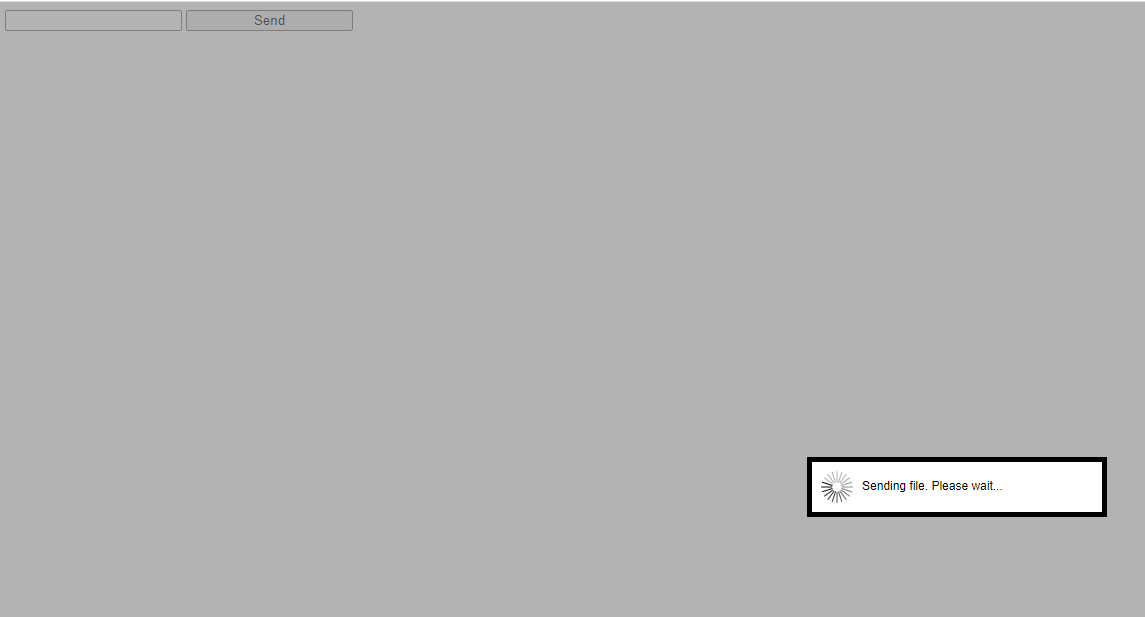
Below is the image of my browser when I run my code. As you can see the txtFirstName text box is not filled out. Still, I can see the modalPopup:
Answers:
Thank you for visiting the Q&A section on Magenaut. Please note that all the answers may not help you solve the issue immediately. So please treat them as advisements. If you found the post helpful (or not), leave a comment & I’ll get back to you as soon as possible.
Method 1
When using .NET 4.5, placing the script manager control into a form will disable client side validation.
The solution is to add this appSettings to the web.config:
<appSettings>
   <add key="ValidationSettings:UnobtrusiveValidationMode" value="None" />
</appSettings>
The above will force a loss of HTML5 client side validating, but the result is client side validation will return to your forms that use the script manager.
I found the solution here
I just tested with a .NET 4.0 project and your code is working fine without modifying the web.config file.
All methods was sourced from stackoverflow.com or stackexchange.com, is licensed under cc by-sa 2.5, cc by-sa 3.0 and cc by-sa 4.0