I’m working on a site that will make use of a few custom taxonomies (for custom post types). I’ve chosen to make some of the taxonomies hierarchical because the method of inputting values (checking boxes) is more desirable for this site than the free-form input of non-hierarchical taxonomies. However, what I would really like is to be able to use radio button inputs instead of check boxes. Additionally, I’d like to remove the dropdown that is used to choose the parent item in the taxonomy.
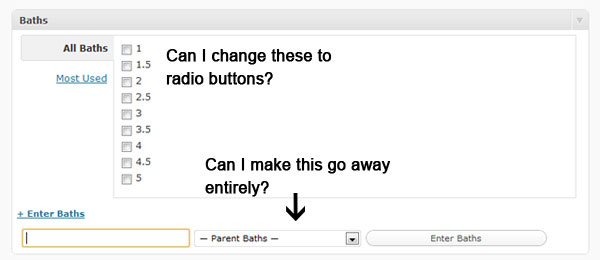
Am I going about this the wrong way? Should I start with non-hierarchical taxonomies and modify the input methods on those instead? I’m completely open to input and will gladly answer any questions or supply more information if I can.
Answers:
Thank you for visiting the Q&A section on Magenaut. Please note that all the answers may not help you solve the issue immediately. So please treat them as advisements. If you found the post helpful (or not), leave a comment & I’ll get back to you as soon as possible.
Method 1
Sure thing, just use CSS and the 'admin_head' hook to make it disappear. I believe this is what you are looking for?
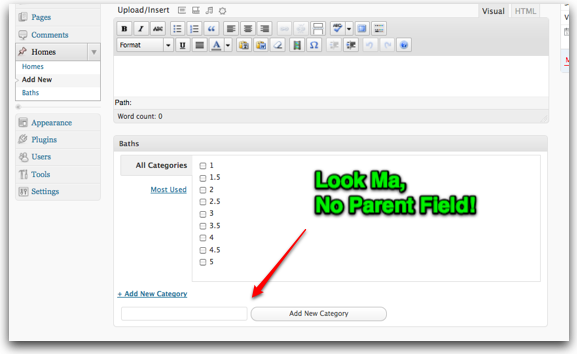
(source: mikeschinkel.com)
Just add the following to your theme’s functions.php file or to a .php file of a plugin that you might be writing. Note that I included an 'init' hook to define the “Home” post type and the “Bath” taxonomy so others can more easily follow the example. Also note that if your taxonomy is named Baths” you’ll need to change the CSS selector to be #newbaths_parent instead of #newbath_parent:
add_action('admin_head','remove_bath_parents');
function remove_bath_parents() {
  global $pagenow;
  if (in_array($pagenow,array('post-new.php','post.php'))) { // Only for the post add & edit pages
    $css=<<<STYLE
<style>
<!--
#newbath_parent {
  display:none;
}
-->
</style>
STYLE;
    echo $css;
  }
}
add_action('init','add_homes_and_baths');
function add_homes_and_baths() {
  register_post_type('home',
    array(
      'label'           => 'Homes',
      'public'          => true,
      'rewrite'         => array('slug' => 'homes'),
      'hierarchical'    => false,
    )
  );
  register_taxonomy('bath', 'home', array(
    'hierarchical'    => true,
    'label'           => 'Baths',
    'rewrite'         => array('slug' => 'baths' ),
    )
  );
}
UPDATE
So it seems I missed the radio button part of the question. Unfortunately WordPress does not make this easy but you can make it happen by using PHP output buffering (via the ob_start() and ob_get_clean() functions.) Just find a hook before the metabox is output ('add_meta_boxes') and a hook after it is output ('dbx_post_sidebar') and then search the captured HTML for 'checkbox' and replace with 'radio', echo it to the screen and yer done! Code follows:
add_action('add_meta_boxes','mysite_add_meta_boxes',10,2);
function mysite_add_meta_boxes($post_type, $post) {
  ob_start();
}
add_action('dbx_post_sidebar','mysite_dbx_post_sidebar');
function mysite_dbx_post_sidebar() {
  $html = ob_get_clean();
  $html = str_replace('"checkbox"','"radio"',$html);
  echo $html;
}
And the evidence:
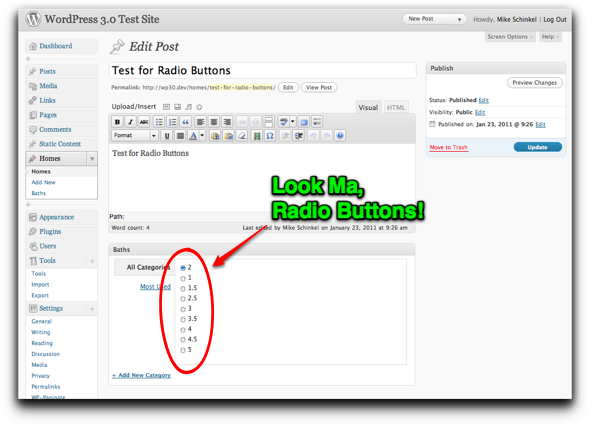
(source: mikeschinkel.com)
Method 2
or, if you’re lazy can use this plugin: Single Value Taxonomy UI
(I would’ve rather added this as a comment to Mike’s answer as it mostly does the same thing – but I can’t yet add comments)
All methods was sourced from stackoverflow.com or stackexchange.com, is licensed under cc by-sa 2.5, cc by-sa 3.0 and cc by-sa 4.0