I’ve been very confused about how python axes are defined, and whether they refer to a DataFrame’s rows or columns. Consider the code below:
>>> df = pd.DataFrame([[1, 1, 1, 1], [2, 2, 2, 2], [3, 3, 3, 3]], columns=["col1", "col2", "col3", "col4"])
>>> df
   col1  col2  col3  col4
0     1     1     1     1
1     2     2     2     2
2     3     3     3     3
So if we call df.mean(axis=1), we’ll get a mean across the rows:
>>> df.mean(axis=1)
0    1
1    2
2    3
However, if we call df.drop(name, axis=1), we actually drop a column, not a row:
>>> df.drop("col4", axis=1)
   col1  col2  col3
0     1     1     1
1     2     2     2
2     3     3     3
Can someone help me understand what is meant by an “axis” in pandas/numpy/scipy?
A side note, DataFrame.mean just might be defined wrong. It says in the documentation for DataFrame.mean that axis=1 is supposed to mean a mean over the columns, not the rows…
Answers:
Thank you for visiting the Q&A section on Magenaut. Please note that all the answers may not help you solve the issue immediately. So please treat them as advisements. If you found the post helpful (or not), leave a comment & I’ll get back to you as soon as possible.
Method 1
It’s perhaps simplest to remember it as 0=down and 1=across.
This means:
- Use
axis=0to apply a method down each column, or to the row labels (the index). - Use
axis=1to apply a method across each row, or to the column labels.
Here’s a picture to show the parts of a DataFrame that each axis refers to:
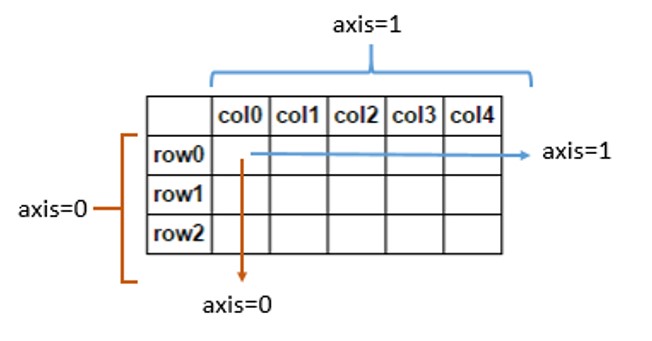
It’s also useful to remember that Pandas follows NumPy’s use of the word axis. The usage is explained in NumPy’s glossary of terms:
Axes are defined for arrays with more than one dimension. A 2-dimensional array has two corresponding axes: the first running vertically downwards across rows (axis 0), and the second running horizontally across columns (axis 1). [my emphasis]
So, concerning the method in the question, df.mean(axis=1), seems to be correctly defined. It takes the mean of entries horizontally across columns, that is, along each individual row. On the other hand, df.mean(axis=0) would be an operation acting vertically downwards across rows.
Similarly, df.drop(name, axis=1) refers to an action on column labels, because they intuitively go across the horizontal axis. Specifying axis=0 would make the method act on rows instead.
Method 2
There are already proper answers, but I give you another example with > 2 dimensions.
The parameter axis means axis to be changed.
For example, consider that there is a dataframe with dimension a x b x c.
df.mean(axis=1)returns a dataframe with dimenstion a x 1 x c.df.drop("col4", axis=1)returns a dataframe with dimension a x (b-1) x c.
Here, axis=1 means the second axis which is b, so b value will be changed in these examples.
Method 3
Another way to explain:
// Not realistic but ideal for understanding the axis parameter
df = pd.DataFrame([[1, 1, 1, 1], [2, 2, 2, 2], [3, 3, 3, 3]],
                  columns=["idx1", "idx2", "idx3", "idx4"],
                  index=["idx1", "idx2", "idx3"]
                 )

---------------------------------------1
|          idx1  idx2  idx3  idx4
|    idx1     1     1     1     1
|    idx2     2     2     2     2
|    idx3     3     3     3     3
0
About df.drop (axis means the position)
A: I wanna remove idx3.
B: **Which one**? // typing while waiting response: df.drop("idx3",
A: The one which is on axis 1
B: OK then it is >> df.drop("idx3", axis=1)

// Result
---------------------------------------1
|          idx1  idx2     idx4
|    idx1     1     1     1
|    idx2     2     2     2
|    idx3     3     3     3
0
About df.apply (axis means direction)
A: I wanna apply sum.
B: Which direction? // typing while waiting response: df.apply(lambda x: x.sum(),
A: The one which is on *parallel to axis 0*
B: OK then it is >> df.apply(lambda x: x.sum(), axis=0)

// Result
idx1    6
idx2    6
idx3    6
idx4    6
Method 4
It should be more widely known that the string aliases ‘index’ and ‘columns’ can be used in place of the integers 0/1. The aliases are much more explicit and help me remember how the calculations take place. Another alias for ‘index’ is ‘rows’.
When axis='index' is used, then the calculations happen down the columns, which is confusing. But, I remember it as getting a result that is the same size as another row.
Let’s get some data on the screen to see what I am talking about:
df = pd.DataFrame(np.random.rand(10, 4), columns=list('abcd'))
          a         b         c         d
0  0.990730  0.567822  0.318174  0.122410
1  0.144962  0.718574  0.580569  0.582278
2  0.477151  0.907692  0.186276  0.342724
3  0.561043  0.122771  0.206819  0.904330
4  0.427413  0.186807  0.870504  0.878632
5  0.795392  0.658958  0.666026  0.262191
6  0.831404  0.011082  0.299811  0.906880
7  0.749729  0.564900  0.181627  0.211961
8  0.528308  0.394107  0.734904  0.961356
9  0.120508  0.656848  0.055749  0.290897
When we want to take the mean of all the columns, we use axis='index' to get the following:
df.mean(axis='index')
a    0.562664
b    0.478956
c    0.410046
d    0.546366
dtype: float64
The same result would be gotten by:
df.mean() # default is axis=0
df.mean(axis=0)
df.mean(axis='rows')
To get use an operation left to right on the rows, use axis=’columns’. I remember it by thinking that an additional column may be added to my DataFrame:
df.mean(axis='columns')
0    0.499784
1    0.506596
2    0.478461
3    0.448741
4    0.590839
5    0.595642
6    0.512294
7    0.427054
8    0.654669
9    0.281000
dtype: float64
The same result would be gotten by:
df.mean(axis=1)
Add a new row with axis=0/index/rows
Let’s use these results to add additional rows or columns to complete the explanation. So, whenever using axis = 0/index/rows, its like getting a new row of the DataFrame. Let’s add a row:
df.append(df.mean(axis='rows'), ignore_index=True)

           a         b         c         d
0   0.990730  0.567822  0.318174  0.122410
1   0.144962  0.718574  0.580569  0.582278
2   0.477151  0.907692  0.186276  0.342724
3   0.561043  0.122771  0.206819  0.904330
4   0.427413  0.186807  0.870504  0.878632
5   0.795392  0.658958  0.666026  0.262191
6   0.831404  0.011082  0.299811  0.906880
7   0.749729  0.564900  0.181627  0.211961
8   0.528308  0.394107  0.734904  0.961356
9   0.120508  0.656848  0.055749  0.290897
10  0.562664  0.478956  0.410046  0.546366
Add a new column with axis=1/columns
Similarly, when axis=1/columns it will create data that can be easily made into its own column:
df.assign(e=df.mean(axis='columns'))

          a         b         c         d         e
0  0.990730  0.567822  0.318174  0.122410  0.499784
1  0.144962  0.718574  0.580569  0.582278  0.506596
2  0.477151  0.907692  0.186276  0.342724  0.478461
3  0.561043  0.122771  0.206819  0.904330  0.448741
4  0.427413  0.186807  0.870504  0.878632  0.590839
5  0.795392  0.658958  0.666026  0.262191  0.595642
6  0.831404  0.011082  0.299811  0.906880  0.512294
7  0.749729  0.564900  0.181627  0.211961  0.427054
8  0.528308  0.394107  0.734904  0.961356  0.654669
9  0.120508  0.656848  0.055749  0.290897  0.281000
It appears that you can see all the aliases with the following private variables:
df._AXIS_ALIASES
{'rows': 0}

df._AXIS_NUMBERS
{'columns': 1, 'index': 0}

df._AXIS_NAMES
{0: 'index', 1: 'columns'}
Method 5
When axis=’rows’ or axis=0, it means access elements in the direction of the rows, up to down. If applying sum along axis=0, it will give us totals of each column.
When axis=’columns’ or axis=1, it means access elements in the direction of the columns, left to right. If applying sum along axis=1, we will get totals of each row.
Still confusing! But the above makes it a bit easier for me.
Method 6
I remembered by the change of dimension, if axis=0, row changes, column unchanged, and if axis=1, column changes, row unchanged.
All methods was sourced from stackoverflow.com or stackexchange.com, is licensed under cc by-sa 2.5, cc by-sa 3.0 and cc by-sa 4.0