I’d like my summary, param info, returns info, etc (listed below) to show up on the standard help page that .net generates for .asmx web services.
/// <summary>
/// Brief description
/// </summary>
/// <param name="fakeParamOne">Fake Param One Description</param>
/// <returns>Bool representing foo</returns>
The only thing that I’ve tried that affected the auto-generated help page in any way was this:
[WebMethod(Description = "Does awesome things.")]
I’m sure I’m missing something VERY simple (or it’s not possible to do what I want). Any suggestions?
Answers:
Thank you for visiting the Q&A section on Magenaut. Please note that all the answers may not help you solve the issue immediately. So please treat them as advisements. If you found the post helpful (or not), leave a comment & I’ll get back to you as soon as possible.
Method 1
Like @John Saunders comment mentioned there’s not really an automatic way to use the XML method comments to show up in the WSDL Help, but there are a couple of alternatives to get what you’re looking for.
WebMethod Description attribute can be set to be formatted HTML
Here’s an example:
const string someWebMethodDescription = @"
<table>
<tr>
<td>Summary:</td><td>[My Summary]</td>
</tr>
<tr>
<td>Parameters:</td><td> </td>
</tr>
<tr>
<td>fakeParam:</td><td>[My Fake Param Description]</td>
</tr>
</table>";
[WebMethod(Description=someWebMethodDescription)]
public List<string> SomeWebMethod
Where the result is:
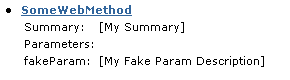
Alternatively, to create a custom WSDL Help Page
<configuration>
   <system.web>
      <webServices>
         <wsdlHelpGenerator href="docs/HelpPage.aspx" rel="nofollow noreferrer noopener"/>
      </webServices>
   </system.web>
</configuration>
check this codeproject post for details on making your own HelpPage:
Improving the ASP.NET Webservice Help Generator to Reflect Inheritance – CodeProject
All methods was sourced from stackoverflow.com or stackexchange.com, is licensed under cc by-sa 2.5, cc by-sa 3.0 and cc by-sa 4.0