I want to have my ASP.NET C# textbox to span the entire width of the div and be responsive. Also, I am using Bootstrap 4 if there is an option with that.
- I have tried placing a div in a div with centering and expanding.
- margin-left & right set to auto
- display: Block, Flex, and inline-block
- Hard coding size
- CSS Sizing
- Box Sizing
- A dozen or so Bootstrap classes
- plus more.
Here is a picture of what I got.
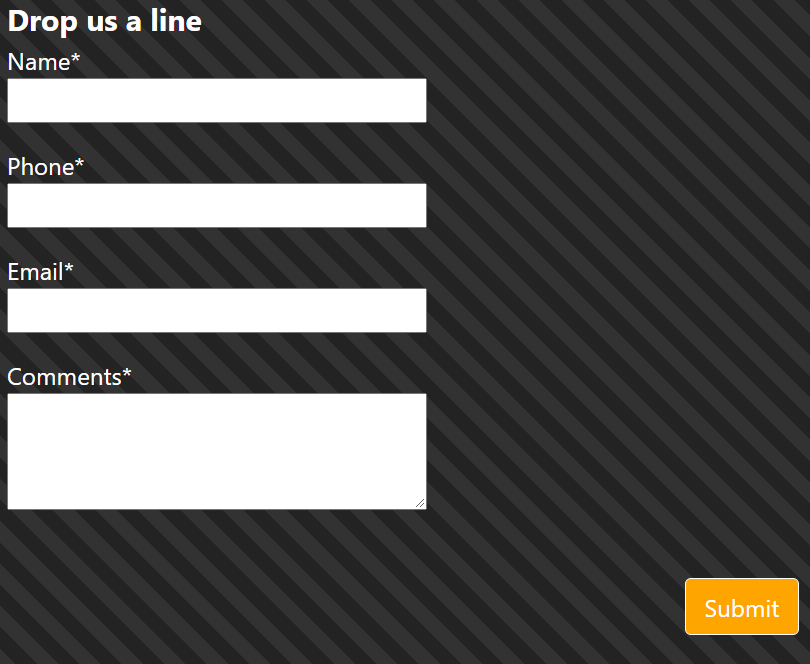
Here is the ASPX and HTML Code
         <div class="col-sm-6">
            <asp:Label ID="lblContactHeader" runat="server" Text="Drop us a line" Font-Bold="True" CssClass="large-label"></asp:Label>
            <br />
            <div class="form-group">
                <asp:Label ID="lblName" runat="server" Text="Name*"></asp:Label><br />
                <asp:TextBox ID="txtName" runat="server" CssClass="inputSize"></asp:TextBox><br />
            </div>
            <div class="form-group">
                <asp:Label ID="lblPhone" runat="server" Text="Phone*"></asp:Label><br />
                <asp:TextBox ID="txtPhone" runat="server" CssClass="inputSize"></asp:TextBox><br />
            </div>
            <div class="form-group">
                <asp:Label ID="lblEmail" runat="server" Text="Email*"></asp:Label><br />
                <asp:TextBox ID="txtEmail" runat="server" CssClass="inputSize"></asp:TextBox><br />
            </div>
            <div class="form-group">
                <asp:Label ID="lblComments" runat="server" Text="Comments*"></asp:Label><br />
                <asp:TextBox ID="txtComments" runat="server" CssClass="inputSize" TextMode="MultiLine" Rows="3"></asp:TextBox>
            </div>
            <br />
            <asp:Button ID="custContact" runat="server" Type="submit" Text="Submit" CssClass="btn btn-orange btn-right"/>
        </div>
Here is the current CSS Code. I have tried over 10 different suggestions on other Stack Overflow posts.
.inputSize {
width: 100%;
margin-left: 0px;
margin-right: 0px;
padding-left: 0px;
padding-right: 0px;}
Here is the HTML Code Version.
                    <label>Name*</label>
                    <input type="text" name="custName" class="form-control" required />
                    <label>Phone*</label>
                    <input type="text" name="custPhone" class="form-control" placeholder="(###) ###-####" pattern="^d{10}$|^((d{3})s*)?d{3}[s-]?d{4}$" required />
                    <label>Email*</label>
                    <input type="text" name="custEmail" class="form-control" required />
                    <label>Comments*</label>
                    <textarea class="form-control" name="custComm" required ></textarea>
                    <br/>
                    <input type="submit" name="btn-submit" id="custContact" value="Submit" class="btn btn-orange btn-right"/>
Answers:
Thank you for visiting the Q&A section on Magenaut. Please note that all the answers may not help you solve the issue immediately. So please treat them as advisements. If you found the post helpful (or not), leave a comment & I’ll get back to you as soon as possible.
Method 1
This is most likely due to another style sheet overriding the bootstrap styles.
Method 2
Please read Bootstrap documentation so that you know how those <div class="row" /> and <div class="col-*" /> work. Also reading through reponsive breakpoints would be helpful to understand what those -sm-, -md-, etc mean.
If you have
<div class="row">
    <div class="col-sm-6">
        ...
    </div>
</div>
It will give you 50% width of the screen because Bootstrap uses 12 column system, and 6 is half of it.
If you need 100%, just get rid of <div class="row" /> and <div class="col-sm-6" /> or change <div class="col-sm-6" /> to <div class="col-sm-12" />.
To set any input 100% width in regard to its container, just like what @bhmahler said in the comment, you need to set .form-control to the input, which will set the input display: block; and width: 100%;: https://getbootstrap.com/docs/4.5/components/forms/#layout
All methods was sourced from stackoverflow.com or stackexchange.com, is licensed under cc by-sa 2.5, cc by-sa 3.0 and cc by-sa 4.0