The setup:
The controller contains a method public ActionResult SaveFile() which returns a FileContentResult.
What works:
The view contains a form, which submits to this action. The result is this dialog: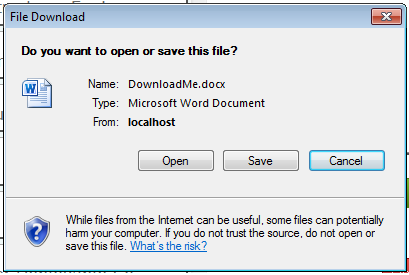
What doesn’t work:
The view contains some javascript to do an AJAX call to the same controller action where the form would post. Rather than triggering the aforementioned dialog, or even the AJAX success function, the response triggers the AJAX error function, and the XMLHttpRequest.responseText contains the file response.
What I need to do:
Make the request for the file using AJAX, and end up with the same result as when submitting a form. How can I make the AJAX request provide the dialog that submitting a form shows?
Answers:
Thank you for visiting the Q&A section on Magenaut. Please note that all the answers may not help you solve the issue immediately. So please treat them as advisements. If you found the post helpful (or not), leave a comment & I’ll get back to you as soon as possible.
Method 1
Here’s a quick example I made up. This is the concept LukLed was talking about with calling SaveFile but don’t return file contents via ajax and instead redirect to the download.
Here’s the view code:
<script src="../../Scripts/jquery-1.3.2.min.js" type="text/javascript"></script>
<script type="text/javascript">
    $(function() {
        // hide form code here

        // upload to server
        $('#btnUpload').click(function() {
            $.ajax({
                type: 'POST',
                dataType: 'json',
                url: '<%= Url.Action("SaveFile", "Home") %>',
                success: function(fileId) {
                    window.location = '<%= Url.Action("DownloadFile", "Home") %>?fileId=' + fileId;
                },
                error: function() {
                    alert('An error occurred uploading data.');
                }
            });
        });
    });
</script>

<% using (Html.BeginForm()) { %>

    <div>Field 1: <%= Html.TextBox("field1") %></div>

    <div>Field 2: <%= Html.TextBox("field2") %></div>

    <div>Field 3: <%= Html.TextBox("field3") %></div>

    <button id="btnUpload" type="button">Upload</button>

<% } %>
Here’s the controller code:
[HandleError]
public class HomeController : Controller
{
    public ActionResult Index()
    {
        return View();
    }

    public JsonResult SaveFile(string field1, string field2, string field3)
    {
        // save the data to the database or where ever
        int savedFileId = 1;

        // return the saved file id to the browser
        return Json(savedFileId);
    }

    public FileContentResult DownloadFile(int fileId)
    {
        // load file content from db or file system
        string fileContents = "field1,field2,field3";

        // convert to byte array
        // use a different encoding if needed
        var encoding = new System.Text.ASCIIEncoding();
        byte[] returnContent = encoding.GetBytes(fileContents);

        return File(returnContent, "application/CSV", "test.csv");
    }

    public ActionResult About()
    {
        return View();
    }
}
All methods was sourced from stackoverflow.com or stackexchange.com, is licensed under cc by-sa 2.5, cc by-sa 3.0 and cc by-sa 4.0