I am using the following code to let user select multiple locations on the form.
@Html.DropDownListFor(m => m.location_code, Model.location_type, new { @class = "form-control", @multiple = "multiple" }).
location_code is an List<int> and location_type is List<SelectListItem> populated with data.
The code does return me the selected values in the controller, but when the user clicks on edit button the object passed does not show the selected values but instead shows the normal initialized dropdown with nothing selected.
What i actually want is that once the user submits the form (including the multiple selected values) it goes to a page where user confirms if the details are correct.If not he presses edit button and the object is again passed to controller.In this phase it should show the multiple values selected.Other fields behave properly .
Any insight on this ?
Answers:
Thank you for visiting the Q&A section on Magenaut. Please note that all the answers may not help you solve the issue immediately. So please treat them as advisements. If you found the post helpful (or not), leave a comment & I’ll get back to you as soon as possible.
Method 1
In your view:
@Html.ListBoxFor(m => m.location_code, Model.location_type)
That’s all you need. You’re using a ListBox control so it’s already a multiple select list.
Then back in your controller you can get the selected items like this:
[HttpPost]
public string SaveResults(List<int> location_code)
{

    if (location_code!= null)
    {
        return string.Join(",", location_code);
    }
    else
    {
        return "No values are selected";
    }
}
Method 2
MultiSelect DropdownList Using jQuery in Asp.Net MVC and C#.Net :
first we will create a new mvc application and add the a model class file in model folder. In this model class file add the below code.
using System;
using System.Collections.Generic;
using System.Linq;
using System.Web;

namespace MvcApplication1.Models
{
    public class CountryModel
    {
        public List<Country> CountryList { get; set; }
        public string SelectedCountryId { get; set; }
    }
    public class Country
    {
        public string CountryName { get; set; }
    }
}
Now add a controller class file and add the below code.
using System;
using System.Collections.Generic;
using System.Linq;
using System.Web;
using System.Web.Mvc;
using MvcApplication1.Models;

namespace MvcApplication1.Controllers
{
    public class HomeController : Controller
    {
        //
        // GET: /Home/

        public ActionResult Index()
        {
            CountryModel objcountrymodel = new CountryModel();
            objcountrymodel.CountryList = new List<Country>();
            objcountrymodel.CountryList = CountryDate();
            return View(objcountrymodel);
        }
        public List<Country> CountryDate()
        {
            List<Country> objcountry = new List<Country>();
            objcountry.Add(new Country { CountryName = "America" });
            objcountry.Add(new Country { CountryName = "India" });
            objcountry.Add(new Country { CountryName = "Sri Lanka" });
            objcountry.Add(new Country { CountryName = "China" });
            objcountry.Add(new Country { CountryName = "Pakistan" });
            return objcountry;
        }
    }
}
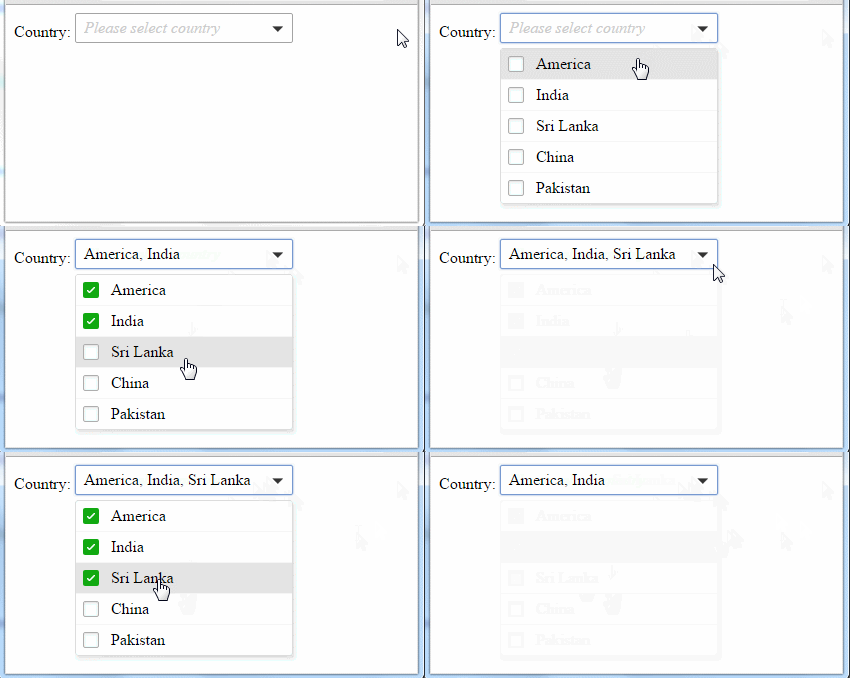
In above code I have created a collection of country. This list we will bind with the dropdown list. Now create the view and add the below code into the view.
@model MvcApplication1.Models.CountryModel
@{
    ViewBag.Title = "MultiSelect DropdownList Using jQuery in Asp.Net MVC and C#.Net";
}
 <script src="http://ajax.googleapis.com/ajax/libs/jquery/1.9.0/jquery.min.js"></script>
<script src="../../Scripts/jquery.sumoselect.js" type="text/javascript"></script>
<link href="../../Css/dropdownliststyle.css" rel="stylesheet" type="text/css" />
 <script type="text/javascript">
     $(document).ready(function () {
         window.asd = $('.ddlMultiSlectBox).SumoSelect({ csvDispCount: 4 });
     });
    </script>
Country:
@Html.DropDownListFor(m => m.SelectedCountryId, new SelectList(Model.CountryList, "CountryName", "CountryName"), new {@multiple="multiple",@placeholder="Please select country", @class="ddlMultiSlectBox" })
Here in this code I have added the css and jQuery library reference and used sumoselect function to show multi select dropdown list.
Now we have done run the application to check the output.
All methods was sourced from stackoverflow.com or stackexchange.com, is licensed under cc by-sa 2.5, cc by-sa 3.0 and cc by-sa 4.0