At some point, shortly after a code push, we saw numerous restarts occurring in our web application with no logging indicating an issue whatsoever. So I found this article: http://weblogs.asp.net/scottgu/433194 and we added Application_End logging, which immediately revealed this:
_shutDownMessage=Recompilation limit of 15 reached HostingEnvironment initiated shutdown HostingEnvironment caused shutdown _shutDownStack=
at System.Environment.GetStackTrace(Exception e, Boolean needFileInfo)
at System.Environment.get_StackTrace() at
System.Web.Hosting.HostingEnvironment.InitiateShutdownInternal() at
System.Web.Hosting.HostingEnvironment.InitiateShutdownWithoutDemand()
at System.Web.HttpRuntime.ShutdownAppDomain(String stackTrace) at
System.Web.Compilation.DiskBuildResultCache.ShutdownCallBack(Object
state) at
System.Threading.ExecutionContext.RunInternal(ExecutionContext
executionContext, ContextCallback callback, Object state, Boolean
preserveSyncCtx) at
System.Threading.ExecutionContext.Run(ExecutionContext
executionContext, ContextCallback callback, Object state, Boolean
preserveSyncCtx) at
System.Threading.QueueUserWorkItemCallback.System.Threading.IThreadPoolWorkItem.ExecuteWorkItem()
at System.Threading.ThreadPoolWorkQueue.Dispatch()
Googling this error reveals surprisingly little, so we updated our web.config
<compilation debug="false" numRecompilesBeforeAppRestart="100">
and viola! Everything back to normal. We reviewed our changes thoroughly but didn’t find anything that we felt could’ve been the culprit.
Has anyone else encountered this or similar, or has knowledge / suspicions of what in the world could’ve caused this? Any feedback would be superb!
Answers:
Thank you for visiting the Q&A section on Magenaut. Please note that all the answers may not help you solve the issue immediately. So please treat them as advisements. If you found the post helpful (or not), leave a comment & I’ll get back to you as soon as possible.
Method 1
So the application is actually getting recompiled and since the default limit is 15 after 15 recompilation the app domain/application pool recycles.
Usually you will see an event in event viewer with event id – 1305. Open IIS Manager => Application Pools =>Right Click the Application pool and go to advanced settings => Scroll down to Generate Recycle Event Log Entry and change everything to true. Also you may need to enable health monitoring to see the details in event viewer.
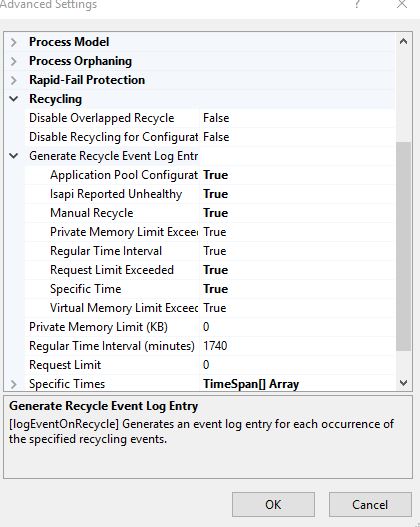
When you increased it to 100 the limit is not reached and hence application pool would have recyled during the regular recycle schedule (default every 29 hours)
A list of what causes whole website recompile:
- By default, when any change is made to a top-level file in a Web site, the whole site is recompiled. Top-level files include the global.asax file and all files in the bin/ and App_Code/ folders. Additional details here – https://blogs.msdn.microsoft.com/tmarq/2007/11/01/asp-net-file-change-notifications-exactly-which-files-and-directories-are-monitored/
- modifying web.config
-
a configuration include file change, if the SectionInformation.RestartOnExternalChanges property is true
<section name="MyAppSettings" type="System.Configuration.AppSettingsSection, System.Configuration, Version=2.0.0.0, Culture=neutral, PublicKeyToken=b03f5f7f11d50a3a" restartOnExternalChanges="true" requirePermission="false" />
Notes:
If you want to be able to change top-level files without causing the whole site to be recompiled, you can set the optimizeCompilations attribute of the compilation element in the Web.config file to true
References:
Understanding ASP.Net dynamic compilations
One of the other common cause for recompilation is due to a file being written to the source code folder i.e. something like writing a log file with in the source code folder or anti virus trying to scan web app folder and probably writing something into it (you can exclude web app folder from anti virus scan and see if it helps).
However to exactly find out what is causing recompilation you need to capture a ETW trace and see. A detailed explanation is given here on how to do that – https://blogs.msdn.microsoft.com/tess/2008/11/06/troubleshooting-appdomain-restarts-and-other-issues-with-etw-tracing/
Also there is a known issue around this is mentioned here – http://support.microsoft.com/kb/319947
Relevant text from the link
However, this problem occurs when you load many new .aspx or .ascx
files to the server (for example, 61 files). The server unloads the
application when the first 15 files are recompiled and every time
another 15 files are recompiled until the server reaches 61. This
results in four application restarts even though only one is required.
It talks about memory implications so make sure you do have the periodic application pool recycling enabled.
Hope this helps
All methods was sourced from stackoverflow.com or stackexchange.com, is licensed under cc by-sa 2.5, cc by-sa 3.0 and cc by-sa 4.0