I have searched a lot and spend 3 days only for searching and trying different technique (on stackoverflow etc) but I find no solution for implementing checkboxlist in asp.net mvc. And at last I am posting my problem to stackoverflow;
So, my model looks like this;
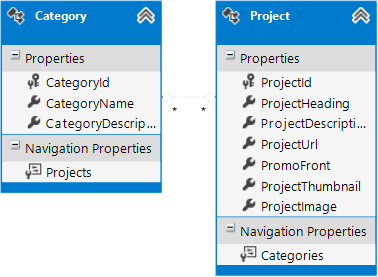
Many to Many relationship of my model(1 category may contain many projects and a project may belongs to many categories)
My controller;
 [HttpGet]
    [Authorize(Roles = "Admin")]
    public ActionResult ProjectAdd()
    {
        return View();
    }
My view;
@using (Html.BeginForm())
{
    @Html.ValidationSummary(true)

    <fieldset>
        <legend>Add New Project</legend>

        <div class="editor-label">
            @Html.LabelFor(model => model.ProjectHeading)
        </div>
        <div class="editor-field">
            @Html.EditorFor(model => model.ProjectHeading)
            @Html.ValidationMessageFor(model => model.ProjectHeading)
        </div>

        <div class="editor-label">
            @Html.LabelFor(model => model.ProjecctUrl)
        </div>
        <div class="editor-field">
            @Html.EditorFor(model => model.ProjecctUrl)
            @Html.ValidationMessageFor(model => model.ProjecctUrl)
        </div>

        <div class="editor-label">
            @Html.LabelFor(model => model.ProjectLongDescription)
        </div>
        <div class="editor-field">
            @Html.EditorFor(model => model.ProjectLongDescription)
            @Html.ValidationMessageFor(model => model.ProjectLongDescription)
        </div>

        <div class="editor-label">
            @Html.LabelFor(model => model.PromoFront)
        </div>
        @Html.EditorFor(model => model.PromoFront)
        @Html.ValidationMessageFor(model => model.PromoFront)

        <div class="editor-label">
            @Html.LabelFor(model => model.ProjectThubmnail)
        </div>
        <div class="editor-field">
            @Html.EditorFor(model => model.ProjectThubmnail)
            @Html.ValidationMessageFor(model => model.ProjectThubmnail)
        </div>

        <div class="editor-label">
            @Html.LabelFor(model => model.ProjectImage)
        </div>
        <div class="editor-field">
            @Html.EditorFor(model => model.ProjectImage)
            @Html.ValidationMessageFor(model => model.ProjectImage)
        </div>

        <div class="editor-label">
            @Html.LabelFor(model => model.CategoryId)
        </div>
        <div class="editor-field">
            @Html.EditorFor(model => model.CategoryId)
            @Html.ValidationMessageFor(model => model.CategoryId)
        </div>

        <p>
            <input type="submit" value="Create" class="submit" />
        </p>
So, my question is How do I display checkboxlist for categories in my view?
How do I get selected values from that checkboxlist?
Answers:
Thank you for visiting the Q&A section on Magenaut. Please note that all the answers may not help you solve the issue immediately. So please treat them as advisements. If you found the post helpful (or not), leave a comment & I’ll get back to you as soon as possible.
Method 1
You need to have an object that will have a list of all categories, for example, you could do this:
[HttpGet]
[Authorize(Roles = "Admin")]
public ActionResult ProjectAdd()
{
    // Get all categories and pass it into the View
    ViewBag.Categories = db.ListAllCategories();

    return View();
}
in the top of your View
@model Database.Project
@{
   // retrieve the list of Categories
   List<Database.Category> categories = ViewBag.Categories;
}
and then replace this
    <div class="editor-label">
        @Html.LabelFor(model => model.CategoryId)
    </div>
    <div class="editor-field">
        @Html.EditorFor(model => model.CategoryId)
        @Html.ValidationMessageFor(model => model.CategoryId)
    </div>
for this
    <div class="editor-label">
        <label for="categories">Categories</label>
    </div>
    <div class="editor-field">
        @foreach(var c in categories) {

        <label class="checkbox">
            <input type="checkbox" name="categories" value="@c.CategoryId"> @c.CategoryName
        </label>

        }
    </div>
back in your Controller
[HttpPost]
[Authorize(Roles = "Admin")]
public ActionResult ProjectAdd(Database.Project model, int[] categories)
{
    if(ModelState.IsValid) {

        // fill up categories
        db.InsertAndSaveProject(model, categories);

    }

    ...

    return redirectToView("ProjectAdd");
}
Method 2
Answer suggested by @balexandre above works great. However, I used following HTML Extension for CheckBoxList.
1. CheckboxList in ASP.net MVC4
2. Source Code:HTML Extension Helper method (Github)
The Major advantage of using this helper method is clean code and better readability. E.g.
@Html.CheckBoxListFor(model => model.SelectedItems, Model.AllItems)
All methods was sourced from stackoverflow.com or stackexchange.com, is licensed under cc by-sa 2.5, cc by-sa 3.0 and cc by-sa 4.0