after a lot of help yesterday, I came up against a known error in asp.net4 beta – I upgraded to VS2012 RC Express (4.5), and now I’m getting an internal server error, and I can’t see why. I’m creating a web API:
Model
using System;
using System.Collections.Generic;
using System.Linq;
using System.Web;
using System.ComponentModel.DataAnnotations;
using System.Data.Entity.ModelConfiguration.Conventions;
using System.Data.Entity;
using System.ComponentModel.DataAnnotations.Schema;

namespace MvcApplication6.Models
{
    public class tblCustomerBooking
    {
        [Key()]
        public int customer_id { get; set; }
        public string customer_name { get; set; }
        public string customer_email { get; set; }
        public virtual ICollection<tblRental> tblRentals { get; set; }
    }

    public class tblRental
    {
        [Key()]
        public int rental_id { get; set; }
        public int room_id { get; set; }
        public DateTime check_in { get; set; }
        public DateTime check_out { get; set; }
        public decimal room_cost { get; set; }
        public int customer_id { get; set; }
        [ForeignKey("customer_id")]
        public virtual tblCustomerBooking tblCustomerBooking { get; set; }
    }
}
I then used the Add Controller wizard, selected “Template: API controller with read/write actoins, using Entity Framework”, chose tblCustomerBooking as my Model Class, and clicked , which is:
using System.Data.Entity;

namespace MvcApplication6.Models
{
    public class BookingsContext : DbContext
    {
        public BookingsContext() : base("name=BookingsContext")
        {
        }
        public DbSet<tblCustomerBooking> tblCustomerBookings { get; set; }
    }
}
My Controller (BookingsController.cs) automatically generated by Visual Studio 2012 Express is:
using System;
using System.Collections.Generic;
using System.Data;
using System.Data.Entity.Infrastructure;
using System.Linq;
using System.Net;
using System.Net.Http;
using System.Web;
using System.Web.Http;
using MvcApplication6.Models;

namespace MvcApplication6.Controllers
{
    public class BookingsController : ApiController
    {
        private BookingsContext db = new BookingsContext();

        // GET api/Bookings
        public IEnumerable<tblCustomerBooking> GettblCustomerBookings()
        {
            return db.tblCustomerBookings.AsEnumerable();
        }
    }
}
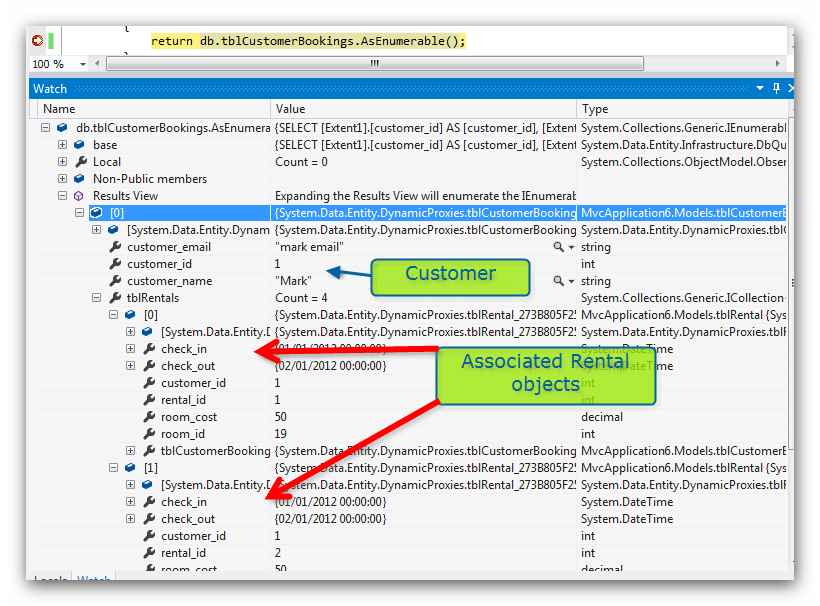
I added a breakpoint at “return db…..” above, and checked the Watch part in VS – it clearly shows the object, with the customer, and the associated rentals:
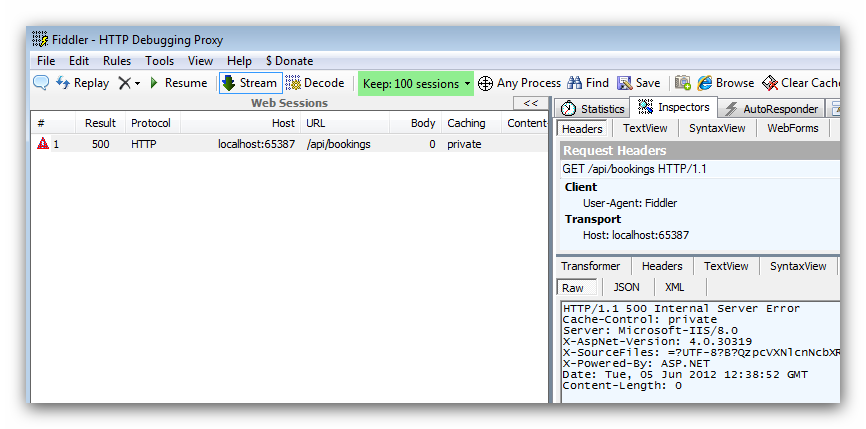
However if I allow the script to continue, I just get an http500 error (as shown in Fiddler below):
Is there any more code I can add into the controller to allow me to see why it is erroring? Or can anyone see what may be wrong? VS appears to retrieve it ok, as shown in the first screenshot, but doesn’t seem to be able to send it out.
Thanks for any help or pointers,
Mark
Update
Hi – am I simply asking too much of the API? Is it not possible (out of the box) for it to simply return objects with one to many relationships? Can it only really produce a single object list?
Thanks, Mark
Answers:
Thank you for visiting the Q&A section on Magenaut. Please note that all the answers may not help you solve the issue immediately. So please treat them as advisements. If you found the post helpful (or not), leave a comment & I’ll get back to you as soon as possible.
Method 1
To resolve the error 500 issue when returning JSON with entities with virtual keyword I did the following,
    public class BookingsController : ApiController
{
    private BookingsContext db = new BookingsContext();

    // GET api/Bookings
    public IEnumerable<tblCustomerBooking> GettblCustomerBookings()
    {
        db.Configuration.ProxyCreationEnabled = false;
        return db.tblCustomerBookings.AsEnumerable();
    }
}
It’s enough to disable proxy creation (which disables lazy loading as well) for the specific circumstances where proxies are disturbing, like serialization. This disables proxy creation only for the specific context instance of db
db.Configuration.ProxyCreationEnabled = false;
Method 2
[Update]
1, change the action code to include the navigation property data:
    // GET api/Bookings
    public IEnumerable<tblCustomerBooking> GettblCustomerBookings()
    {
        return db.tblCustomerBookings.Include("tblRentals").AsEnumerable();
    }
2, turn off proxy in data context
EF suggests to turn off proxy when serializing POCO.
If you want to support proxy, there are different ways for different serializers:
JSON.net serializer: It can support proxy by upgrading to latest version. Version 4.5.1 has a bug that can’t support ignore NonserializedAttribute. It will block proxy to be serialized.
DataContractSerializer (JSON/XML): use ProxyDataContractResolver to resolve the types, here is a walkthrough.
3, enable preserving reference in model class
Both json.net and DataContract serializer support detecting circular reference and they give developer to control how to handle it.
Change the model class to following:
[JsonObject(IsReference = true)]
[DataContract(IsReference = true)]
public class tblCustomerBooking
{
    [Key()]
    public int customer_id { get; set; }
    [DataMember]
    public string customer_name { get; set; }
    [DataMember]
    public string customer_email { get; set; }
    [DataMember]
    public virtual ICollection<tblRental> tblRentals { get; set; }
}


public class tblRental
{
    [Key()]
    public int rental_id { get; set; }
    public int room_id { get; set; }
    public DateTime check_in { get; set; }
    public DateTime check_out { get; set; }
    public decimal room_cost { get; set; }
    public int customer_id { get; set; }
    [ForeignKey("customer_id")]
    public virtual tblCustomerBooking tblCustomerBooking { get; set; }
}
Note that, if the model is attributed with DataContract, you have to specify DataMember for all its members, otherwise none of them will be serialized.
Method 3
are you doing:
db.tblCustomerBookings.Include("tblRentals").Select(i =>
    new { i.something //etc });
also, which MediaTypeFormatter are you using, Xml or Json? Error 500 often means that Formatter is choking.
Switch to JSON.NET formatter (in Web API RC the easiest way is to do GlobalConfiguration.Configuration.Formatters.RemoveAt(1) – this removes XML formatter) and see if it helps or at least gives more meaningful error (or request your method with content type JSON).
Method 4
You might want to add a global error handler to your project. It can trap and log any odd errors that are happening in background threads. This S/O article talks about some solid approaches. They will save you lots of time in any project: ASP.NET MVC Error Logging in Both Global.asax and Error.aspx
Method 5
Api Controller is based on Convention-Over-Configuration so you can try to solve in either one of the following ways:
- Rename your method to “Get” so that it match the GET verb
- Decorate your method with the HttpGet attribute: [HttpGet]
-
Go to the API’s Route mapping in Global.asax and {action} after {controller}/ in order to call it by http://mydomain.com/myapi/api/bookings/GettblCustomerBookings()
Method 6
I guess you are getting an exception at serialization due to lazy loading of the entities.
This thread may help you.
UPDATE:
Try if this working or not and if yes then the issue is mostly what I said
public IList<tblCustomerBooking> GettblCustomerBookings()
{
    var custBookings = db.tblCustomerBookings.Include("tblRentals").AsEnumerable();

    return custBookings
               .Select(c => new tblCustomerBooking
                            {
                               customer_id = c.customer_id,
                               customer_name = c.customer_name,
                               customer_email = c.customer_email,
                               tblRentals = c.tblRentals
                                               .Select(r => new tblRentals
                                                      {
                                                          rental_id = r.rental_id,
                                                          // other props exclude the
                                                          // tblCustomerBooking
                                                      })
                            }
                      ).ToList();
}
I guess if you are using JSON.NET library with web api you can easily control the properties that don’t need to be serialized by specifying the [JsonIgnore] attribute and there by you can avoid writing the above LINQ query.
http://code.msdn.microsoft.com/Using-JSONNET-with-ASPNET-b2423706
Method 7
I struggled with this issue of serializing the proxy object to a poco as well. You can build into your context a flag that switches the db.Configuration.ProxyCreationEnabled = false;
Or you should set up a viewmodel and take the proxy object and assign the parameters to the viewmodel.
public IEnumerable<tblCustomerBooking> GettblCustomerBookings()
        {
            return db.tblCustomerBookings.Select(cb=> new CustomerBookingsViewModel{id=cb.Id, et.....);
        }
or use an anonymous type:
.Select(cb=>new{id=cb.id....}
All methods was sourced from stackoverflow.com or stackexchange.com, is licensed under cc by-sa 2.5, cc by-sa 3.0 and cc by-sa 4.0