I just need to know if there’s a way to change the message shown by the Asp:FileUpload when no file as been selected.
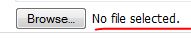
Thanks.
Answers:
Thank you for visiting the Q&A section on Magenaut. Please note that all the answers may not help you solve the issue immediately. So please treat them as advisements. If you found the post helpful (or not), leave a comment & I’ll get back to you as soon as possible.
Method 1
See above link. I use css to hide the default text and use a label to show what I want:
html
<div>
      <input type='file' title="Choose a video please" id="aa" onchange="pressed()">
      <label id="fileLabel">Choose file</label>
</div>
css
input[type=file]{
    width:90px;
    color:transparent;
}
javascript
window.pressed = function(){
    var a = document.getElementById('aa');
    if(a.value == "")
    {
        fileLabel.innerHTML = "Choose file";
    }
    else
    {
        var theSplit = a.value.split('\');
        fileLabel.innerHTML = theSplit[theSplit.length-1];
    }
 };
Method 2
You replace the text with your own message using CSS pseduo-class :after. You can declare a class like this one:
.bar:after {
    content:"Please select a file";
    background-color:white;
}
And assign it to your FileUpload control. The content message will replace the original one. Of course upon file selection you need to remove the message, you can do this for example via jQuery .removeClass (assuming ID of your FileUpload is “foo”):
$('#foo').change(function() {
    $(this).removeClass("bar");
})
Demo: http://jsfiddle.net/5zhuL/2/
Note that this solution seems to work Webkit-browser’s only (Chrome, Opera, Safari) you may need an alternative for others.
Method 3
Nope, not possible. This is the standard rendering in Chrome and cannot be changed.
Method 4
If you visit your page source in your browser ASP.NET put an input element with type='file' instead of your FileUpload.
You could simply use CSS to cover the text with something when the value attribute is empty.
Method 5
Only add this CSS to your code. It simply hide the “No file chosen”.
<style>
 input[type=file]
{
width:90px;
color:transparent;
}

</style>
Method 6
http://jsfiddle.net/Lsgbx5ne/1/
input[type=file]{
  color:transparent;
}
input[type=file]:after {
  color: #000;
  content:" Cool!";
}
Improvements over other solutions:
- Works for short text
- Doesn’t change the background color
- Pure css
Method 7
This work in all browser
window.pressed = function(){
    var a = document.getElementById('aa');
    if(!(a.value == ""))
    {
        var theSplit = a.value.split('\');
        fileLabel.innerHTML = theSplit[theSplit.length-1];
    }
};
input[type=file]{
width:90px;
color:transparent;
}<div>
<input type='file' title="Choose a video please" id="aa" onchange="pressed()">
<label id="fileLabel">Choose file</label>
</div>All methods was sourced from stackoverflow.com or stackexchange.com, is licensed under cc by-sa 2.5, cc by-sa 3.0 and cc by-sa 4.0