I have some knowledge on .NET 4.5, but totally new to 4.5.1. As I read, they have a couple of changes so that apps work with Identity, which is nice for scale web apps.
That being said, I need to work on a web app with a basic user/password login system and I’m wondering if this template Individual User Accounts can work, or if I have to go with No Authentication? Please explain your answer.
Answers:
Thank you for visiting the Q&A section on Magenaut. Please note that all the answers may not help you solve the issue immediately. So please treat them as advisements. If you found the post helpful (or not), leave a comment & I’ll get back to you as soon as possible.
Method 1
basic user/password login system
Individual User Accounts will configure ASP.Net Identity for you. In addition, it will also create basic login, logout and other extra templates too. Click on Learn more for more information.
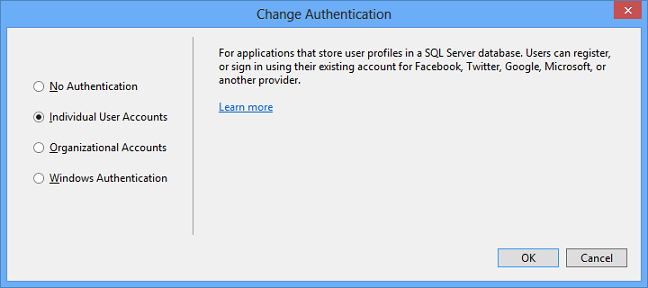
However, if you just need simple FormAuthentication, you want to select No Authentication.
The following is the example of simple FormAuthentication.
Sign-In method
public void SignIn(string username, bool createPersistentCookie)
{
    var now = DateTime.UtcNow.ToLocalTime();
    TimeSpan expirationTimeSpan = FormsAuthentication.Timeout;

    var ticket = new FormsAuthenticationTicket(
        1 /*version*/,
        username,
        now,
        now.Add(expirationTimeSpan),
        createPersistentCookie,
        "" /*userData*/,
        FormsAuthentication.FormsCookiePath);

    var encryptedTicket = FormsAuthentication.Encrypt(ticket);

    var cookie = new HttpCookie(FormsAuthentication.FormsCookieName,
        encryptedTicket)
    {
        HttpOnly = true,
        Secure = FormsAuthentication.RequireSSL,
        Path = FormsAuthentication.FormsCookiePath
    };

    if (ticket.IsPersistent)
    {
        cookie.Expires = ticket.Expiration;
    }
    if (FormsAuthentication.CookieDomain != null)
    {
        cookie.Domain = FormsAuthentication.CookieDomain;
    }

    Response.Cookies.Add(cookie);
}
Global.asax.cs
You need this in order to retrieve the username from cookie, and save it in IPrincipal Object.
public class Global : HttpApplication
{
    private void Application_AuthenticateRequest(object sender, EventArgs e)
    {
        HttpCookie decryptedCookie =
            Context.Request.Cookies[FormsAuthentication.FormsCookieName];

        FormsAuthenticationTicket ticket =
            FormsAuthentication.Decrypt(decryptedCookie.Value);

        var identity = new GenericIdentity(ticket.Name);
        var principal = new GenericPrincipal(identity, null);

        HttpContext.Current.User = principal;
        Thread.CurrentPrincipal = HttpContext.Current.User;
    }
}
web.config
Make sure you have authentication tag in web.config.
For example,
<authentication mode="Forms">
   <forms loginUrl="~/Account/Login" />
</authentication>
Usage
public ActionResult Index()
{
    var username = User.Identity.Name;

    return View();
}
All methods was sourced from stackoverflow.com or stackexchange.com, is licensed under cc by-sa 2.5, cc by-sa 3.0 and cc by-sa 4.0