Is there a way to change wordpress page password automatically based on date date interval?
For example I want to change a page password every 2 days.
Where is the page password stored in the database? Can’t seem to find it.
I saw one related post here
How to automatically apply a password to all posts within a custom post type
Can this be applied the same way to pages?
Thanks
Answers:
Thank you for visiting the Q&A section on Magenaut. Please note that all the answers may not help you solve the issue immediately. So please treat them as advisements. If you found the post helpful (or not), leave a comment & I’ll get back to you as soon as possible.
Method 1
The post/page passwords are stored in the wp_posts table in the post_password field.
You can try the following demo plugin to update the post password automatically with help of wp-cron. You might alternatively consider transients or custom post meta.
<?php
/**
 * Plugin Name: Auto Post-Password Changer
 * Description: Schedule a wp-cron password update event that runs every 2nd day
 * Plugin URI:  http://wordpress.stackexchange.com/a/174820/26350
 * Author:      Birgir Erlendsson (birgire)
 * Version:     0.0.1
 */

add_action( 'wpse_change_pass_event', function()
{
    // Update the post password for a given slug.
    // See for example: http://wordpress.stackexchange.com/a/130535/26350

    $slug = 'hello-world'; // Edit this post slug to your needs!

    global $wpdb;
    $wpdb->update(
        $wpdb->posts,
        array( 'post_password' => uniqid() ),
        array( 'post_name'     => $slug    ),
        array( '%s' ),
        array( '%s' )
    );
});

add_filter( 'cron_schedules', function( $schedules )
{
    // Our custom cron interval:
    $schedules['every_2nd_day'] = array(
        'interval'  => 2 * DAY_IN_SECONDS,
        'display'   => 'Once every second day'
    );

    return $schedules;
});

register_activation_hook( __FILE__, function()
{
    // Start the cron job:
    wp_schedule_event( time(), 'every_2nd_day', 'wpse_change_pass_event' );
});


register_deactivation_hook( __FILE__, function()
{
    // Stop the cron job:
    wp_clear_scheduled_hook( 'wpse_change_pass_event' );
});
You just have to modify the $slug of the page you want to modify.
Notice that you need a traffic to your site to activate the wp-cron.
Here we use the PHP function uniqid() to generate the password, so it’s of the form:
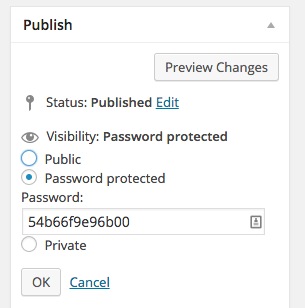
I hope you can extend this to your needs.
All methods was sourced from stackoverflow.com or stackexchange.com, is licensed under cc by-sa 2.5, cc by-sa 3.0 and cc by-sa 4.0