I have a pandas dataframe with positive and negative values and want to plot it as a bar chart.
I want to plot the positive colors ‘green’ and the negative values ‘red’ (very original…lol).
I’m not sure how to pass if > 0 ‘green’ else < 0 ‘red’?
data = pd.DataFrame([[-15], [10], [8], [-4.5]],
                    index=['a', 'b', 'c', 'd'],
                    columns=['values'])
data.plot(kind='barh')

Answers:
Thank you for visiting the Q&A section on Magenaut. Please note that all the answers may not help you solve the issue immediately. So please treat them as advisements. If you found the post helpful (or not), leave a comment & I’ll get back to you as soon as possible.
Method 1
I would create a dummy column for whether the observation is larger than 0.
In [39]: data['positive'] = data['values'] > 0

In [40]: data
Out[40]:
   values positive
a   -15.0    False
b    10.0     True
c     8.0     True
d    -4.5    False

[4 rows x 2 columns]

In [41]: data['values'].plot(kind='barh',
                             color=data.positive.map({True: 'g', False: 'r'}))

Also, you may want to be careful not to have column names that overlap with DataFrame attributes. DataFrame.values give the underlying numpy array for a DataFrame. Having overlapping names prevents you from using the df.<column name> syntax.
Method 2
If you want to avoid adding a column, you can do TomAugspurger’s solution in one step:
data['values'].plot(kind='barh',
                    color=(data['values'] > 0).map({True: 'g',
                                                    False: 'r'}))

Method 3
Define
def bar_color(df,color1,color2):
    return np.where(df.values>0,color1,color2).T
then
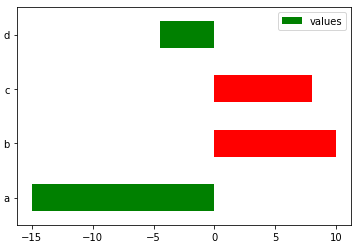
data.plot.barh(color=bar_color(data,'r','g'))
gives
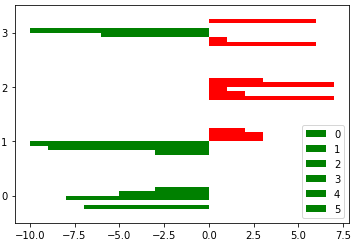
It also works for multiple bar series
df=pd.DataFrame(np.random.randint(-10,10,(4,6)))
df.plot.barh(color=bar_color(df,'r','g'))
gives
Method 4
Drawing on @Max Ghenis answer (which doesn’t work for me but seems to be a minor change in the packages):
tseries = data['values']
color = (tseries > 0).apply(lambda x: 'g' if x else 'r')

splot = tseries.plot.barh(color=color)
gives:
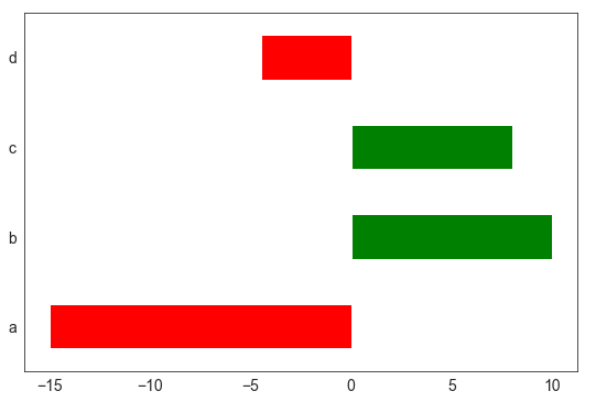
.. what you expect to see.
All methods was sourced from stackoverflow.com or stackexchange.com, is licensed under cc by-sa 2.5, cc by-sa 3.0 and cc by-sa 4.0