When I try to load a dropdown list in a Bootstrap navbar on an ASP.NET page, the desktop version of the list loads exactly as it appears on the official navbar documentation, but not when loading the same page on an iPad Air 2 with iOS 13.3.1. Instead of loading the listed items in a dropdown fashion, they appear below the dropdown menu’s name. Just as well, the toggle “hamburger” button appears as a blank button.
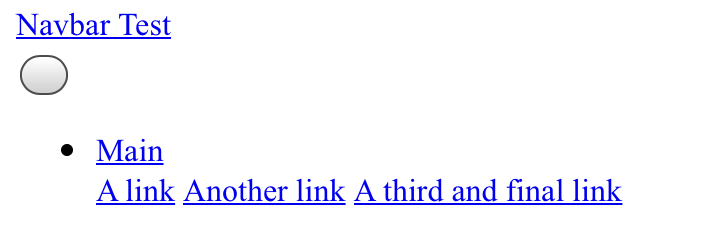
I’ve heard elsewhere that the link in the list needs to have href="#", but this has already been done, as you will see below:
Head
<meta http-equiv="X-UA-Compatible" content="IE=edge, width=device-width, initial scale=1.0" />
<title>Navbar Testing</title>
<link rel="stylesheet" href="https://maxcdn.bootstrapcdn.com/bootstrap/4.5.0/css/bootstrap.min.css" />
<script src="https://ajax.googleapis.com/ajax/libs/jquery/3.5.1/jquery.min.js"></script>
<script src="https://maxcdn.bootstrapcdn.com/bootstrap/4.5.0/js/bootstrap.min.js"></script>
<script src="packages/popper.js.1.16.1/content/Scripts/popper.min.js"></script>
Body
<form id="form1" runat="server">
 <asp:ScriptManager ID="smmaster" runat="server" EnablePartialRendering="true" EnablePageMethods="true"></asp:ScriptManager>
 <div id="wrapper">
  <asp:UpdatePanel ID="uppnl" runat="server" UpdateMode="Conditional">
   <ContentTemplate>
    <nav class="navbar navbar-expand-lg navbar-dark bg-dark">
     <div class="container-fluid">
      <a class="navbar-brand" href="#">
       <div class="container-sm">
        Navbar Test
       </div>
      </a>
      <button class="navbar-toggler" data-toggle="collapse" data-target="#navbarSupportedContent"
       aria-controls="navbarSupportedContent" aria-expanded="false" aria-label="Toggle navigation" type="button" />
       <span class="navbar-toggler-icon" />
      </button>
      <div class="navbar-collapse" id="navbarSupportedContent">
       <ul class="navbar-nav mr-auto">
        <li class="nav-item dropdown" style="background-color: white;">
         <a href="#" id="btnMain" class="btn dropdown-toggle" type="button" data-toggle="dropdown"
          aria-haspopup="true" aria-expanded="false">Main</a>
         <div id="ddlMain" runat="server" class="dropdown-menu" aria-labelledby="btnMain">
          <a class="dropdown-item" href="#">A link</a>
          <a class="dropdown-item" href="#">Another link</a>
          <a class="dropdown-item" href="#">A third and final link</a>
         </div>
        </li>
       </ul>
      </div>
     </div>
    </nav>
   </ContentTemplate>
  </asp:UpdatePanel>
 </div>
</form>
Any help on this would be greatly appreciated!! 😀
Answers:
Thank you for visiting the Q&A section on Magenaut. Please note that all the answers may not help you solve the issue immediately. So please treat them as advisements. If you found the post helpful (or not), leave a comment & I’ll get back to you as soon as possible.
Method 1
The issue is that the bootstrap.min.css file is being loaded from a CDN, rather than using a local file. Formatting errors can be resolved simply by retrieving Bootstrap through Nuget and importing the file like so:
<link href="../../Content/bootstrap.min.css" rel="stylesheet" />
All methods was sourced from stackoverflow.com or stackexchange.com, is licensed under cc by-sa 2.5, cc by-sa 3.0 and cc by-sa 4.0