I’m a beginner in Angular, and use BreadCrumb in my project. I have no problem with other pages, but when I want to show my child node details, I can only see the product id.
My project is here, and this is my code.
core.module.ts:
import { NgModule } from '@angular/core';
import { CommonModule } from '@angular/common';
import { NavBarComponent } from './nav-bar/nav-bar.component';
import { RouterModule } from '@angular/router';
import { TestErrorComponent } from './test-error/test-error.component';
import { NotFoundComponent } from './not-found/not-found.component';
import { ServerErrorComponent } from './server-error/server-error.component';
import { ToastrModule } from 'ngx-toastr';
import { BreadcrumbModule } from 'xng-breadcrumb';
import { SectionHeaderComponent } from './section-header/section-header.component';


@NgModule({
  declarations: [NavBarComponent, TestErrorComponent, NotFoundComponent, ServerErrorComponent, SectionHeaderComponent],
  imports: [
    CommonModule,
    RouterModule,
    BreadcrumbModule,
    ToastrModule.forRoot({
      positionClass: 'toast-bottom-right',
      preventDuplicates: true
    })
  ],
  exports: [NavBarComponent, SectionHeaderComponent]
})
export class CoreModule { }
shop.routing.module.ts:
import { NgModule } from '@angular/core';
import { CommonModule } from '@angular/common';
import { Routes, RouterModule } from '@angular/router';
import { ShopComponent } from './shop.component';
import { ProductDetailsComponent } from './product-details/product-details.component';

const routes: Routes = [
  { path: '', component: ShopComponent },
  { path: ':id', component: ProductDetailsComponent, data: { breadCrumb: { alias: 'productDetails' } }}
];

@NgModule({
  declarations: [],
  imports: [
    CommonModule,
    RouterModule.forChild(routes)
  ],
  exports: [RouterModule]
})
export class ShopRoutingModule { }
product-details.component.ts:
import { Component, OnInit } from '@angular/core';
import { IProduct } from '../../shared/models/product';
import { ShopService } from '../shop.service';
import { ActivatedRoute } from '@angular/router';
import { BreadcrumbService } from 'xng-breadcrumb';

@Component({
  selector: 'app-product-details',
  templateUrl: './product-details.component.html',
  styleUrls: ['./product-details.component.scss']
})
export class ProductDetailsComponent implements OnInit {

  product: IProduct;

  constructor(private shopService: ShopService, private activatedRoute: ActivatedRoute, private bcService: BreadcrumbService) { }

  ngOnInit(): void {
    this.loadProduct();
  }

  loadProduct() {
    this.shopService.getProduct(+this.activatedRoute.snapshot.paramMap.get('id')).subscribe(product => {
      this.product = product;
      this.bcService.set('@productDetails', product.name);
    }, error => {
      console.log(error);
    });
  }
}
I gave my project link to check all of my code if you need it. Thanks for the help!
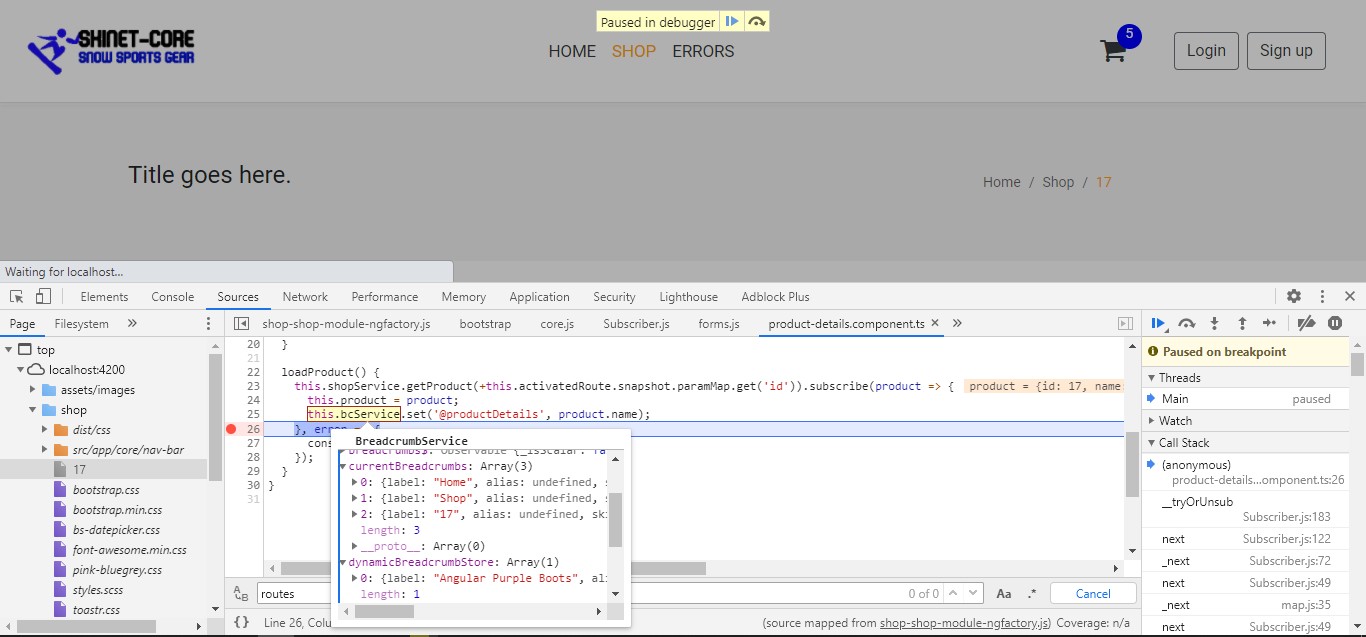
This happened when I debugged my project on chrome:
Answers:
Thank you for visiting the Q&A section on Magenaut. Please note that all the answers may not help you solve the issue immediately. So please treat them as advisements. If you found the post helpful (or not), leave a comment & I’ll get back to you as soon as possible.
Method 1
seems you have a typing error,
in shop-routing-module.ts it should be breadcrumbnot breadCrumb
data: { breadcrumb: { alias: 'productDetails' } },
All methods was sourced from stackoverflow.com or stackexchange.com, is licensed under cc by-sa 2.5, cc by-sa 3.0 and cc by-sa 4.0