This is the most strange problem I’ve ever seen.
I’m using Visual Studio Enterprise 2015 Version 14.0.25425.01 Update 3 and developing .NET web applications.
Today when I lunched one of web applications, after page loads completely, suddenly it scrolled down to the bottom.
First I thought it may be a javascript function or something, but it wasn’t.
It works without problem on hosted server but in local host this problem exists.
The diagnosis steps I’ve tried are as below and nothing else comes to my mind.
1) I asked my colleague to get my version from TFS and run it, the project works great without problem on his machine.
2) I republished my version and uploaded to Host, it works great on the Host.
3) I commented all css and js files, reset Chrome cache and tried again, no luck!
4) I downloaded and installed Mozilla Firefox, the problem exists yet.
5) I restarted IIS Express and rebooted my laptop, wasn’t helpful.
6) I opened another solution and ran it, and strangely the problem exists on other projects too!!!!
7) I tried changing the project port and it didn’t help.
8) I tried to create a new page, without MasterPage and it had no problem.
9) When I add a Button or Anchor element to the page, the browser scrolls down to that element but a page without any active element such as anchor or button, has no problem.
10) I also tried to disable and enable Scroll-Anchoring in Chrome settings, but no help.
I’m confused, If the browser causes problem, why it works great on the Host and just problem with LocalHost? And why both FF and Chrome had the same problem? Is it possible that IIS causes such problem?!
Any Help would be appreciated.
Answers:
Thank you for visiting the Q&A section on Magenaut. Please note that all the answers may not help you solve the issue immediately. So please treat them as advisements. If you found the post helpful (or not), leave a comment & I’ll get back to you as soon as possible.
Method 1
I’ve just had this and it is definitely Browser Link in my case. To disable this, you can add this setting to your web.config.
<add key="vs:EnableBrowserLink" value="false" />
As @Salman points out, this should live in the appSettings section:
<appSettings>
    <add key="vs:EnableBrowserLink" value="false" />
</appSettings>
Method 2
I’ve experienced this problem too and it began for me yesterday. Same symptoms – happens locally but not if published.
A windows update was implemented yesterday – Update for Windows 7 for x64-based systems (KB2952664). I’m wondering if they are linked.
Disabling browser link works for me also
Method 3
This was caused by a recent update to the Web Accessibility Checker extension. I’ve just released version 1.4.47 with a fix
Method 4
Browser behavior (issue):
Browser scrolls to the bottom of the page automatically on load.
Problem:
Web Essentials is somehow causing a bug in Browser Link.
Temporal Solution (no changes to web.config):
1) Disable Browser Link > Uncheck the following checkbox:
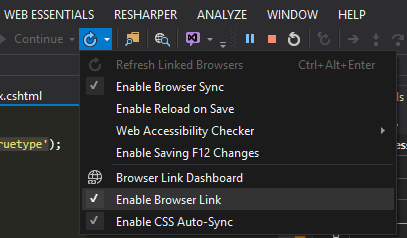
OR
2) Disable Web Essentials Extension.
Further Details:
Apparently the problem resides when they use Element.scrollIntoView() along this lines in browserLink.js:
u.getBackgroundColor = function(a) {
  var b = arguments.length > 1 && void 0 !== arguments[1] ? arguments[1] : [],
    e = arguments.length > 2 && void 0 !== arguments[2] && arguments[2];
  e !== !0 && a.scrollIntoView();
  var f = [],
    g = u.getBackgroundStack(a);
  return (g || []).some(function(e) {
      var g = window.getComputedStyle(e),
        h = d(e, g);
      return a !== e && !v.visuallyContains(a, e) && 0 !== h.alpha || c(e, g) ? (f = null,
        b.push(e), !0) : 0 !== h.alpha && (b.push(e),
        f.push(h),
        1 === h.alpha)
    }),
    null !== f && null !== g ? (f.push(new u.Color(255, 255, 255, 1)),
      f.reduce(u.flattenColors)) : null
}
All methods was sourced from stackoverflow.com or stackexchange.com, is licensed under cc by-sa 2.5, cc by-sa 3.0 and cc by-sa 4.0