I am new to this concept, this is my first project implementing the optimization concept with (Bundling & minification)
Just i am trying to test with simple js & css
Test.aspx
<html>
<%@ import namespace="System.Web.Optimization" %>
<html>
<head runat="server">
    <%: Scripts.Render("~/bundles/js") %>
    <%: Styles.Render("~/bundles/css") %>
</head>
<body>
    <form id="form1" runat="server">
    <div>
        <button id="tests">
            testing</button>
    </div>
    </form>
</body>
</html>
Global.Asax look like this
protected void Application_Start(object sender, EventArgs e)
{
    RegisterBundles(BundleTable.Bundles);
}

public static void RegisterBundles(BundleCollection bundles)
{
    bundles.Add(new ScriptBundle("~/bundles/js").Include(
     "~/script/jquery-1.8.2.min.js",
     "~/script/s.js"));

    bundles.Add(new StyleBundle("~/bundles/css").Include(
     "~/css/master.css"));

    BundleTable.EnableOptimizations = true;
}
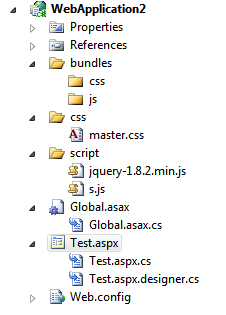
Project Structure Look like this
browser View

the file are Bundling, but in Css i have some style to render in the webpage, it nothing appearing on this,
Sample like jquery files also
for more info abt this post, please check this..Click here
can you guide me to achieve this…
Answers:
Thank you for visiting the Q&A section on Magenaut. Please note that all the answers may not help you solve the issue immediately. So please treat them as advisements. If you found the post helpful (or not), leave a comment & I’ll get back to you as soon as possible.
Method 1
Your bundling is working, problem is you css are not working when bundled.
Change your style sheet bundle name to this:
bundles.Add(new StyleBundle("~/css/allcss").Include("~/css/master.css"));
This should solve your problem.
P.S. if you keep your css files in multiple folders, then create a bundle for each folder. You can use the IncludeFolder method to make your job easier.
Method 2
Set this in web config:
<compilation debug="false" targetFramework="4.0">
Why is my CSS bundling not working with a bin deployed MVC4 app?
Bundled scripts not working MVC
Method 3
Prasad Raja,
When debugging or when your web.config has the setting
<compilation debug="true" ..>
the script bundling and minification is disabled. Also if you set EnableOptimizations = false will also disable budling and minification regardless of the debug=true setting.
Try changing your web.config and try again.
OK so after I reviewed the code and dug deeper into the problem the reason why this is happening is the paths ~/bundles/js and ~/bundles/css exist. Therefore your IIS (Express) is trying to load the contents of the directory. To get this to work ensure you set your compilation debug = false (it was set to true on the project download). Such as
<compilation debug="false" targetFramework="4.0"/>
Next locate the ~/bundle folder and DELETE IT…
Finally rebuild your application and run the project. However dont run it in debug or it will try and set your debug flag above back to true.
This is working on my machine now for both JS and CSS.
Method 4
Try this in your web.config
<configuration>
    ...
    <system.web>
        <compilation
            debug="true"
            ...
        >
        ...
        </compilation>
    </system.web>
</configuration>
see MSDN
Method 5
in your web config file set this:
<compilation debug="false" targetFramework="4.0">
All methods was sourced from stackoverflow.com or stackexchange.com, is licensed under cc by-sa 2.5, cc by-sa 3.0 and cc by-sa 4.0