I need to change the background colour of a button using C# code (Visual Studio 2008).
I saw some people recommending the inclusion of a directive: using System.Windows.Media; – I tried it and it triggered this error: Windows does not exist in namespace System. I tried several combinations like:
 btn.BackColor = Color.Red;
 btn.Background = Brushes.Green;
And neither is working. Is a special directive needed for using colour? What code do you suggest. Thanks a lot.
Answers:
Thank you for visiting the Q&A section on Magenaut. Please note that all the answers may not help you solve the issue immediately. So please treat them as advisements. If you found the post helpful (or not), leave a comment & I’ll get back to you as soon as possible.
Method 1
This should change your button background color to Red
yourButtonName.BackColor = Color.Red;
You need to include System.Drawing namespace as Color class belongs to that. Like this
using System.Drawing;
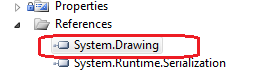
And ofcourse you need to add the reference to System.Drawing DLL in your project to use this namespace and Color class.
Method 2
Button1.BackColor = System.Drawing.Color.Red;
Method 3
using System.Drawing;
allows you to use
Color.Red;
Method 4
try this
button.BackColor = Color.Red
Method 5
Although that property is technically available to all WebControls, it may be ignored for buttons (I haven’t confirmed). This, of course, is assuming your project is ASP.NET. Having said that, if it DOES happen to work for you, I highly advise that you test this in other browsers as it may be MS specific.
From MSDN:
This property will render for only certain controls. For example,
Table, Panel, DataGrid, Calendar, and ValidationSummary will render
this property. It will also work for CheckBoxList, RadioButtonList and
DataList if their RepeatLayout property is RepeatLayout.Table, not
RepeatLayout.Flow.
Source: WebControl.BackColor Property
However, a more flexible and widely practiced method of achieving this is to use CSS.
Method 6
On PageLoad try this,
Button1.Style.Add("background-color", "green");
Use a method to write a condition when you want to change the color of the button. if condition is true use above code to change the color of the button as you prefer.
All methods was sourced from stackoverflow.com or stackexchange.com, is licensed under cc by-sa 2.5, cc by-sa 3.0 and cc by-sa 4.0