How can I cache a few specific JavaScript & CSS files. I found advice from this site to put this in my .htaccess file
AddOutputFilter DEFLATE css js
ExpiresActive On
ExpiresByType application/x-javascript A2592000
But it is incomplete. What is .htaccess and how do I create it, where to store it, in my web root folder?
What is the meaning of the following statements:
AddOutputFilter DEFLATE css js
ExpiresActive On
ExpiresByType application/x-javascript A2592000
I dont want to cache all my Javascript & CSS files rather just a few specific files which will never change.
How can I do this?
Answers:
Thank you for visiting the Q&A section on Magenaut. Please note that all the answers may not help you solve the issue immediately. So please treat them as advisements. If you found the post helpful (or not), leave a comment & I’ll get back to you as soon as possible.
Method 1
You can configure IIS to cache specific files by extension. For example:
Select the folder where your css/js files reside and then click on Output Caching.
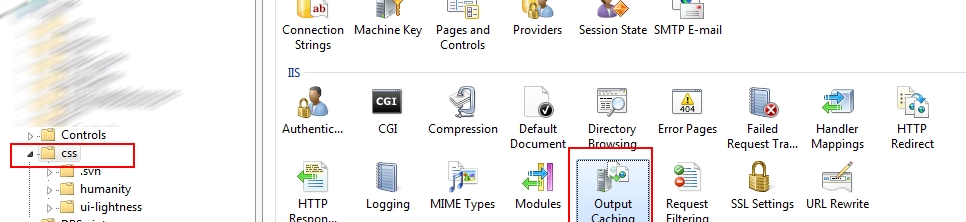
Then add the file extensions that you want to cache:
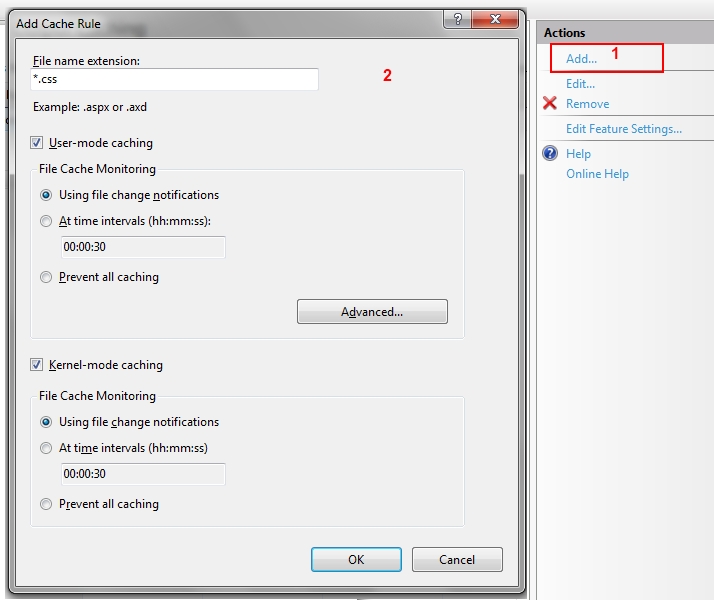
I don’t think you can specify which ones to cache on a per file basis unless you write an http handler module to add the appropriate headers for each file independently, but from IIS this is how is done.
Then you can verify that you are getting 304 responses using firebug / fiddler or your tool of choice.
I hope this is helpful.
Method 2
That’s cool i would anyways add a file revisions and make IIS cache css + js files.
As Icarus specified.
Then if you update the files on the server just add a new revision number this could also be a timestamp.
- http://particletree.com/notebook/automatically-version-your-css-and-javascript-files/
- http://davidwalsh.name/prevent-cache (just the opposite)
- http://betterexplained.com/articles/speed-up-your-javascript-load-time/
- http://www.die.net/musings/page_load_time/
- http://ajaxpatterns.org/Patterns#Performance_Optimisation
Method 3
- AddOutputFilter DEFLATE: output is compressed(usually gzip) before
sent to server in this casecss & jsyour css and js. - ExpiresActive On: Sets
Expiresand cache control headers to On - ExpiresByType: Set the expire rule for the content type in this case
application/x-javascriptto a monthA2592000 => 24 * 3600 * 30its inms.
I would recommend to instead of handling specific js via .htaccess you should add a revisions number to your js files, ala:
<script src="link/to/file.js?rev=xxx"></script>
Then when you update your files just update the rev number.
And your clients will automatically be served the new files.
Resources:
- http://httpd.apache.org/docs/2.0/mod/mod_deflate.html
- http://httpd.apache.org/docs/2.0/mod/mod_expires.html
- http://html5boilerplate.com/docs/htaccess/
All methods was sourced from stackoverflow.com or stackexchange.com, is licensed under cc by-sa 2.5, cc by-sa 3.0 and cc by-sa 4.0