I’ve got a View rendering two dropdownlists. The controllers for the dropdownlists work fine. They call methods in a repository class for the DB selections. Below the dropdownlists I’m trying to render a table of data in a partial view, in response to the dropdownlist selections.
The dropdowns in the View use a single model:
@model BudgetDemo.Models.BudgetsActualsViewModel
The Partial View displaying the table data uses IEnumerable:
@model IEnumerable<BudgetDemo.Models.BudgetsActualsViewModel>
View (GetBudgetsActuals.cshtml):
@using (Html.BeginForm("GetBudgetsActuals", "BudgetsActuals", FormMethod.Post))
{
    ... DropDownLists and Submit button

    @if (Model.SelectedDepartment != null && Model.SelectedYear != null)
    {
        // Table headers
        @if (Model != null)
        {
            Html.RenderPartial("_BudgetsActuals", Model);
        }
    }
}
Partial View (_BudgetsActuals.cshtml):
@model IEnumerable<BudgetDemo.Models.BudgetsActualsViewModel>
@foreach (var item in Model)
{
    <tr>
        <td>
            @Html.DisplayFor(modelItem => item.Account)
        </td>
        <td>
            @Html.DisplayFor(modelItem => item.CostCenter)
        </td>
        <td>
            @Html.DisplayFor(modelItem => item.TotalCurrentMonthActual)
        </td>
        <td>
            @Html.DisplayFor(modelItem => item.TotalCurrentMonthBudget)
        </td>
        <td>
            @Html.DisplayFor(modelItem => item.TotalYTDActual)
        </td>
        <td>
            @Html.DisplayFor(modelItem => item.TotalYTDBudget)
        </td>
        <td>
            @Html.DisplayFor(modelItem => item.TotalVariance)
        </td>
        <td>
            @Html.DisplayFor(modelItem => item.TotalETCBudget)
        </td>
        <td>
             @Html.DisplayFor(modelItem => item.TotalEAC)
        </td>
    </tr>
}
Controllers:
// GET: Render view with dropdowns
public ActionResult GetBudgetsActuals()
{
    try
    {
        // Populate Department dropdown and Year dropdown here
        repo = new BudgetDemoRepository();
        ModelState.Clear();

        return View(repo.GetBudgetsActuals());
    }
    catch
    {
        return View("Error");
    }
}

// POST: Grab data for department and year
[HttpPost]
public ActionResult GetBudgetsActuals(BudgetsActualsViewModel model)
{
    repo = new BudgetDemoRepository();
    if (ModelState.IsValid)
    {
        return View(repo.GetBudgetsActuals(model));
    }
    else
    {
        model.Departments = repo.GetBudgetsActuals().Departments;
        model.Years = repo.GetBudgetsActuals().Years;
        return View(model);
    }
}

[ChildActionOnly]
public ActionResult
    GetBudgetsActualsPartialData(BudgetsActualsViewModel model)
{
    repo = new BudgetDemoRepository();
    List<BudgetsActualsViewModel> dataVM =
        repo.GetBudgetsActualsData(model);

    // RETURNING CORRECT DATA
    return PartialView("GetBudgetsActuals", dataVM);
}
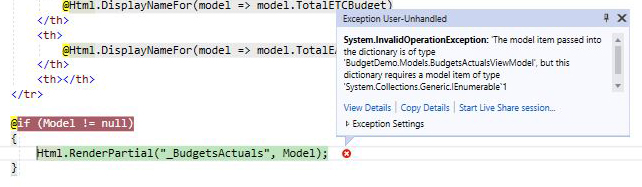
What I’m trying to figure out is how to hook this all together. It’s blowing up here:
@if (Model != null)
{
    Html.RenderPartial("_BudgetsActuals", Model);
}
This is the error error message:
The model item passed into the dictionary is of type
'System.Collections.Generic.List`1[BudgetDemo.Models.BudgetsActualsViewModel]',
but this dictionary requires a model item of type
'BudgetDemo.Models.BudgetsActualsViewModel'.
UPDATE
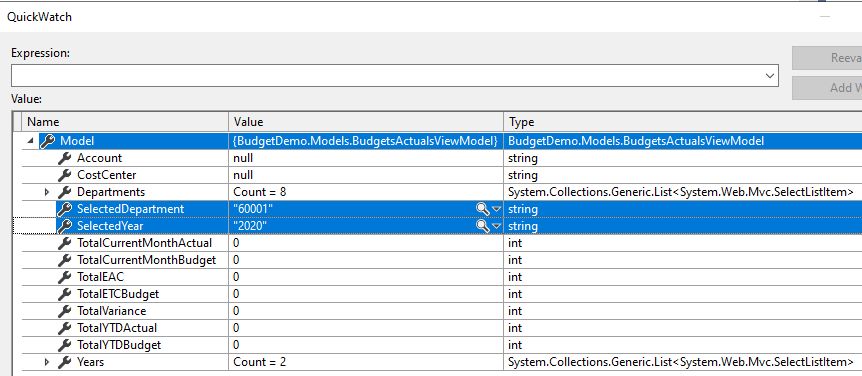
There seems to be a known issue with partial view if you’re passing a model to the RenderPartial helper method and that model is null – it will default to the model of the containing view. I have debugged this and from what I can see the model being passed to the helper method is not null, so I am at a loss.
UPDATE 2
Apparently I was not alone regarding the issue of the model of the calling view being passed to the partial view. This problem is addressed in .NET Core with the introduction of View Components 🙂
Answers:
Thank you for visiting the Q&A section on Magenaut. Please note that all the answers may not help you solve the issue immediately. So please treat them as advisements. If you found the post helpful (or not), leave a comment & I’ll get back to you as soon as possible.
Method 1
Well, what happens is, when you do Html.RenderPartial("_BudgetsActuals", Model); , it takes the model from the view in which the code is written, and tries to pass it as is to the partial view. So here, based on the error screenshot in the question and the behavior of .net, BudgetDemo.Models.BudgetsActualsViewModel was passed to the partial view because GetBudgetsActuals.cshtml view takes that as a model. But, that is not right, because your partial view requires IEnumerable<BudgetDemo.Models.BudgetsActualsViewModel> as model. So, you need to actually store an instance of IEnumerable<BudgetDemo.Models.BudgetsActualsViewModel> in your BudgetDemo.Models.BudgetsActualsViewModel
Model
public class BudgetsActualsViewModel
{
   // other properties

   public IEnumerable<BudgetDemo.Models.BudgetsActualsViewModel> BudgetActualCollection {get;set;}
}
note: make sure to initialize it with the data on server or with a new instance when there is no data. Otherwise, it will throw null reference error. You can initialize it in the constructor as well.
Controller (updated post method, this is just for example, you can simplify or update to your needs)
// GET: Render view with dropdowns
public ActionResult GetBudgetsActuals()
{
    try
    {
        // Populate Department dropdown and Year dropdown here
        repo = new BudgetDemoRepository();
        ModelState.Clear();

        return View(repo.GetBudgetsActuals());
    }
    catch
    {
        return View("Error");
    }
}

// POST: Grab data for department and year
[HttpPost]
public ActionResult GetBudgetsActuals(BudgetsActualsViewModel model)
{
    var repo = new BudgetDemoRepository();
    model.Departments = repo.GetBudgetsActuals().Departments;
    model.Years = repo.GetBudgetsActuals().Years;

    if (ModelState.IsValid)
    {
         model.BudgetActualCollection = repo.GetBudgetsActualsData(model);
    }
    else
    {
        model.BudgetActualCollection = new List<BudgetDemo.Models.BudgetsActualsViewModel>();
    }
    return View(model);
}
Then do Html.RenderPartial("_BudgetsActuals", Model.BudgetActualCollection ). Now proper model will be passed to the partial view.
Doing
Html.RenderPartial("_BudgetsActuals", Model); and (as op tried in comment below)
Html.RenderPartial("_BudgetsActuals", new BudgetDemo.Models.BudgetsActualsViewModel
{
   SelectedDepartment = Model.SelectedDepartment,
   SelectedYear = Model.SelectedYear
})
are essentially the same with one difference. In first one, the model from main view will be passed whereas second will pass a new instance of the model.
All methods was sourced from stackoverflow.com or stackexchange.com, is licensed under cc by-sa 2.5, cc by-sa 3.0 and cc by-sa 4.0