Data fetched from API is not getting displayed on the screen but I am getting the data in the console.
Here is the .ts file.
export class VisibilityComponent implements OnInit {


  check = false;
  pmDetails1: IEmployee[];
  constructor( private userService: UserService) {
    this.pmDetails1 = [];
     }

  ngOnInit() {

     this.userService.getAllEmployee().subscribe((pmDetails1:       IEmployee[]) => {
      this.pmDetails1 = pmDetails1;
      console.log(this.pmDetails1);
    });


   }
   onItemChange(value) {
    if (value === '1' ) {
      this.check = true;
    } else {
      this.check = false;
    }
 }
 }
here is the HTML file
<div>
          <table class="table table-light" style="border: 1px solid">
            <thead style="background-color: aqua">
              <tr>
                <th>Select</th>
                <th>Name</th>
                <th>Role</th>
              </tr>
            </thead>
            <tbody>
              <tr
                *ngFor="let p of pmDetails1"
              >
                <td>
                  <input
                    type="checkbox"
                    value="{{ p.id }}"
                    [checked]="check"
                  />
                </td>
                <td>{{p.name}}</td>
                <td>{{p.role}}</td>
              </tr>
            </tbody>
          </table>
        </div>
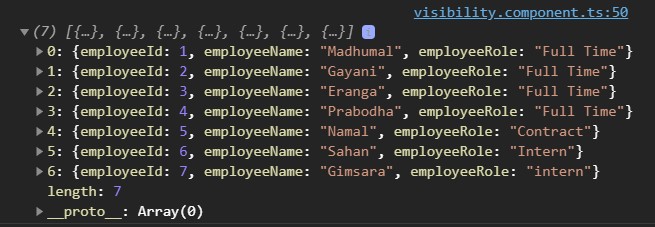
And here is the output on the console
Please help me to solve that problem.
Answers:
Thank you for visiting the Q&A section on Magenaut. Please note that all the answers may not help you solve the issue immediately. So please treat them as advisements. If you found the post helpful (or not), leave a comment & I’ll get back to you as soon as possible.
Method 1
Your data doesn’t contain the elements id, name and role.
Instead it has employeeId, employeeName and employeeRole. You need to update your table code.
<td>
    <input
       type="checkbox"
       value="{{ p.employeeId }}"
       [checked]="check"
    />
</td>
<td>{{p.employeeName}}</td>
<td>{{p.employeeRole}}</td>
All methods was sourced from stackoverflow.com or stackexchange.com, is licensed under cc by-sa 2.5, cc by-sa 3.0 and cc by-sa 4.0