I am trying to build a web interface to Mock up a restful interface on networking device this networking device uses Digest Authentication and HTTPS.
I figured out how to integrate Digest Authentication into the web server but I cannot seem to find out how to get https using FLASK if you can show me how please comment on what i would need to do with the code below to make that happen.
from flask import Flask, jsonify

app = Flask(__name__)


@app.route('/')
def index():
    return 'Flask is running!'


@app.route('/data')
def names():
    data = {"names": ["John", "Jacob", "Julie", "Jennifer"]}
    return jsonify(data)


if __name__ == '__main__':
    app.run()
Answers:
Thank you for visiting the Q&A section on Magenaut. Please note that all the answers may not help you solve the issue immediately. So please treat them as advisements. If you found the post helpful (or not), leave a comment & I’ll get back to you as soon as possible.
Method 1
Don’t use openssl or pyopenssl its now become obselete in python
Refer the Code below
from flask import Flask, jsonify
import os

ASSETS_DIR = os.path.dirname(os.path.abspath(__file__))
app = Flask(__name__)


@app.route('/')
def index():
    return 'Flask is running!'


@app.route('/data')
def names():
    data = {"names": ["John", "Jacob", "Julie", "Jennifer"]}
    return jsonify(data)


if __name__ == '__main__':
    context = ('local.crt', 'local.key')#certificate and key files
    app.run(debug=True, ssl_context=context)
Method 2
this also works in a pinch
from flask import Flask, jsonify


from OpenSSL import SSL
context = SSL.Context(SSL.PROTOCOL_TLSv1_2)
context.use_privatekey_file('server.key')
context.use_certificate_file('server.crt')


app = Flask(__name__)


@app.route('/')
def index():
    return 'Flask is running!'


@app.route('/data')
def names():
    data = {"names": ["John", "Jacob", "Julie", "Jennifer"]}
    return jsonify(data)


#if __name__ == '__main__':
#    app.run()
if __name__ == '__main__':
     app.run(host='127.0.0.1', debug=True, ssl_context=context)
Method 3
- To run HTTPS functionality or SSL authentication in your flask application, first install “pyOpenSSL” python package
pip install pyopenssl
- Next step is to create
cert.pemandkey.pem
openssl req -x509 -newkey rsa:4096 -nodes -out cert.pem -keyout key.pem -days 365
-
Copy generated
cert.pemandkey.pemin your flask application project -
Add
ssl_context=('cert.pem', 'key.pem')inapp.run(), like in the example below.
from flask import Flask, jsonify

app = Flask(__name__)


@app.route("/")
def index():

    return "Flask is running!"


@app.route("/data")
def names():

    data = {"names": ["John", "Jacob", "Julie", "Jennifer"]}

    return jsonify(data)


if __name__ == "__main__":

    app.run(ssl_context=("cert.pem", "key.pem"))
Method 4
Deploy Flask on a real web server, rather than with the built-in (development) server.
See the Deployment Options chapter of the Flask documentation. Servers like Nginx and Apache both can handle setting up HTTPS servers rather than HTTP servers for your site.
The standalone WSGI servers listed would typically be deployed behind Nginx and Apache in a proxy-forwarding configuration, where the front-end server handles the SSL encryption for you still.
Method 5
For a quick n’ dirty self-signed cert, you can also use flask run --cert adhoc or set the FLASK_RUN_CERT env var.
$ export FLASK_APP="app.py"
$ export FLASK_ENV=development
$ export FLASK_RUN_CERT=adhoc

$ flask run
 * Serving Flask app "app.py" (lazy loading)
 * Environment: development
 * Debug mode: on
 * Running on https://127.0.0.1:5000/ (Press CTRL+C to quit)
 * Restarting with stat
 * Debugger is active!
 * Debugger PIN: 329-665-000
The adhoc option isn’t well documented (for good reason, never do this in production), but it’s mentioned in the cli.py source code.
There’s a thorough explanation of this by Miguel Grinberg at Running Your Flask Application Over HTTPS.
Method 6
The top-scoring answer has the right idea, but the API seems to have evolved so that it no longer works as when it was first written, in 2015.
In place of this:
from OpenSSL import SSL
context = SSL.Context(SSL.PROTOCOL_TLSv1_2)
context.use_privatekey_file('server.key')
context.use_certificate_file('server.crt')
I used this, with Python 3.7.5:
import ssl
context = ssl.SSLContext()
context.load_cert_chain('fullchain.pem', 'privkey.pem')
and then supplied the SSL context in the Flask.run call as it said:
app.run(…, ssl_context=context)
(My server.crt file is called fullchain.pem and my server.key is called privkey.pem. These files were supplied to me by my LetsEncrypt Certbot.)
Method 7
If this webserver is only for testing and demoing purposes. You can use ngrok, a open source too that tunnels your http traffic.
Bascially ngrok creates a public URL (both http and https) and then tunnels the traffic to whatever port your Flask process is running on.
It only takes a couple minutes to set up. You first have to download the software. Then run the command
./ngrok http [port number your python process is running on]
It will then open up a window in terminal giving you both an http and https url to access your web app.
Method 8
Super simple:
app.py
from flask import Flask
app = Flask(__name__)

@app.route("/")
def hello():
    return "Hello World!"
run:
$ openssl req -x509 -newkey rsa:4096 -nodes -out cert.pem -keyout key.pem -days 365
$ flask run --cert=cert.pem --key=key.pem
Method 9
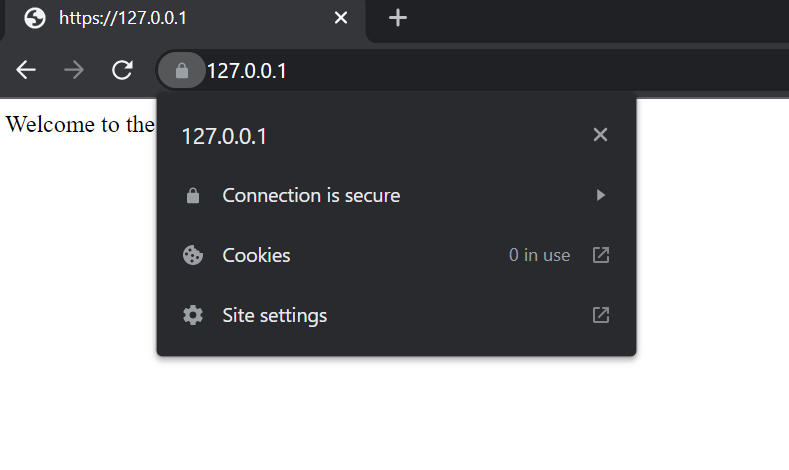
You can use mkcert to generate certificate that is trusted by browsers.
mkcert example.com "*.example.com" example.test localhost 127.0.0.1 ::1
Browser will trust all of the following domains and IPs
- "example.com"
- "*.example.com"
- "example.test"
- "localhost"
- "127.0.0.1"
- "::1"
Python Code:
from flask import Flask, jsonify

app = Flask(__name__)


@app.route("/")
def index():

    return "Welcome to the Python Flask's Index!"


if __name__ == "__main__":
    app.run(port=443, ssl_context=("localhost+3.pem", "localhost+3-key.pem"))
Screenshot:
All methods was sourced from stackoverflow.com or stackexchange.com, is licensed under cc by-sa 2.5, cc by-sa 3.0 and cc by-sa 4.0