I have an ASP.net that I built in VS2010 running in iis7 however when I go back into VS and make updates to the code behind file and re-publish the application still acts as it has before I made the changes. I have tried deleting and republishing all the files and restarting the app pool but it still doesn’t affect how the application behaves.
Answers:
Thank you for visiting the Q&A section on Magenaut. Please note that all the answers may not help you solve the issue immediately. So please treat them as advisements. If you found the post helpful (or not), leave a comment & I’ll get back to you as soon as possible.
Method 1
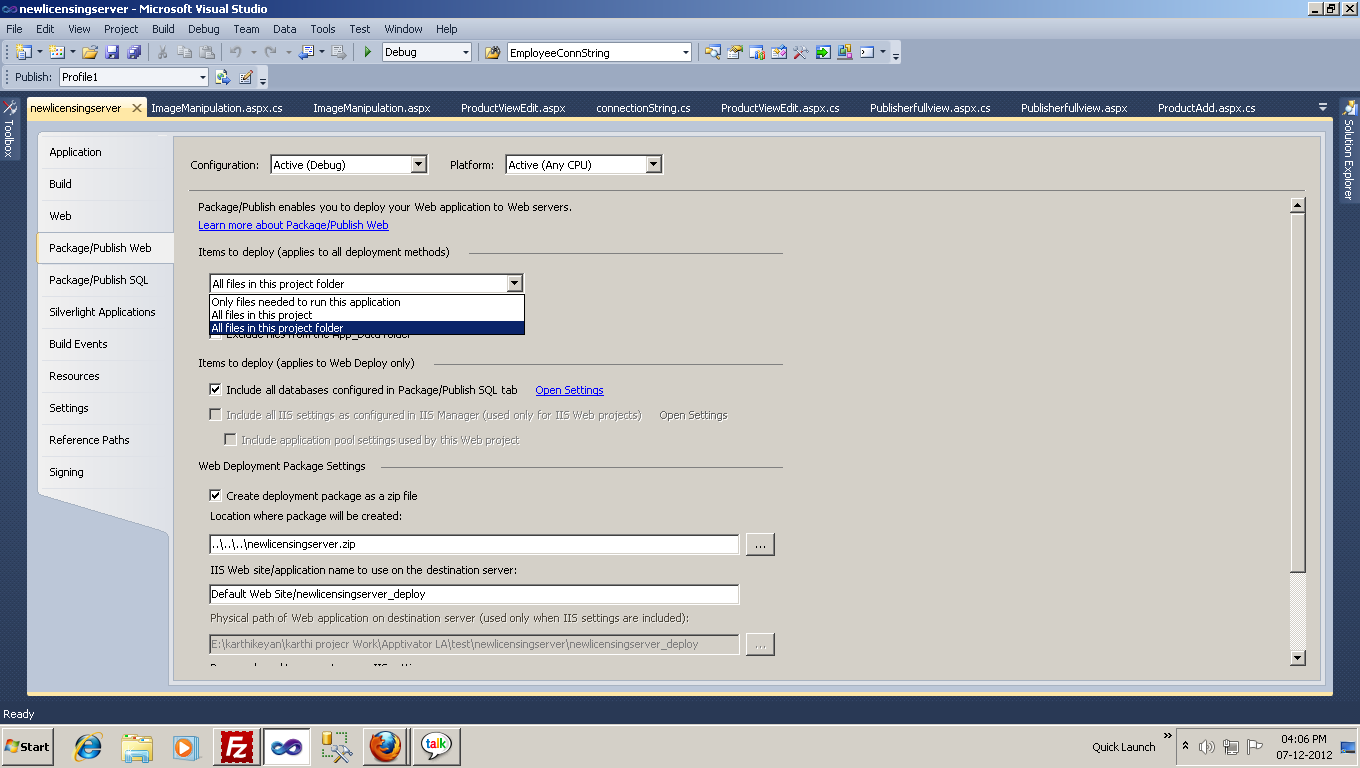
project–>Property’s–> Package / product web–> Items to deploy –> All files in this project folders
now publish your project.
your new files also added in publish folder. . .
Method 2
DO NOT publish your vb and cs file on there server unless you feel like having your source code potentially exposed. There have been multiple vulnerabilities that have allowed code download.
Publish the application to a folder via the visual studio publish menu.
On the server, go into your temporary aspnet folder for example:
c:WINDOWSMicrosoft.NETFrameworkv2.0.50727Temporary ASP.NET Files
and find your app and delete it. If you cannot delete the files stop the worker process (w3wp.exe) or restart iis.
Republish and all should be good. If you are in doubt if that version is getting executed then add some logging in the new version or trace information.
Method 3
There are two options for publishing an ASP.NET site to a server:
- Copy the .aspx AND aspx.vb (or .aspx.cs) files to the server. The first user to hit the server causes compilation so it takes a little bit of extra time for them. Once that’s done, subsequent hits should not be impacted.
- Copy just the .aspx files – and a compiled DLL to the server. The DLL contains the compiled code so it doesn’t exist on the webserver. The first user does not have to wait for compilation and the VB or C# source code is not on the server, potentially accessible to hackers.
It sounds like you’ve compiled the site to a DLL but that DLL isn’t getting published to the server when you re-publish. Have you recompiled the site before publishing?
Method 4
I faced similar issue with WPF single file exe publish.
while debugging from VS my changes were visible.
But when I pasted the exe to deployment folder, the changes weren’t there.
I had to change the version number to see my changes when I run the exe from the deployment folder.
I may have to do with how single file exes are handled. The extracted cache may not be getting updated.
All methods was sourced from stackoverflow.com or stackexchange.com, is licensed under cc by-sa 2.5, cc by-sa 3.0 and cc by-sa 4.0