I have a pandas dataframe:
arrays = [['Midland', 'Midland', 'Hereford', 'Hereford', 'Hobbs','Hobbs', 'Childress',
           'Childress', 'Reese', 'Reese', 'San Angelo', 'San Angelo'],
          ['WRF','MOS','WRF','MOS','WRF','MOS','WRF','MOS','WRF','MOS','WRF','MOS']]
tuples = list(zip(*arrays))
index = pd.MultiIndex.from_tuples(tuples)
df = pd.DataFrame(np.random.randn(12, 4), index=arrays,
                  columns=['00 UTC', '06 UTC', '12 UTC', '18 UTC'])
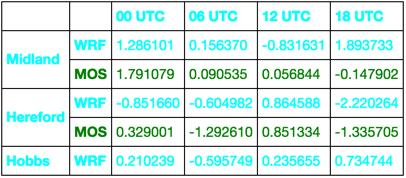
The table that prints df from this looks like this: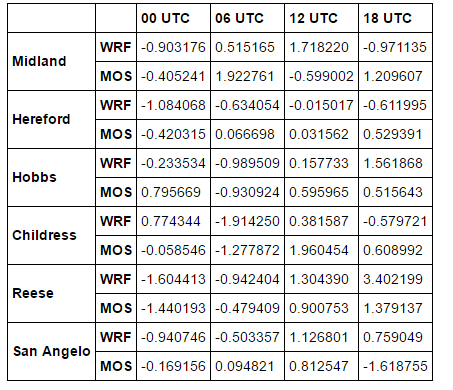
I would like to color all of the values in the ‘MOS’ rows a certain color and color the left two index/header columns as well as the top header row a different background color than the rest of the cells with values in them. Any ideas how I can do this?
Answers:
Thank you for visiting the Q&A section on Magenaut. Please note that all the answers may not help you solve the issue immediately. So please treat them as advisements. If you found the post helpful (or not), leave a comment & I’ll get back to you as soon as possible.
Method 1
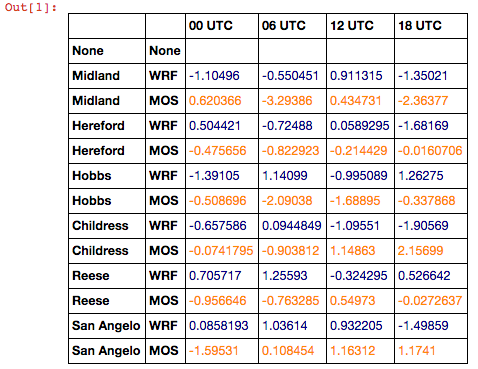
Using pandas new styling functionality (since 0.17.1):
import numpy as np
import pandas as pd

arrays = [['Midland', 'Midland', 'Hereford', 'Hereford', 'Hobbs','Hobbs', 'Childress',
           'Childress', 'Reese', 'Reese', 'San Angelo', 'San Angelo'],
          ['WRF','MOS','WRF','MOS','WRF','MOS','WRF','MOS','WRF','MOS','WRF','MOS']]
tuples = list(zip(*arrays))
index = pd.MultiIndex.from_tuples(tuples)
df = pd.DataFrame(np.random.randn(12, 4), index=arrays,
                  columns=['00 UTC', '06 UTC', '12 UTC', '18 UTC'])


def highlight_MOS(s):
    is_mos = s.index.get_level_values(1) == 'MOS'
    return ['color: darkorange' if v else 'color: darkblue' for v in is_mos]

s = df.style.apply(highlight_MOS)
s
Method 2
This takes a few steps:
First import HTML and re
from IPython.display import HTML
import re
You can get at the html pandas puts out via the to_html method.
df_html = df.to_html()
Next we are going to generate a random identifier for the html table and style we are going to create.
random_id = 'id%d' % np.random.choice(np.arange(1000000))
Because we are going to insert some style, we need to be careful to specify that this style will only be for our table. Now let’s insert this into the df_html
df_html = re.sub(r'<table', r'<table id=%s ' % random_id, df_html)
And create a style tag. This is really up to you. I just added some hover effect.
style = """
<style>
    table#{random_id} tr:hover {{background-color: #f5f5f5}}
</style>
""".format(random_id=random_id)
Finally, display it
HTML(style + df_html)
Function all in one.
def HTML_with_style(df, style=None, random_id=None):
    from IPython.display import HTML
    import numpy as np
    import re

    df_html = df.to_html()

    if random_id is None:
        random_id = 'id%d' % np.random.choice(np.arange(1000000))

    if style is None:
        style = """
        <style>
            table#{random_id} {{color: blue}}
        </style>
        """.format(random_id=random_id)
    else:
        new_style = []
        s = re.sub(r'</?style>', '', style).strip()
        for line in s.split('n'):
                line = line.strip()
                if not re.match(r'^table', line):
                    line = re.sub(r'^', 'table ', line)
                new_style.append(line)
        new_style = ['<style>'] + new_style + ['</style>']

        style = re.sub(r'table(#S+)?', 'table#%s' % random_id, 'n'.join(new_style))

    df_html = re.sub(r'<table', r'<table id=%s ' % random_id, df_html)

    return HTML(style + df_html)
Use it like this:
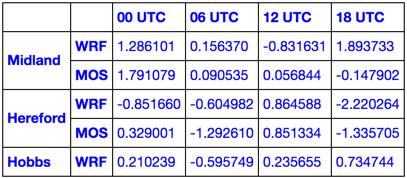
HTML_with_style(df.head())
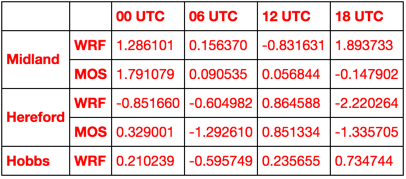
HTML_with_style(df.head(), '<style>table {color: red}</style>')
style = """
<style>
    tr:nth-child(even) {color: green;}
    tr:nth-child(odd)  {color: aqua;}
</style>
"""
HTML_with_style(df.head(), style)
Learn CSS and go nuts!
All methods was sourced from stackoverflow.com or stackexchange.com, is licensed under cc by-sa 2.5, cc by-sa 3.0 and cc by-sa 4.0