Is there a way to change the text of the publish button on a custom post type to say some different? For example, Save instead of Publish. And also remove the draft button?
Answers:
Thank you for visiting the Q&A section on Magenaut. Please note that all the answers may not help you solve the issue immediately. So please treat them as advisements. If you found the post helpful (or not), leave a comment & I’ll get back to you as soon as possible.
Method 1
If you look into /wp-admin/edit-form-advanced.php, you will find the meta box:
add_meta_box('submitdiv', __('Publish'), 'post_submit_meta_box', $post_type, 'side', 'core');
Note the __('Publish') – the function __() leads to translate() where you get the filter 'gettext'.
There are two ways to handle your problem: 1. Address the string in a single specialized function (be sure to match the correct textdomain!) or 2. use a more generic approach.
@Rarst has just now posted version 1, so I’ll add version 2. 🙂
<?php
/*
Plugin Name: Retranslate
Description: Adds translations.
Version:     0.1
Author:      Thomas Scholz
Author URI:  http://toscho.de
License:     GPL v2
*/

class Toscho_Retrans {
    // store the options
    protected $params;

    /**
     * Set up basic information
     *
     * @param  array $options
     * @return void
     */
    public function __construct( array $options )
    {
        $defaults = array (
            'domain'       => 'default'
        ,   'context'      => 'backend'
        ,   'replacements' => array ()
        ,   'post_type'    => array ( 'post' )
        );

        $this->params = array_merge( $defaults, $options );

        // When to add the filter
        $hook = 'backend' == $this->params['context']
            ? 'admin_head' : 'template_redirect';

        add_action( $hook, array ( $this, 'register_filter' ) );
    }

    /**
     * Conatiner for add_filter()
     * @return void
     */
    public function register_filter()
    {
        add_filter( 'gettext', array ( $this, 'translate' ), 10, 3 );
    }

    /**
     * The real working code.
     *
     * @param  string $translated
     * @param  string $original
     * @param  string $domain
     * @return string
     */
    public function translate( $translated, $original, $domain )
    {
        // exit early
        if ( 'backend' == $this->params['context'] )
        {
            global $post_type;

            if ( ! empty ( $post_type )
                && ! in_array( $post_type, $this->params['post_type'] ) )
            {
                return $translated;
            }
        }

        if ( $this->params['domain'] !== $domain )
        {
            return $translated;
        }

        // Finally replace
        return strtr( $original, $this->params['replacements'] );
    }
}

// Sample code
// Replace 'Publish' with 'Save' and 'Preview' with 'Lurk' on pages and posts
$Toscho_Retrans = new Toscho_Retrans(
    array (
        'replacements' => array (
            'Publish' => 'Save'
        ,   'Preview' => 'Lurk'
        )
    ,   'post_type'    => array ( 'page', 'post' )
    )
);
You don’t need to use the code as a plugin. Including it in your theme’s functions.php will be enough.
Update
To remove the original Save button (not sure what the ‘draft’ button is), add the following code to your functions.php/a plugin:
add_action( 'admin_print_footer_scripts', 'remove_save_button' );
function remove_save_button()
{
?>
<script>
jQuery(document).ready(function($){$('#save-post').remove();});
</script><?php
}
Yes, it’s ugly.
Method 2
The code for hakre’s suggestion to use translation filter would be something like this:
add_filter( 'gettext', 'change_publish_button', 10, 2 );

function change_publish_button( $translation, $text ) {

if ( $text == 'Publish' )
    return 'Save';

return $translation;
}
Method 3
This is not a full answer but some directions: Any text displayed surpasses a translation filter and can therefore be changed in a callback function (hook). So if the hook is only registered on the page where you would like to change that, job done.
The draft button could be “removed” by hiding it via CSS. The CSS could be injected into the <head>-tag of the admin with another callback. I think the filter is called admin_head for that. It’s somehow dirty as the button still is there, for example if a user switches CSS off.
Method 4
For consistency, I’m assuming you’d prefer to use “Save” instead of “Publish” throughout WordPress instead of just on the text of the button.
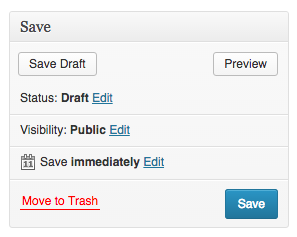

Based on the solution provided by @Rarst, I expanded the code so it translates many (all?) other instances of the word “Publish” to the appropriate variation of “Save”.
add_filter("gettext", "translate_publish_post_status", 10, 2);
add_filter("ngettext", "translate_publish_post_status_number", 10, 5);
add_filter("ngettext_with_context", "translate_publish_post_status_number", 10, 6);

function translate_publish_post_status($translation, $text) {
    switch($text) {
        case "Publish":                     return "Save";
        case "Published on: <b>%1$s</b>":  return "Saved on: <b>%1$s</b>";
        case "Publish <b>immediately</b>":  return "Approve <b>immediately</b>";
        case "Publish on: <b>%1$s</b>":    return "Approve on: <b>%1$s</b>";
        case "Privately Published":         return "Privately Saved";
        case "Published":                   return "Saved";
        case "Save & Publish":              return "Save"; //"Double-save"? :)
        default:                            return $translation;
    }
}

function translate_publish_post_status_number($translation, $single, $plural, $number, $domain) {
    if($translation == "Published <span class="count">(%s)</span>") {
        return "Saved <span class="count">(%s)</span>";
    }

    return $translation;
}
For removing the Draft button, the answer given by @toscho contains a good solution.
Method 5
Another approach would be unregister the metabox, then re-register that same box with differing values, namingly the publish text..
See the discussion i had here regarding moving a meta box, you should be able to apply something similar to rename that Publish text.
Method 6
You could just find the button via jQuery and swap the text node for something else. That would be a piece of cake to do.
Method 7
Much cleaner & easier solution.
function change_publish_btn_txt() {
    echo "<script type='text/javascript'>jQuery(document).ready(function(){
        jQuery('#publish').attr('value', 'Your Custom Text');
    });</script>";
}
add_action('admin_footer-post-new.php', 'change_publish_btn_txt', 99);
All methods was sourced from stackoverflow.com or stackexchange.com, is licensed under cc by-sa 2.5, cc by-sa 3.0 and cc by-sa 4.0