I got the thankfull job of debugging somebody’s code who left my company a year ago. I’m new to jquery and I’m struggling with my task at hand.
The application is a store/inventory management ASP.NET app. There’s an overview page, which lists all the stores. And you can edit the stores. So the function for that is:
$(document).on('click', '.js-open-edit-modal', function () {
    $("#EditWinkelModal").load("/Winkels/Details/" + $(this).data("id"), function () {
        $("#modal-winkel-edit").modal();
    });
});
which opens a modal. So far it’s ok. The problem is when the user closes the modal. That can either be done by pressing the “X” in the upper right corner, pressing escape, clicking outside of the modal or pressing a button, defined as
<button type="button" class="c-btn c-btn--secondary" modal-close>Annuleer</button>
What happens is that this only hides the modal (sets ‘display’ to ‘none’. It doesn’t remove the added code. So now, when the user edits another store, more code is added to the page. and the codes clash.
Here’s a picture of Chrome inspect, after I’ve eddited some stores (called ‘winkel’ in my language/Dutch)
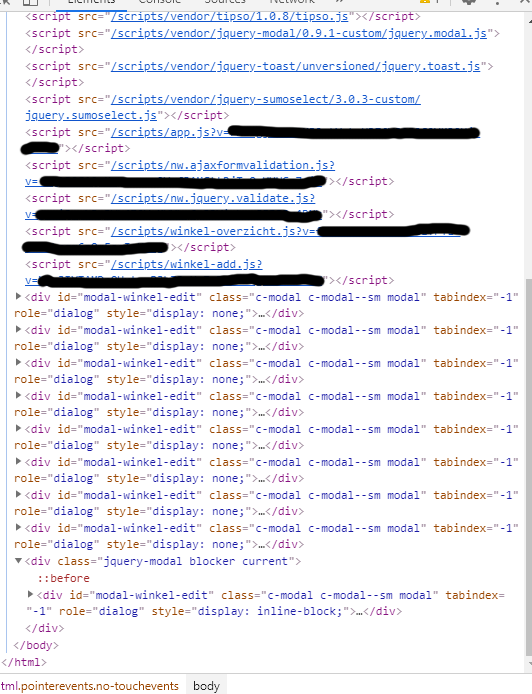
I’ve figured out a way to solve this for the button. I just changed it to
<button type="button" class="c-btn c-btn--secondary" id="cancelWinkelAdd">Annuleer</button>
and added the code
$(document).on('click', '#cancelWinkelEdit', function () {
    $.modal.close();
    var element = $("#modal-winkel-edit")[0];
    element.parentNode.removeChild(element);
});
But this only solves it for the button. Problem still occurs for all other close options (mentioned above). So now I’m looking at a way to overwrite this close-modal method.
How should I do this, or is there a better solution altogether?
Answers:
Thank you for visiting the Q&A section on Magenaut. Please note that all the answers may not help you solve the issue immediately. So please treat them as advisements. If you found the post helpful (or not), leave a comment & I’ll get back to you as soon as possible.
Method 1
Looks like you are using jQuery-modal, jQuery-modal has a list of events that get fired with certain actions. You can listen for the event that is fired when the modal gets closed.
$.modal.AFTER_CLOSE = 'modal:after-close';
// Fires after the modal has fully closed (including animations).
And remove the modal from the DOM when this event is called
$('#example-modal').on($.modal.AFTER_CLOSE, function(event, modal) {
    modal.remove(); // <-- delete the modal from the DOM
});
More information can be found here: https://github.com/kylefox/jquery-modal#events
All methods was sourced from stackoverflow.com or stackexchange.com, is licensed under cc by-sa 2.5, cc by-sa 3.0 and cc by-sa 4.0