Firstly, add_theme_support( 'title-tag' ); is enabled in my theme.
I have two filters to modify titles, this one hooking on to the_title
add_filter( 'the_title', 'custom_account_endpoint_titles', 10, 2 );
function custom_account_endpoint_titles( $title ) {

// Currently only have conditions here for My Account pages (is_account_page())
// example: if ( isset( $wp_query->query_vars['edit-account'] ) && is_account_page() ) {

return $title;
}
Secondly I have another function which fixed some title issues on Account pages as well (if I do not add this, the My Account pages all revert to a title tag of simply My Account instead of the conditional statements set for the Title changed intended.
function theme_slug_filter_wp_title( $title_parts ) {
        $title_parts['title'] = get_the_title();
    return $title_parts;
}

add_filter( 'document_title_parts', 'theme_slug_filter_wp_title' );
Doing a little debugging — adding a print_r on $title_parts in the document_title_parts function
<pre>Array
(
    [title] => Products
    [site] => Example.com
)
</pre>
One would think, that the Title on my Shop Archive page would just be Products, but that is not the case.
Doing the same print_r debugging on the the_title filter on my shop archive page…
brings back <pre>925 Sterling Silver.....</pre> (which is the name of the first product in the loop
followed by <pre>Shop</pre> for the breadcrumb
and then additionally above all my products in the shop archive, the title and a list of classes, but te html seems to be malformed when doing so which is odd:
<div class="grid_col"> <div <pre="">925 Sterling Silver...... class="shop-product hover-border nt-post-class masonry-item excerpt-none product type-product "
The only solution I have read which does not work is hooking onto the is_shop() function in my the_title filter, such as..
add_filter( 'the_title', 'custom_account_endpoint_titles', 10, 2 );
function custom_account_endpoint_titles( $title ) {
    global $wp_query;
    global $current_user;

    if (is_shop()) {
        return 'My Shop Archive';
    }
This does indeed change the <title> tag on the shop page to My Shop Archive… but then proceeds to change the title of all my products on the page to My Shop Archive!
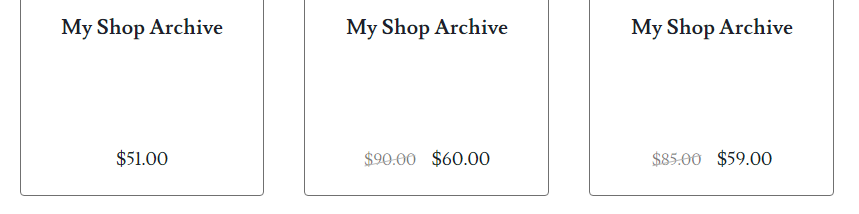
What is the solution for just simply changing the <title> tag on my shops archive page without affecting the product titles like in the image above?
Answers:
Thank you for visiting the Q&A section on Magenaut. Please note that all the answers may not help you solve the issue immediately. So please treat them as advisements. If you found the post helpful (or not), leave a comment & I’ll get back to you as soon as possible.
Method 1
Seems like the solution I was looking for was !in_the_loop()
Full:
add_filter( 'the_title', 'custom_account_endpoint_titles', 10, 2 );
function custom_account_endpoint_titles( $title ) {
if (is_shop() && !in_the_loop() && ! is_admin() && ( ! defined( 'DOING_AJAX' ) || ! DOING_AJAX )) {
    return 'Shop - Parure.co';
}
}
Note: the !is_admin and !DOING_AJAX functions are to prevent this from affecting product titles in the admin panel
All methods was sourced from stackoverflow.com or stackexchange.com, is licensed under cc by-sa 2.5, cc by-sa 3.0 and cc by-sa 4.0