I’m trying to make a wp query to WP Post Meta Table where I want to check the post’s META KEY and its META VALUE if its EMPTY or NOT.
The meta key is wc_pay_per_post_product_ids.
IF the statement is TRUE, display the following:
<h1>The Meta Key Is Empty or NULL</h1>
<div class="row"><div class="col-2">One</div><div class="col-10">Two</div></div>
ELSE:
<h1>The Meta Key Is NOT Empty or NULL</h1>
<div class="row"><div class="col-4"></div><div class="col-4"></div><div class="col-4"></div></div>
Here’s the complete code.
<?php
  global $wpdb;
  $post_id = get_the_ID();
  $meta_value = 'wc_pay_per_post_product_ids';

    $args = array(
        'post_type' => 'post',
        'meta_query'     => array(
        array(
            'post_id' => get_the_ID(),
            'key'     => 'wc_pay_per_post_product_ids',
            'compare' => 'EXIST' // CHECK THE VALUE OF META KEY IF EXISTS?
        )
        )
    );

    if ($arg == TRUE) {
        echo '<h1>The Meta Key Is Empty or NULL</h1><div class="row"><div class="col-2"></div><div class="col-10"></div></div>';
    } else {
        echo '<h1>The Meta Key Is NOT Empty or NULL</h1><div class="row"><div class="col-4">ONE</div><div class="col-4">TWO</div><div class="col-4">THREE</div></div>';
    }

?>
Here’s the screenshot of my table:
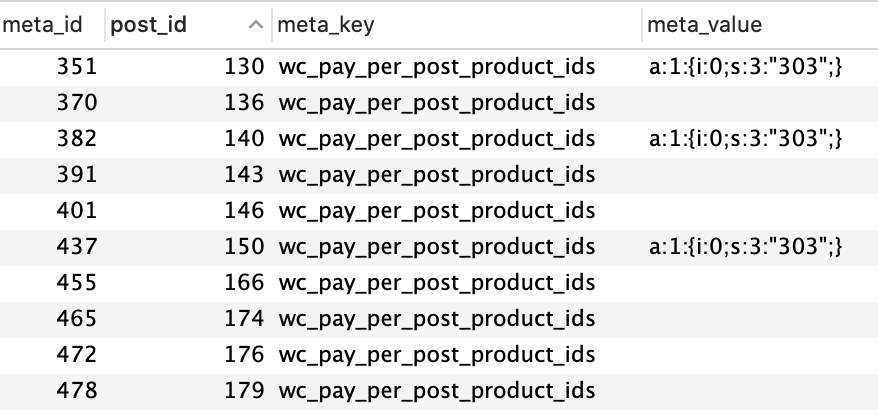
The issue I’m encountering is it always return the result “The Meta Key Is NOT Empty or NULL” Any idea what’s wrong?
Answers:
Thank you for visiting the Q&A section on Magenaut. Please note that all the answers may not help you solve the issue immediately. So please treat them as advisements. If you found the post helpful (or not), leave a comment & I’ll get back to you as soon as possible.
Method 1
Note that the correct compare value is EXISTS and not EXIST. post_id is also not a valid/standard parameter for a meta query clause. 🙂
But 'compare' => 'EXIST' is equivalent to 'compare' => '=', i.e. the default compare value is =, therefore your meta query worked and only posts with the meta (regardless the value is empty or not) included in the results.
And actually, you don’t need the meta query there if you just want to check if a post contains a specific meta.
Just use get_post_meta() to get the meta value and then do an if-else check like in the while loop below:
$args = array(
    'post_type' => 'post',
);

// Get all matching posts, with and without the meta wc_pay_per_post_product_ids.
$query = new WP_Query( $args );

while ( $query->have_posts() ) : $query->the_post();
    // Get the meta value.
    $meta = get_post_meta( get_the_ID(), 'wc_pay_per_post_product_ids', true );

    // Then do an if-else:
    if ( $meta ) {
        echo 'has meta<br>';
    } else {
        echo 'has no meta<br>';
    }
endwhile;
You can also use metadata_exists() if you don’t need to access/know the meta value:
if ( metadata_exists( 'post', get_the_ID(), 'wc_pay_per_post_product_ids' ) ) {
    echo 'has meta<br>';
} else {
    echo 'has no meta<br>';
}
All methods was sourced from stackoverflow.com or stackexchange.com, is licensed under cc by-sa 2.5, cc by-sa 3.0 and cc by-sa 4.0