The labels on my horizontal colorbar are too close together and I don’t want to reduce text size further:
cbar = plt.colorbar(shrink=0.8, orientation='horizontal', extend='both', pad=0.02)
cbar.ax.tick_params(labelsize=8)
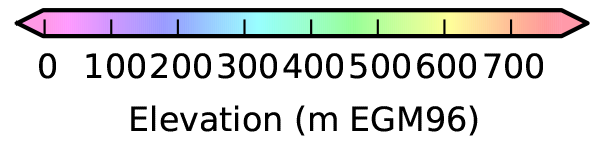
I’d like to preserve all ticks, but remove every other label.
Most examples I’ve found pass a user-specified list of strings to cbar.set_ticklabels(). I’m looking for a general solution.
I played around with variations of
cbar.set_ticklabels(cbar.get_ticklabels()[::2])
and
cbar.ax.xaxis.set_major_locator(matplotlib.ticker.MaxNLocator(nbins=4))
but I haven’t found the magic combination.
I know there must be a clean way to do this using a locator object.
Answers:
Thank you for visiting the Q&A section on Magenaut. Please note that all the answers may not help you solve the issue immediately. So please treat them as advisements. If you found the post helpful (or not), leave a comment & I’ll get back to you as soon as possible.
Method 1
For loop the ticklabels, and call set_visible():
for label in cbar.ax.xaxis.get_ticklabels()[::2]:
    label.set_visible(False)
Method 2
One-liner for those who are into that!
n = 7  # Keeps every 7th label
[l.set_visible(False) for (i,l) in enumerate(ax.xaxis.get_ticklabels()) if i % n != 0]
Method 3
Just came across this thread, nice answers.
I was looking for a way to hide every tick between the nth ticks. And found the enumerate function. So if anyone else is looking for something similar you can do it like this.
for index, label in enumerate(ax.xaxis.get_ticklabels()):
    if index % n != 0:
        label.set_visible(False)
Method 4
I use the following to show every 7th x label:
plt.scatter(x, y)
ax = plt.gca()
temp = ax.xaxis.get_ticklabels()
temp = list(set(temp) - set(temp[::7]))
for label in temp:
    label.set_visible(False)
plt.show()
It’s pretty flexible, as you can do whatever you want instead of plt.scatter. Hope it helps.
All methods was sourced from stackoverflow.com or stackexchange.com, is licensed under cc by-sa 2.5, cc by-sa 3.0 and cc by-sa 4.0