im desperately trying to make asp.net work with the comma symbol as the decimal seperator but this seems to be a lot harder then necessary…
i’ve done everything that’s in this tutorial http://www.asp.net/mvc/overview/getting-started/introduction/examining-the-edit-methods-and-edit-view
tried this in the root web config
<system.web>
    <globalization culture="de-DE" uiCulture="de-DE" />
</system.web>
stepped through the jQuery code – the globalization there seems to work.
i’m using a get request with a model view Controller that looks like this
public class SearchCalcViewModel
{
        public SearchCalcViewModel() { }

        public IEnumerable<Calculation> Calculations { get; set; }
        [Display(Name="Name")]
        public string Name { get; set; }
        [Display(Name="Height")]
        public decimal? Height { get; set; }
}
the get request is called in the in the maincontroller – so that strengthens my assumption that the jquery culture dependent validation is working and something in the .net culture is awry even though Thread.CurrentTHread.CurrentCulture / CurrentUICulture is set correctly too.
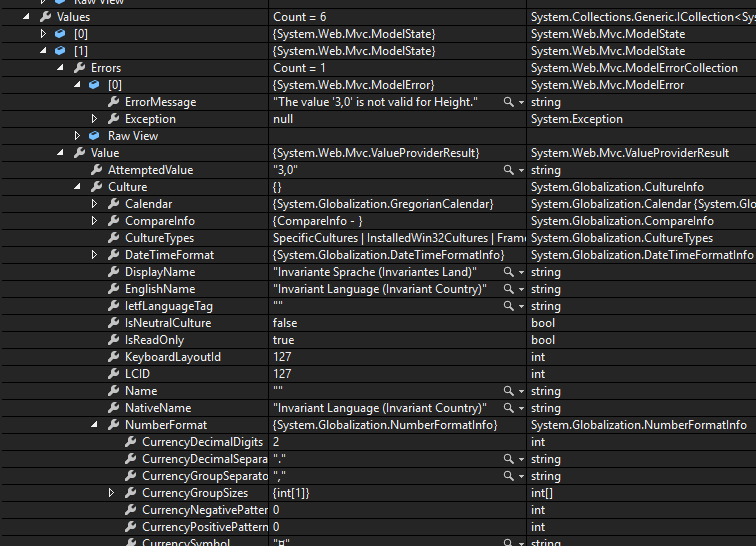
When i try to fill in 3,0 as a height I get the following error message:
The value ‘3,0’ is not valid for Height.
This is the import part of my view:
@using (Html.BeginForm("Search", "Main", FormMethod.Get))

<div class="form-group">
         @Html.LabelFor(m => m.Height, new { @class = "col-md-2 control-label" })
        <div class="col-md-10">
             @Html.TextBoxFor(m => m.Height, new { @class = "form-control"})
             @Html.ValidationMessageFor(m => m.Height)
        </div>
     </div>
}
this is my MainController:
public ActionResult Search(SearchCalcViewModel searchViewModel)
    {
        searchViewModel.Products = db.Products;
        searchViewModel.Calculations = from c in db.Calculations select c;


        if (searchViewModel.Height.HasValue)
        {
            searchViewModel.Calculations =  searchViewModel.Calculations.Where(c => c.Length == searchViewModel.Height);
        }


        return View(searchViewModel);
    }
i’ve stepped into the modelstate and somehow the culture is different from my current culture
Answers:
Thank you for visiting the Q&A section on Magenaut. Please note that all the answers may not help you solve the issue immediately. So please treat them as advisements. If you found the post helpful (or not), leave a comment & I’ll get back to you as soon as possible.
Method 1
Your value is 3,0 which is not a valid decimal type value. It should be 3.0 replace " comma(,) with dot(.).
Edit : Create your own model binder.
public class DecimalModelBinder : DefaultModelBinder
{
    public override object BindModel(ControllerContext controllerContext, ModelBindingContext bindingContext)
    {
        var valueProviderResult = bindingContext.ValueProvider.GetValue(bindingContext.ModelName);

        return valueProviderResult == null ? base.BindModel(controllerContext, bindingContext) : Convert.ToDecimal(valueProviderResult.AttemptedValue);

    }
}
Add these lines in Application_Start file.
ModelBinders.Binders.Add(typeof(decimal), new DecimalModelBinder());
ModelBinders.Binders.Add(typeof(decimal?), new DecimalModelBinder());
I think this should work now. 🙂
Method 2
I know is old but I had the same problem (with es-AR) and I found a better solution, you can simple do this:
void Application_AcquireRequestState(object sender, EventArgs e)
{
    System.Threading.Thread.CurrentThread.CurrentCulture = new System.Globalization.CultureInfo(HttpContext.Current.Session["userCulture"]);
    System.Threading.Thread.CurrentThread.CurrentUICulture = new System.Globalization.CultureInfo(HttpContext.Current.Session["userCulture"]);
}
On Global.asax
This code runs before model binding so you can set the culture information to the thread and also you have access to the session variable (for especific user culture)
All methods was sourced from stackoverflow.com or stackexchange.com, is licensed under cc by-sa 2.5, cc by-sa 3.0 and cc by-sa 4.0