import pandas as pd
data={'col1':[1,3,3,1,2,3,2,2]}
df=pd.DataFrame(data,columns=['col1'])
print df


         col1
    0     1
    1     3
    2     3
    3     1
    4     2
    5     3
    6     2
    7     2
I have the following Pandas DataFrame and I want to create another column that compares the previous row of col1 to see if they are equal. What would be the best way to do this? It would be like the following DataFrame. Thanks
    col1  match
0     1   False
1     3   False
2     3   True
3     1   False
4     2   False
5     3   False
6     2   False
7     2   True
Answers:
Thank you for visiting the Q&A section on Magenaut. Please note that all the answers may not help you solve the issue immediately. So please treat them as advisements. If you found the post helpful (or not), leave a comment & I’ll get back to you as soon as possible.
Method 1
df['match'] = df.col1.eq(df.col1.shift())
print (df)
   col1  match
0     1  False
1     3  False
2     3   True
3     1  False
4     2  False
5     3  False
6     2  False
7     2   True
Or instead eq use ==, but it is a bit slowier in large DataFrame:
df['match'] = df.col1 == df.col1.shift()
print (df)
   col1  match
0     1  False
1     3  False
2     3   True
3     1  False
4     2  False
5     3  False
6     2  False
7     2   True
Timings:
import pandas as pd
data={'col1':[1,3,3,1,2,3,2,2]}
df=pd.DataFrame(data,columns=['col1'])
print (df)
#[80000 rows x 1 columns]
df = pd.concat([df]*10000).reset_index(drop=True)

df['match'] = df.col1 == df.col1.shift()
df['match1'] = df.col1.eq(df.col1.shift())
print (df)

In [208]: %timeit df.col1.eq(df.col1.shift())
The slowest run took 4.83 times longer than the fastest. This could mean that an intermediate result is being cached.
1000 loops, best of 3: 933 µs per loop

In [209]: %timeit df.col1 == df.col1.shift()
1000 loops, best of 3: 1 ms per loop
Method 2
1) pandas approach: Use diff:
df['match'] = df['col1'].diff().eq(0)
2) numpy approach: Use np.ediff1d.
df['match'] = np.ediff1d(df['col1'].values, to_begin=np.NaN) == 0
Both produce:
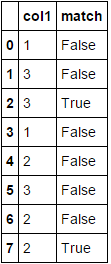
Timings: (for the same DF used by @jezrael)
%timeit df.col1.eq(df.col1.shift())
1000 loops, best of 3: 731 µs per loop

%timeit df['col1'].diff().eq(0)
1000 loops, best of 3: 405 µs per loop
Method 3
Here’s a NumPy arrays based approach using slicing that lets us use the views into the input array for efficiency purposes –
def comp_prev(a):
    return np.concatenate(([False],a[1:] == a[:-1]))

df['match'] = comp_prev(df.col1.values)
Sample run –
In [48]: df['match'] = comp_prev(df.col1.values)

In [49]: df
Out[49]:
   col1  match
0     1  False
1     3  False
2     3   True
3     1  False
4     2  False
5     3  False
6     2  False
7     2   True
Runtime test –
In [56]: data={'col1':[1,3,3,1,2,3,2,2]}
    ...: df0=pd.DataFrame(data,columns=['col1'])
    ...:

#@jezrael's soln1
In [57]: df = pd.concat([df0]*10000).reset_index(drop=True)

In [58]: %timeit df['match'] = df.col1 == df.col1.shift()
1000 loops, best of 3: 1.53 ms per loop

#@jezrael's soln2
In [59]: df = pd.concat([df0]*10000).reset_index(drop=True)

In [60]: %timeit df['match'] = df.col1.eq(df.col1.shift())
1000 loops, best of 3: 1.49 ms per loop

#@Nickil Maveli's soln1
In [61]: df = pd.concat([df0]*10000).reset_index(drop=True)

In [64]: %timeit df['match'] = df['col1'].diff().eq(0)
1000 loops, best of 3: 1.02 ms per loop

#@Nickil Maveli's soln2
In [65]: df = pd.concat([df0]*10000).reset_index(drop=True)

In [66]: %timeit df['match'] = np.ediff1d(df['col1'].values, to_begin=np.NaN) == 0
1000 loops, best of 3: 1.52 ms per loop

# Posted approach in this post
In [67]: df = pd.concat([df0]*10000).reset_index(drop=True)

In [68]: %timeit df['match'] = comp_prev(df.col1.values)
1000 loops, best of 3: 376 µs per loop
Method 4
I’m surprised no one mentioned rolling method here. rolling can be easily used to verify if the n-previous values are all the same or to perform any custom operations. This is certainly not as fast as using diff or shift but it can be easily adapted for larger windows:
df['match'] = df['col1'].rolling(2).apply(lambda x: len(set(x)) != len(x),raw= True).replace({0 : False, 1: True})
All methods was sourced from stackoverflow.com or stackexchange.com, is licensed under cc by-sa 2.5, cc by-sa 3.0 and cc by-sa 4.0