I have a dataframe with this type of data (too many columns):
col1        int64
col2        int64
col3        category
col4        category
col5        category
Columns look like this:
Name: col3, dtype: category
Categories (8, object): [B, C, E, G, H, N, S, W]
I want to convert all the values in each column to integer like this:
[1, 2, 3, 4, 5, 6, 7, 8]
I solved this for one column by this:
dataframe['c'] = pandas.Categorical.from_array(dataframe.col3).codes
Now I have two columns in my dataframe – old col3 and new c and need to drop old columns.
That’s bad practice. It works but in my dataframe there are too many columns and I don’t want do it manually.
How can I do this more cleverly?
Answers:
Thank you for visiting the Q&A section on Magenaut. Please note that all the answers may not help you solve the issue immediately. So please treat them as advisements. If you found the post helpful (or not), leave a comment & I’ll get back to you as soon as possible.
Method 1
First, to convert a Categorical column to its numerical codes, you can do this easier with: dataframe['c'].cat.codes.
Further, it is possible to select automatically all columns with a certain dtype in a dataframe using select_dtypes. This way, you can apply above operation on multiple and automatically selected columns.
First making an example dataframe:
In [75]: df = pd.DataFrame({'col1':[1,2,3,4,5], 'col2':list('abcab'),  'col3':list('ababb')})

In [76]: df['col2'] = df['col2'].astype('category')

In [77]: df['col3'] = df['col3'].astype('category')

In [78]: df.dtypes
Out[78]:
col1       int64
col2    category
col3    category
dtype: object
Then by using select_dtypes to select the columns, and then applying .cat.codes on each of these columns, you can get the following result:
In [80]: cat_columns = df.select_dtypes(['category']).columns

In [81]: cat_columns
Out[81]: Index([u'col2', u'col3'], dtype='object')

In [83]: df[cat_columns] = df[cat_columns].apply(lambda x: x.cat.codes)

In [84]: df
Out[84]:
   col1  col2  col3
0     1     0     0
1     2     1     1
2     3     2     0
3     4     0     1
4     5     1     1
Method 2
This works for me:
pandas.factorize( ['B', 'C', 'D', 'B'] )[0]
Output:
[0, 1, 2, 0]
Method 3
If your concern was only that you making a extra column and deleting it later, just dun use a new column at the first place.
dataframe = pd.DataFrame({'col1':[1,2,3,4,5], 'col2':list('abcab'),  'col3':list('ababb')})
dataframe.col3 = pd.Categorical.from_array(dataframe.col3).codes
You are done. Now as Categorical.from_array is deprecated, use Categorical directly
dataframe.col3 = pd.Categorical(dataframe.col3).codes
If you also need the mapping back from index to label, there is even better way for the same
dataframe.col3, mapping_index = pd.Series(dataframe.col3).factorize()
check below
print(dataframe)
print(mapping_index.get_loc("c"))
Method 4
Here multiple columns need to be converted. So, one approach i used is ..
for col_name in df.columns:
    if(df[col_name].dtype == 'object'):
        df[col_name]= df[col_name].astype('category')
        df[col_name] = df[col_name].cat.codes
This converts all string / object type columns to categorical. Then applies codes to each type of category.
Method 5
What I do is, I replace values.
Like this-
df['col'].replace(to_replace=['category_1', 'category_2', 'category_3'], value=[1, 2, 3], inplace=True)
In this way, if the col column has categorical values, they get replaced by the numerical values.
Method 6
For converting categorical data in column C of dataset data, we need to do the following:
from sklearn.preprocessing import LabelEncoder
labelencoder= LabelEncoder() #initializing an object of class LabelEncoder
data['C'] = labelencoder.fit_transform(data['C']) #fitting and transforming the desired categorical column.
Method 7
To convert all the columns in the Dataframe to numerical data:
df2 = df2.apply(lambda x: pd.factorize(x)[0])
Method 8
Answers here seem outdated. Pandas now has a factorize() function and you can create categories as:
df.col.factorize()
Function signature:
pandas.factorize(values, sort=False, na_sentinel=- 1, size_hint=None)
Method 9
One of the simplest ways to convert the categorical variable into dummy/indicator variables is to use get_dummies provided by pandas.
Say for example we have data in which sex is a categorical value (male & female)
and you need to convert it into a dummy/indicator here is how to do it.
tranning_data = pd.read_csv("../titanic/train.csv")
features = ["Age", "Sex", ] //here sex is catagorical value
X_train = pd.get_dummies(tranning_data[features])
print(X_train)

Age Sex_female Sex_male
20    0          1
33    1          0
40    1          0
22    1          0
54    0          1
Method 10
you can use .replace as the following:
df['col3']=df['col3'].replace(['B', 'C', 'E', 'G', 'H', 'N', 'S', 'W'],[1,2,3,4,5,6,7,8])
or .map:
df['col3']=df['col3'].map({1: 'B', 2: 'C', 3: 'E', 4:'G', 5:'H', 6:'N', 7:'S', 8:'W'})
Method 11
categorical_columns =['sex','class','deck','alone']

for column in categorical_columns:
     df<div class="su-column su-column-size-1-2"><div class="su-column-inner su-u-clearfix su-u-trim"></div></div> = pd.factorize(df<div class="su-column su-column-size-1-2"><div class="su-column-inner su-u-clearfix su-u-trim"></div></div>)[0]
Factorize will make each unique categorical data in a column into a specific number (from 0 to infinity).
Method 12
@Quickbeam2k1 ,see below –
dataset=pd.read_csv('Data2.csv')
np.set_printoptions(threshold=np.nan)
X = dataset.iloc[:,:].values
Using sklearn 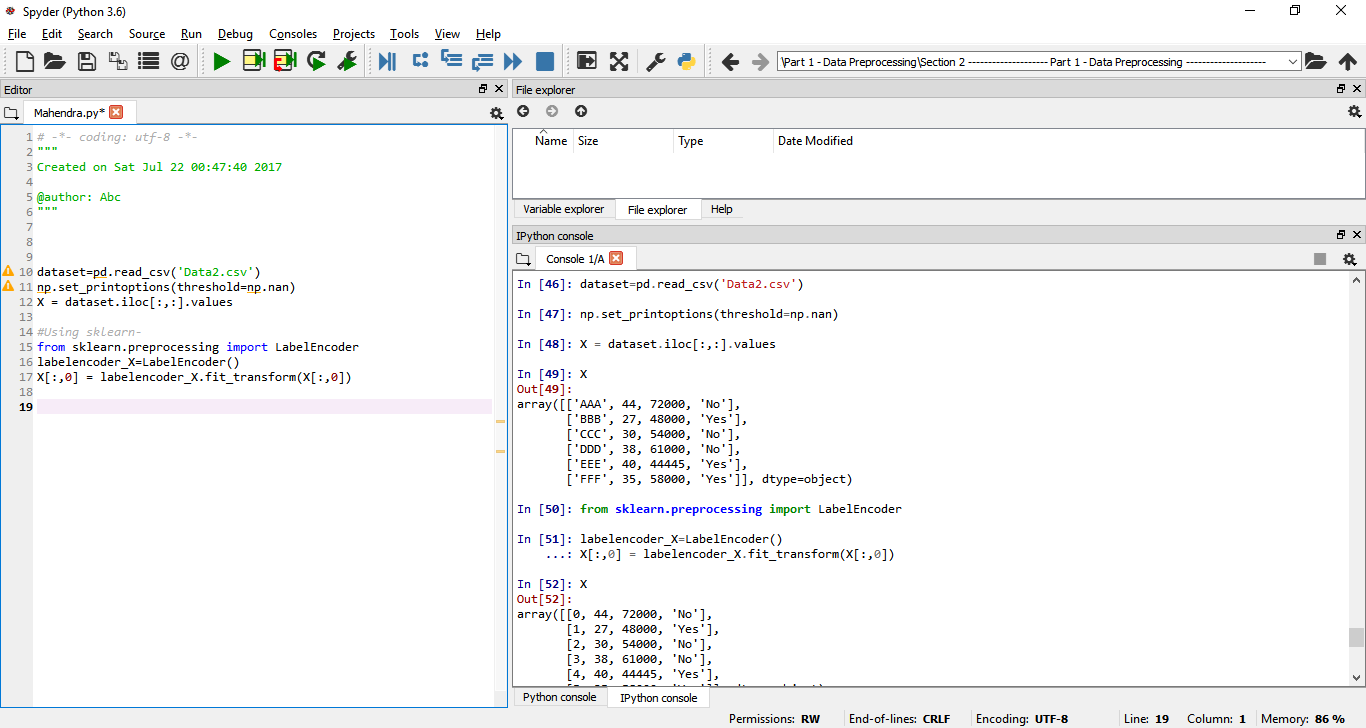
from sklearn.preprocessing import LabelEncoder
labelencoder_X=LabelEncoder()
X[:,0] = labelencoder_X.fit_transform(X[:,0])
Method 13
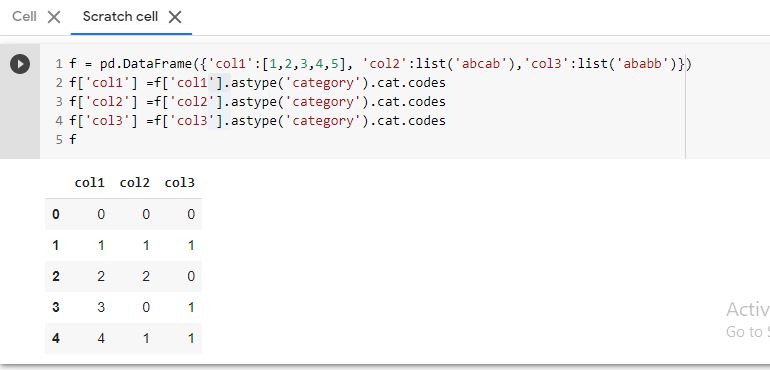
You can do it less code like below :
f = pd.DataFrame({'col1':[1,2,3,4,5], 'col2':list('abcab'),'col3':list('ababb')})

f['col1'] =f['col1'].astype('category').cat.codes
f['col2'] =f['col2'].astype('category').cat.codes
f['col3'] =f['col3'].astype('category').cat.codes

f
Method 14
Just use manual matching:
dict = {'Non-Travel':0, 'Travel_Rarely':1, 'Travel_Frequently':2}

df['BusinessTravel'] = df['BusinessTravel'].apply(lambda x: dict.get(x))
Method 15
For a certain column, if you don’t care about the ordering, use this
df['col1_num'] = df['col1'].apply(lambda x: np.where(df['col1'].unique()==x)[0][0])
If you care about the ordering, specify them as a list and use this
df['col1_num'] = df['col1'].apply(lambda x: ['first', 'second', 'third'].index(x))
All methods was sourced from stackoverflow.com or stackexchange.com, is licensed under cc by-sa 2.5, cc by-sa 3.0 and cc by-sa 4.0