I see a lot on converting a date string to an datetime object in Python, but I want to go the other way.
I’ve got
datetime.datetime(2012, 2, 23, 0, 0)
and I would like to convert it to string like '2/23/2012'.
Answers:
Thank you for visiting the Q&A section on Magenaut. Please note that all the answers may not help you solve the issue immediately. So please treat them as advisements. If you found the post helpful (or not), leave a comment & I’ll get back to you as soon as possible.
Method 1
You can use strftime to help you format your date.
E.g.,
import datetime
t = datetime.datetime(2012, 2, 23, 0, 0)
t.strftime('%m/%d/%Y')
will yield:
'02/23/2012'
More information about formatting see here
Method 2
date and datetime objects (and time as well) support a mini-language to specify output, and there are two ways to access it:
- direct method call:
dt.strftime('format here') - format method (python 2.6+):
'{:format here}'.format(dt) - f-strings (python 3.6+):
f'{dt:format here}'
So your example could look like:
dt.strftime('The date is %b %d, %Y')'The date is {:%b %d, %Y}'.format(dt)f'The date is {dt:%b %d, %Y}'
In all three cases the output is:
The date is Feb 23, 2012
For completeness’ sake: you can also directly access the attributes of the object, but then you only get the numbers:
'The date is %s/%s/%s' % (dt.month, dt.day, dt.year)
# The date is 02/23/2012
The time taken to learn the mini-language is worth it.
For reference, here are the codes used in the mini-language:
%aWeekday as locale’s abbreviated name.%AWeekday as locale’s full name.%wWeekday as a decimal number, where 0 is Sunday and 6 is Saturday.%dDay of the month as a zero-padded decimal number.%bMonth as locale’s abbreviated name.%BMonth as locale’s full name.%mMonth as a zero-padded decimal number. 01, …, 12%yYear without century as a zero-padded decimal number. 00, …, 99%YYear with century as a decimal number. 1970, 1988, 2001, 2013%HHour (24-hour clock) as a zero-padded decimal number. 00, …, 23%IHour (12-hour clock) as a zero-padded decimal number. 01, …, 12%pLocale’s equivalent of either AM or PM.%MMinute as a zero-padded decimal number. 00, …, 59%SSecond as a zero-padded decimal number. 00, …, 59%fMicrosecond as a decimal number, zero-padded on the left. 000000, …, 999999%zUTC offset in the form +HHMM or -HHMM (empty if naive), +0000, -0400, +1030%ZTime zone name (empty if naive), UTC, EST, CST%jDay of the year as a zero-padded decimal number. 001, …, 366%UWeek number of the year (Sunday is the first) as a zero padded decimal number.%WWeek number of the year (Monday is first) as a decimal number.%cLocale’s appropriate date and time representation.%xLocale’s appropriate date representation.%XLocale’s appropriate time representation.%%A literal ‘%’ character.
Method 3
Another option:
import datetime
now=datetime.datetime.now()
now.isoformat()
# ouptut --> '2016-03-09T08:18:20.860968'
Method 4
You could use simple string formatting methods:
>>> dt = datetime.datetime(2012, 2, 23, 0, 0)
>>> '{0.month}/{0.day}/{0.year}'.format(dt)
'2/23/2012'
>>> '%s/%s/%s' % (dt.month, dt.day, dt.year)
'2/23/2012'
Method 5
If you are looking for a simple way of datetime to string conversion and can omit the format. You can convert datetime object to str and then use array slicing.
In [1]: from datetime import datetime

In [2]: now = datetime.now()

In [3]: str(now)
Out[3]: '2019-04-26 18:03:50.941332'

In [5]: str(now)[:10]
Out[5]: '2019-04-26'

In [6]: str(now)[:19]
Out[6]: '2019-04-26 18:03:50'
But note the following thing. If other solutions will rise an AttributeError when the variable is None in this case you will receive a 'None' string.
In [9]: str(None)[:19]
Out[9]: 'None'
Method 6
type-specific formatting can be used as well:
t = datetime.datetime(2012, 2, 23, 0, 0)
"{:%m/%d/%Y}".format(t)
Output:
'02/23/2012'
Method 7
If you want the time as well, just go with
datetime.datetime.now().__str__()
Prints 2019-07-11 19:36:31.118766 in console for me
Method 8
You can easly convert the datetime to string in this way:
from datetime import datetime

date_time = datetime(2012, 2, 23, 0, 0)
date = date_time.strftime('%m/%d/%Y')
print("date: %s" % date)
These are some of the patterns that you can use to convert datetime to string:
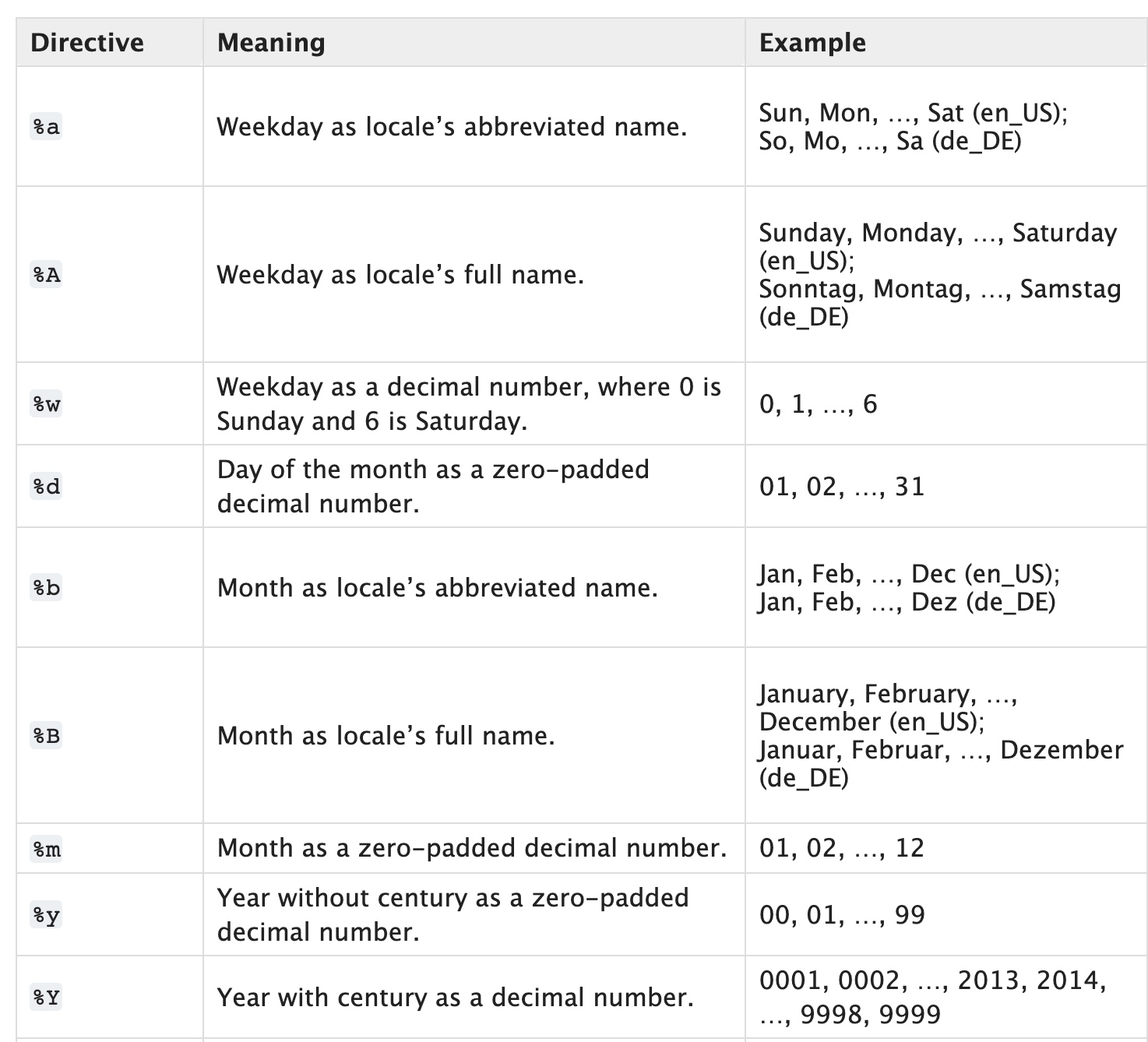
For better understanding, you can take a look at this article on how to convert strings to datetime and datetime to string in Python or the official strftime documentation
Method 9
The sexiest version by far is with format strings.
from datetime import datetime

print(f'{datetime.today():%Y-%m-%d}')
Method 10
It is possible to convert a datetime object into a string by working directly with the components of the datetime object.
from datetime import date

myDate = date.today()
#print(myDate) would output 2017-05-23 because that is today
#reassign the myDate variable to myDate = myDate.month
#then you could print(myDate.month) and you would get 5 as an integer
dateStr = str(myDate.month)+ "/" + str(myDate.day) + "/" + str(myDate.year)
# myDate.month is equal to 5 as an integer, i use str() to change it to a
# string I add(+)the "/" so now I have "5/" then myDate.day is 23 as
# an integer i change it to a string with str() and it is added to the "5/"
# to get "5/23" and then I add another "/" now we have "5/23/" next is the
# year which is 2017 as an integer, I use the function str() to change it to
# a string and add it to the rest of the string.  Now we have "5/23/2017" as
# a string. The final line prints the string.

print(dateStr)
Output –> 5/23/2017
Method 11
You can convert datetime to string.
published_at = "{}".format(self.published_at)
Method 12
String concatenation, str.join, can be used to build the string.
d = datetime.now()
'/'.join(str(x) for x in (d.month, d.day, d.year))
'3/7/2016'
Method 13
end_date = “2021-04-18 16:00:00”
end_date_string = end_date.strftime(“%Y-%m-%d”)
print(end_date_string)
Method 14
An approach to how far from now
- support different languages by passing in param
li, a list corresponding timestamp.
from datetime import datetime
from dateutil import parser

t1 = parser.parse("Tue May 26 15:14:45 2021")
t2 = parser.parse("Tue May 26 15:9:45 2021")
# 5min
t3 = parser.parse("Tue May 26 11:14:45 2021")
# 4h
t4 = parser.parse("Tue May 26 11:9:45 2021")
# 1day
t6 = parser.parse("Tue May 25 11:14:45 2021")
# 1day4h
t7 = parser.parse("Tue May 25 11:9:45 2021")
# 1day4h5min
t8 = parser.parse("Tue May 19 11:9:45 2021")
# 1w
t9 = parser.parse("Tue Apr 26 11:14:45 2021")
# 1m
t10 = parser.parse("Tue Oct 08 06:00:20 2019")
# 1y7m, 19m
t11 = parser.parse("Tue Jan 08 00:00:00 2019")
# 2y4m, 28m


# create: date of object creation
# now: time now
# li: a list of string indicate time (in any language)
# lst: suffix (in any language)
# long: display length
def howLongAgo(create, now, li, lst, long=2):
    dif = create - now
    print(dif.days)
    sec = dif.days * 24 * 60 * 60 + dif.seconds
    minute = sec // 60
    sec %= 60
    hour = minute // 60
    minute %= 60
    day = hour // 24
    hour %= 24
    week = day // 7
    day %= 7
    month = (week * 7) // 30
    week %= 30
    year = month // 12
    month %= 12
    s = []
    for ii, tt in enumerate([sec, minute, hour, day, week, month, year]):
        ss = li[ii]
        if tt != 0:
            if tt == 1:
                s.append(str(tt) + ss)
            else:
                s.append(str(tt) + ss + 's')

    return ' '.join(list(reversed(s))[:long]) + ' ' + lst


t = howLongAgo(t1, t11, [
    'second',
    'minute',
    'hour',
    'day',
    'week',
    'month',
    'year',
], 'ago')
print(t)
# 2years 4months ago
All methods was sourced from stackoverflow.com or stackexchange.com, is licensed under cc by-sa 2.5, cc by-sa 3.0 and cc by-sa 4.0