I have a floating point number, say 135.12345678910. I want to concatenate that value to a string, but only want 135.123456789. With print, I can easily do this by doing something like:
print "%.9f" % numvar
with numvar being my original number. Is there an easy way to do this?
Answers:
Thank you for visiting the Q&A section on Magenaut. Please note that all the answers may not help you solve the issue immediately. So please treat them as advisements. If you found the post helpful (or not), leave a comment & I’ll get back to you as soon as possible.
Method 1
With Python < 3 (e.g. 2.6 [see comments] or 2.7), there are two ways to do so.
# Option one
older_method_string = "%.9f" % numvar

# Option two
newer_method_string = "{:.9f}".format(numvar)
But note that for Python versions above 3 (e.g. 3.2 or 3.3), option two is preferred.
For more information on option two, I suggest this link on string formatting from the Python documentation.
And for more information on option one, this link will suffice and has info on the various flags.
Python 3.6 (officially released in December of 2016), added the f string literal, see more information here, which extends the str.format method (use of curly braces such that f"{numvar:.9f}" solves the original problem), that is,
# Option 3 (versions 3.6 and higher)
newest_method_string = f"{numvar:.9f}"
solves the problem. Check out @Or-Duan’s answer for more info, but this method is fast.
Method 2
Python 3.6
Just to make it clear, you can use f-string formatting. This has almost the same syntax as the format method, but make it a bit nicer.
Example:
print(f'{numvar:.9f}')
More reading about the new f string:
- What’s new in Python 3.6 (same link as above)
- PEP official documentation
- Python official documentation
- Really good blog post – talks about performance too
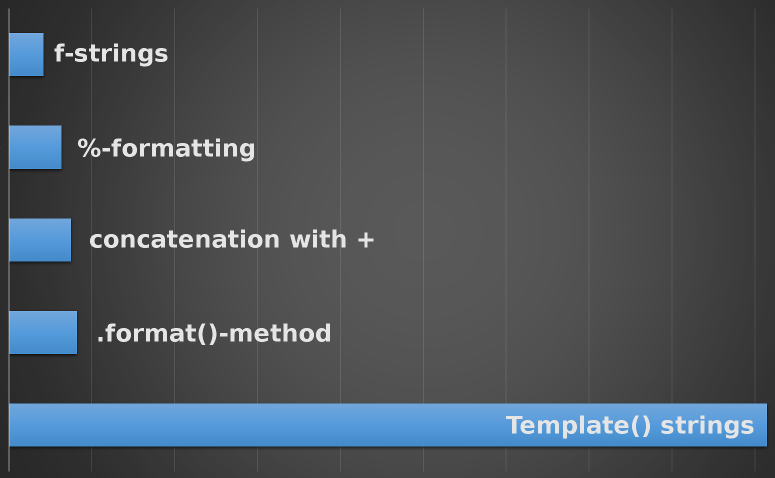
Here is a diagram of the execution times of the various tested methods (from last link above):
Method 3
Using round:
>>> numvar = 135.12345678910
>>> str(round(numvar, 9))
'135.123456789'
Method 4
In case the precision is not known until runtime, this other formatting option is useful:
>>> n = 9
>>> '%.*f' % (n, numvar)
'135.123456789'
Method 5
It’s not print that does the formatting, It’s a property of strings, so you can just use
newstring = "%.9f" % numvar
Method 6
To set precision with 9 digits, get:
print "%.9f" % numvar
Return precision with 2 digits:
print "%.2f" % numvar
Return precision with 2 digits and float converted value:
numvar = 4.2345
print float("%.2f" % numvar)
Method 7
The str function has a bug. Please try the following. You will see ‘0,196553’ but the right output is ‘0,196554’. Because the str function’s default value is ROUND_HALF_UP.
>>> value=0.196553500000
>>> str("%f" % value).replace(".", ",")
All methods was sourced from stackoverflow.com or stackexchange.com, is licensed under cc by-sa 2.5, cc by-sa 3.0 and cc by-sa 4.0