I’m installing several Python packages in Ubuntu 12.04 using the following requirements.txt file:
numpy>=1.8.2,<2.0.0
matplotlib>=1.3.1,<2.0.0
scipy>=0.14.0,<1.0.0
astroML>=0.2,<1.0
scikit-learn>=0.14.1,<1.0.0
rpy2>=2.4.3,<3.0.0
and these two commands:
$ pip install --download=/tmp -r requirements.txt
$ pip install --user --no-index --find-links=/tmp -r requirements.txt
(the first one downloads the packages and the second one installs them).
The process is frequently stopped with the error:
  Could not find a version that satisfies the requirement <package> (from matplotlib<2.0.0,>=1.3.1->-r requirements.txt (line 2)) (from versions: )
No matching distribution found for <package> (from matplotlib<2.0.0,>=1.3.1->-r requirements.txt (line 2))
which I fix manually with:
pip install --user <package>
and then run the second pip install command again.
But that only works for that particular package. When I run the second pip install command again, the process is stopped now complaining about another required package and I need to repeat the process again, ie: install the new required package manually (with the command above) and then run the second pip install command.
So far I’ve had to manually install six, pytz, nose, and now it’s complaining about needing mock.
Is there a way to tell pip to automatically install all needed dependencies so I don’t have to do it manually one by one?
Add: This only happens in Ubuntu 12.04 BTW. In Ubuntu 14.04 the pip install commands applied on the requirements.txt file work without issues.
Answers:
Thank you for visiting the Q&A section on Magenaut. Please note that all the answers may not help you solve the issue immediately. So please treat them as advisements. If you found the post helpful (or not), leave a comment & I’ll get back to you as soon as possible.
Method 1
I had installed python3 but my python in /usr/bin/python was still the old 2.7 version
This worked (<pkg> was pyserial in my case):
python3 -m pip install <pkg>
Method 2
Although it doesn’t really answers this specific question. Others got the same error message with this mistake.
For those who like me initial forgot the -r: Use pip install -r requirements.txt the -r is essential for the command.
The original answer:
https://stackoverflow.com/a/42876654/10093070
Method 3
This approach (having all dependencies in a directory and not downloading from an index) only works when the directory contains all packages. The directory should therefore contain all dependencies but also all packages that those dependencies depend on (e.g., six, pytz etc).
You should therefore manually include these in requirements.txt (so that the first step downloads them explicitly) or you should install all packages using PyPI and then pip freeze > requirements.txt to store the list of all packages needed.
Method 4
Just a reminder to whom google this error and come here.
Let’s say I get this error:
$ python3 example.py
Traceback (most recent call last):
  File "example.py", line 7, in <module>
    import aalib
ModuleNotFoundError: No module named 'aalib'
Since it mentions aalib, I was thought to try aalib:
$ python3.8 -m pip install aalib
ERROR: Could not find a version that satisfies the requirement aalib (from versions: none)
ERROR: No matching distribution found for aalib
But it actually wrong package name, ensure pip search(service disabled at the time of writing), or google, or search on pypi site to get the accurate package name:
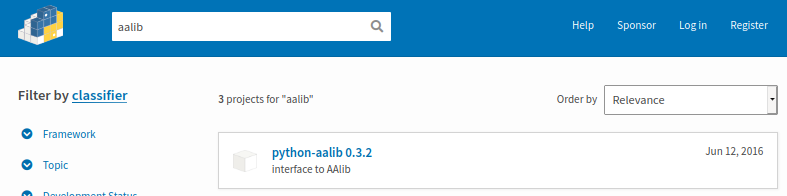
Then install successfully:
$ python3.8 -m pip install python-aalib
Collecting python-aalib
  Downloading python-aalib-0.3.2.tar.gz (14 kB)
...
As pip --help stated:
$ python3.8 -m pip --help
...
  -v, --verbose               Give more output. Option is additive, and can be used up to 3 times.
To have a systematic way to figure out the root causes instead of rely on luck, you can append -vvv option of pip command to see details, e.g.:
$ python3.8 -u -m pip install aalib -vvv
User install by explicit request
Created temporary directory: /tmp/pip-ephem-wheel-cache-b3ghm9eb
Created temporary directory: /tmp/pip-req-tracker-ygwnj94r
Initialized build tracking at /tmp/pip-req-tracker-ygwnj94r
Created build tracker: /tmp/pip-req-tracker-ygwnj94r
Entered build tracker: /tmp/pip-req-tracker-ygwnj94r
Created temporary directory: /tmp/pip-install-jfurrdbb
1 location(s) to search for versions of aalib:
* https://pypi.org/simple/aalib/
Fetching project page and analyzing links: https://pypi.org/simple/aalib/
Getting page https://pypi.org/simple/aalib/
Found index url https://pypi.org/simple
Getting credentials from keyring for https://pypi.org/simple
Getting credentials from keyring for pypi.org
Looking up "https://pypi.org/simple/aalib/" in the cache
Request header has "max_age" as 0, cache bypassed
Starting new HTTPS connection (1): pypi.org:443
https://pypi.org:443 "GET /simple/aalib/ HTTP/1.1" 404 13
[hole] Status code 404 not in (200, 203, 300, 301)
Could not fetch URL https://pypi.org/simple/aalib/: 404 Client Error: Not Found for url: https://pypi.org/simple/aalib/ - skipping
Given no hashes to check 0 links for project 'aalib': discarding no candidates
ERROR: Could not find a version that satisfies the requirement aalib (from versions: none)
Cleaning up...
Removed build tracker: '/tmp/pip-req-tracker-ygwnj94r'
ERROR: No matching distribution found for aalib
Exception information:
Traceback (most recent call last):
  File "/usr/lib/python3/dist-packages/pip/_internal/cli/base_command.py", line 186, in _main
    status = self.run(options, args)
  File "/usr/lib/python3/dist-packages/pip/_internal/commands/install.py", line 357, in run
    resolver.resolve(requirement_set)
  File "/usr/lib/python3/dist-packages/pip/_internal/legacy_resolve.py", line 177, in resolve
    discovered_reqs.extend(self._resolve_one(requirement_set, req))
  File "/usr/lib/python3/dist-packages/pip/_internal/legacy_resolve.py", line 333, in _resolve_one
    abstract_dist = self._get_abstract_dist_for(req_to_install)
  File "/usr/lib/python3/dist-packages/pip/_internal/legacy_resolve.py", line 281, in _get_abstract_dist_for
    req.populate_link(self.finder, upgrade_allowed, require_hashes)
  File "/usr/lib/python3/dist-packages/pip/_internal/req/req_install.py", line 249, in populate_link
    self.link = finder.find_requirement(self, upgrade)
  File "/usr/lib/python3/dist-packages/pip/_internal/index/package_finder.py", line 926, in find_requirement
    raise DistributionNotFound(
pip._internal.exceptions.DistributionNotFound: No matching distribution found for aalib
From above log, there is pretty obvious the URL https://pypi.org/simple/aalib/ 404 not found. Then you can guess the possible reasons which cause that 404, i.e. wrong package name. Another thing is I can modify relevant python files of pip modules to further debug with above log. To edit .whl file, you can use wheel command to unpack and pack.
Method 5
After 2 hours of searching, I found a way to fix it with just one line of command. You need to know the version of the package (Just search up PACKAGE version).
Command:
python3 -m pip install --pre --upgrade PACKAGE==VERSION.VERSION.VERSION
Method 6
Below command worked for me –
python -m pip install flask
Method 7
Not always, but in some cases the package already exists. For example – getpass. It is not listed by “pip list” but it can be imported and used:
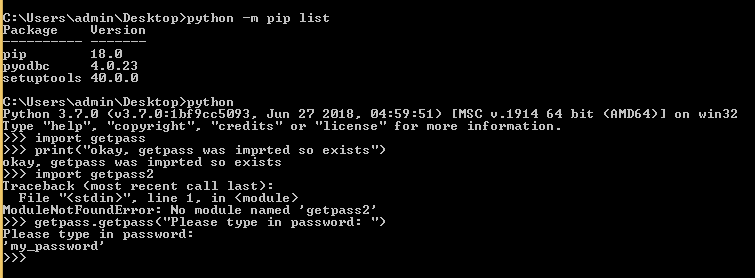
If I try to pip install getpass I get the following error:
“Could not find a version that satisfies the requirement getpass”
Method 8
Try installing flask through the powershell using the following command.
pip install --isolated Flask
This will allow installation to avoide environment variables and user configuration.
Method 9
If you facing this issue at the workplace. This might be the solution for you.
pip install -U <package_name> --user --proxy=<your proxy>
Method 10
Pip install from pypi.org.
pip install -U -i https://pypi.org/simple package
Method 11
When I lost my internet connection, I had this error.
Method 12
Since it’s a pretty annoying problem that may stuck beginners for a long period of time, here I write a complete guild.
if you are running
pip install PACKAGEorpython -m pip install PACKAGE, and ano matching version founderror reported, here’s how to solve the problem.
-
search your package on browser, for example my package is
pycypto, here I searchpycypto pypi - find your package, open the link on pypi, click download file
- open a python shell, import any of your installed package, for example, I have installed Pillow before.
>>> import PIL
>>> PIL.__path__
['/Applications/MAMP/htdocs/canvas/src/zzd/env/lib/python3.7/site-packages/PIL']
PACKAGE.__path__ function will gives you the side packages path where all packages should go into.
PLUS:
if you have no idea what packages you installed before, run pip list to get a list of installed packages.
- after we obtain the path, open a shell, cd to the path
cd /Applications/MAMP/htdocs/canvas/src/zzd/env/lib/python3.7/site-packages/
open
-
unzip the downloaded file, drag it into
site-packages. -
cd into the downloaded directory, and run
setup.pyto install
cd pycrypto-2.6.1
python setup.py install
Then you should be able to import and use the package in python.
Method 13
I got this error while installing awscli on Windows 10 in anaconda (python 3.7).
While troubleshooting, I went to the answer https://stackoverflow.com/a/49991357/6862405 and then to https://stackoverflow.com/a/54582701/6862405. Finally found that I need to install the libraries PyOpenSSL, cryptography, enum34, idna and ipaddress. After installing these (using simply pip install command), I was able to install awscli.
Method 14
One possible error, pip package requires python intepreter which you are not using.
I ran into the same problem, it occurred only when I ran commands from my Docker image (or Dockerfile). Finally many hours later I managed to solve it by updating my python intepreter. Pointed out that my pip-package required python>=3,7 but my Docker image was using python 3.6.
Tip: To check out if you have similar problem, just check pip package requirements and your python version. Private pip package intepreter requirements are wrote down inside setup.py or setup.cfg. Public pip packages are usuially hosted in pypi.org where you can just check intepreter requirements with your browser. To check your python intepreter version just write for example python –version or python3 –version in your console
General problem description
As other answers point out there can also be other requirements that you are not satisfying and that is why pip can not found suitable package version for you. All the requirements are wrote down in pip package documentation and can be easily readed from https://pypi.org/project/graphene-django/your-package
Method 15
Same error in slightly different circumstances, on MacOs. Apparently setuptools versions past 45 can expose some issues and this command got me past it:
pip3 install setuptools==45
Method 16
If the package is local, don’t miss the relative path.
E.g.
pip install ./<pkg>
finally worked in my case, while
pip install <pkg>
yielded:
ERROR: Could not find a version that satisfies the requirement <pkg> (from versions: none)
ERROR: No matching distribution found for <pkg>
Method 17
Search in google if you find some other version of that package available
use that for example
I was getting errors using the glob so I used glob2 instead
All methods was sourced from stackoverflow.com or stackexchange.com, is licensed under cc by-sa 2.5, cc by-sa 3.0 and cc by-sa 4.0