I created my first MVC 4 project and it works perfectly on local server. But when I publish it on to local folder and upload the folder contents to hosting server. I try to run it and I get this error:
Could not load file or assembly ‘DotNetOpenAuth.Core, Version=4.0.0.0, Culture=neutral, PublicKeyToken=2780ccd10d57b246’ or one of its dependencies. The system cannot find the file specified.
Can any one help me please?
Web.config:
<assemblyBinding xmlns="urn:schemas-microsoft-com:asm.v1">
  <dependentAssembly>
    <assemblyIdentity name="DotNetOpenAuth.Core" publicKeyToken="2780ccd10d57b246" />
    <bindingRedirect oldVersion="1.0.0.0-4.0.0.0" newVersion="4.1.0.0" />
  </dependentAssembly>
  <dependentAssembly>
    <assemblyIdentity name="DotNetOpenAuth.AspNet" publicKeyToken="2780ccd10d57b246" />
    <bindingRedirect oldVersion="1.0.0.0-4.0.0.0" newVersion="4.1.0.0" />
  </dependentAssembly>
  <dependentAssembly>
    <assemblyIdentity name="System.Web.Helpers" publicKeyToken="31bf3856ad364e35" />
    <bindingRedirect oldVersion="1.0.0.0-2.0.0.0" newVersion="2.0.0.0" />
  </dependentAssembly>
  <dependentAssembly>
    <assemblyIdentity name="System.Web.Mvc" publicKeyToken="31bf3856ad364e35" />
    <bindingRedirect oldVersion="1.0.0.0-4.0.0.0" newVersion="4.0.0.0" />
  </dependentAssembly>
  <dependentAssembly>
    <assemblyIdentity name="System.Web.WebPages" publicKeyToken="31bf3856ad364e35" />
    <bindingRedirect oldVersion="1.0.0.0-2.0.0.0" newVersion="2.0.0.0" />
  </dependentAssembly>
  <dependentAssembly>
    <assemblyIdentity name="WebGrease" publicKeyToken="31bf3856ad364e35" />
    <bindingRedirect oldVersion="1.0.0.0-1.3.0.0" newVersion="1.3.0.0" />
  </dependentAssembly>
</assemblyBinding>
P.S The same project in Web Forms works on hosting server.
Answers:
Thank you for visiting the Q&A section on Magenaut. Please note that all the answers may not help you solve the issue immediately. So please treat them as advisements. If you found the post helpful (or not), leave a comment & I’ll get back to you as soon as possible.
Method 1
Finally found the answer!!
Go to References –> right cilck on dll file that causing the problem –> select the properties –> check the version –> match the version in properties to web config
<dependentAssembly>
    <assemblyIdentity name="YourDllFile" publicKeyToken="2780ccd10d57b246"               culture="neutral" />
    <bindingRedirect oldVersion="0.0.0.0-YourDllFileVersion" newVersion="YourDllFileVersion" />
  </dependentAssembly>
Method 2
What worked for me immediately was:
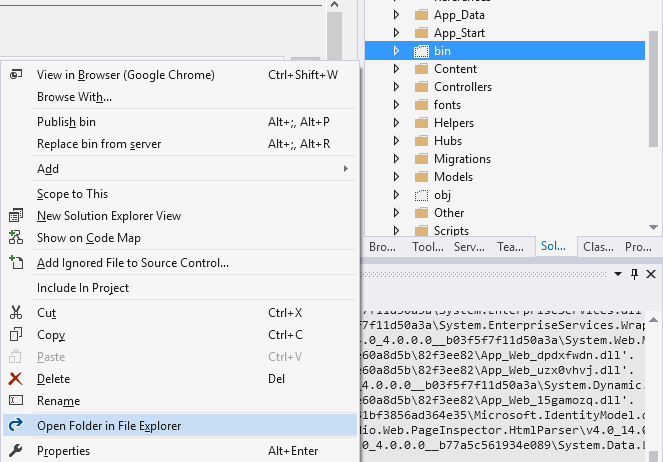
- I located bin folder (picture below shows).
- moved all dll in other folder for safety.
- then rebuild ed the project.
- after solved the issue, deleted old dll files.
Method 3
If your solution contains two projects interacting with each other and both using one same reference, And if version of respective reference is different in both projects; Then also such errors occurred. Keep updating all references to latest one.
Method 4
I had the same issue the NuGet package version was not the same a the one on the references in the project. I had to change the version on the config to match the one in the references from the project. Go to References –> right-click on dll file that causing the problem –> select the properties –> check the version –> match the version in properties to the web config. This should fix the problem.
Method 5
Add following dll files to bin folder:
DotNetOpenAuth.AspNet.dll
DotNetOpenAuth.Core.dll
DotNetOpenAuth.OAuth.Consumer.dll
DotNetOpenAuth.OAuth.dll
DotNetOpenAuth.OpenId.dll
DotNetOpenAuth.OpenId.RelyingParty.dll
If you will not need them, delete dependentAssemblies from config named ‘DotNetOpenAuth.Core’ etc..
Method 6
Try this:
- Edit the *.pubxml file in the PublishProfiles folder
- set DeleteExistingFiles
true - update all nugget packages, rebuild, republish and voila, issue resolved!
…worked for me when I had the same problem.
Method 7
Check if the project having HRESULT: 0x80131040 error is being used/referenced by any project. If yes, kindly check if these project have similar .dll being referenced and the version is the same. If they’re are not of same version number, then it is causing the said error.
Method 8
I have issue with itextsharp and itextsharp.xmlworker dlls for exception-from-hresult-0x80131040 so I have removed those both dlls from references and downloaded new dlls directly from nuget packages, which resolved my issue.
May be this method can be useful to resolved the issue to other people.
All methods was sourced from stackoverflow.com or stackexchange.com, is licensed under cc by-sa 2.5, cc by-sa 3.0 and cc by-sa 4.0