Any help please?
I have only one library and it is driving me crazy. this is the error that I receive.
I am not using any other dependancies.
Could not load file or assembly 'FOD.Intranet.Lib, Version=1.0.0.0, Culture=neutral, PublicKeyToken=039c1f3a4c719e82' or one of its dependencies. The system cannot find the file specified.

Description: An unhandled exception occurred during the execution of the current web request. Please review the stack trace for more information about the error and where it originated in the code.

Exception Details: System.IO.FileNotFoundException: Could not load file or assembly 'FOD.Intranet.Lib, Version=1.0.0.0, Culture=neutral, PublicKeyToken=039c1f3a4c719e82' or one of its dependencies. The system cannot find the file specified.

Source Error:

An unhandled exception was generated during the execution of the current web request. Information regarding the origin and location of the exception can be identified using the exception stack trace below.

Stack Trace:


[FileNotFoundException: Could not load file or assembly 'FOD.Intranet.Lib, Version=1.0.0.0, Culture=neutral, PublicKeyToken=039c1f3a4c719e82' or one of its dependencies. The system cannot find the file specified.]
   NewCollection.VisualWebPart1.VisualWebPart1UserControl.TodaysNews() +0
   NewCollection.VisualWebPart1.VisualWebPart1UserControl.Page_Load(Object sender, EventArgs e) +52
   System.Web.Util.CalliHelper.EventArgFunctionCaller(IntPtr fp, Object o, Object t, EventArgs e) +25
   System.Web.Util.CalliEventHandlerDelegateProxy.Callback(Object sender, EventArgs e) +42
   System.Web.UI.Control.OnLoad(EventArgs e) +132
   System.Web.UI.Control.LoadRecursive() +66
   System.Web.UI.Control.AddedControl(Control control, Int32 index) +350
   NewCollection.VisualWebPart1.VisualWebPart1.CreateChildControls() +155
   System.Web.UI.Control.EnsureChildControls() +146
   System.Web.UI.Control.PreRenderRecursiveInternal() +61
   System.Web.UI.Control.PreRenderRecursiveInternal() +224
   System.Web.UI.Control.PreRenderRecursiveInternal() +224
   System.Web.UI.Control.PreRenderRecursiveInternal() +224
   System.Web.UI.Control.PreRenderRecursiveInternal() +224
   System.Web.UI.Control.PreRenderRecursiveInternal() +224
   System.Web.UI.Page.ProcessRequestMain(Boolean includeStagesBeforeAsyncPoint, Boolean includeStagesAfterAsyncPoint) +3394
Answers:
Thank you for visiting the Q&A section on Magenaut. Please note that all the answers may not help you solve the issue immediately. So please treat them as advisements. If you found the post helpful (or not), leave a comment & I’ll get back to you as soon as possible.
Method 1
To make Visual Studio adding 3rd party assembly or even your own assembly from other project in solution to GAC please do next:
- Open Package.package from Package folder in SharePoint project.
- Click Advanced in bottom area.
- Click Add and chose which type of assembly you want to add.
-
In dialog select dll file, chec GAC or BIN, add safe controls and
class resources entries if required. Click Ok.
Your assembly will be packaged to WSP, defined in manifest and deployed everytime.
Method 2
Problem Solved!
I thought that Visual Studio was copying the DLL in to the GAC, but apparently not. So I copied it there manually and it works.
One question though, is this normal that visual studio does not copy it to the GAC when I deploy the sharepoint application?
For those who would like to know how to copy the dll to GAC
there are two ways to copy the dll to GAC:
-
copy the dll manually
- Open c:windowsassembly directory in windows explorer
- Open another instance of windows explorer and go to the place where your dll is located,
usually in the bin folder. (so now you will have two windows open) - select the dll you would like to copy to gac and drag it inside the assembly directory, c:windowsassembly
-
use VS to deploy it for you to GAC.
- in your sharepoint project double click on “Package”.
- Package.Package will open. Look bottom left of your screen and click on “Advanced”,
- then click on “Add”, then select “Add Assembly from project output…”.
- In the Source project dropdownlist select the project and then click OK.
- finally deploy the solution and the dll will be in the GAC.
thank you for your support.
Method 3
For assemblies not in GAC, and which are referred in the build, sometimes this error also happens if the platform target does not match. So match the assembly platform type to the one where it is being used.
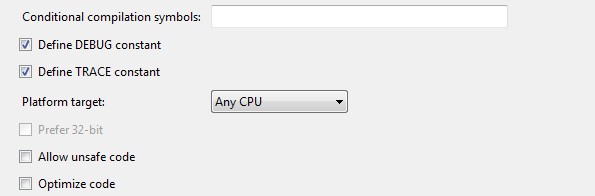
Method 4
Please try to unreference the DLL then re reference it again and rebuild you project. Also Check to ensure that the version matchs what is in the project web config
Method 5
- Does the version number match?
- It’s weird to see you’re trying to load a .lib file instead of a dll. Perhaps you wanted to load a dll instead?
- To debug this kind of problems, try Fusion Logging
- You say you’re using only one library, but that library might have some dependencies you’re not aware of. This SO question deals with listing the dependencies of a managed .NET assembly.
Method 6
Assuming that you have access to SharePoint server, try the following. Some random thoughts and no specific order.
- Deploy the assembly to GAC or copy the dll to the bin folder of your web application
- Add the assembly info in your web.config assemblies section and in the safe controls section.
- If you are developing a web part, make sure to add its reference in the safe controls section of the web parts (although i don’t think this is your problem)
- Signing the assembly with a strong name might help in some cases.
- If you have custom dependencies then you need to do the follow the same steps for all the dependencies (other than .net framework and SharePoint related)
Are you developing your SharePoint project (do you mean web part?) using visual studio? Are you referencing it in your SharePoint project? You need to give us more details on your development environment to be able to pinpoint the problem.
Method 7
If you are using the code Page.Load(“control_path…”). make sure that the actual ascx file you load does not have any directives that include the assembly from your exception message
<%@ Register Tagprefix="SharePoint" Namespace="Microsoft.SharePoint.WebControls" Assembly="Microsoft.SharePoint, Version=14.0.0.0, Culture=neutral, PublicKeyToken=71e9bce111e9429c" %>
Method 8
for guys still looking into this issue one thing u need to know is
there are different GACutils out there , so u need to make sure that ur using correct GACUTIL to deploy the DLL to correct GAC
for eg: if my dll was complied in 3.5 .net framework and my OS version was 64 bit windows it would be in below location
C:Program Files (x86)Microsoft SDKsWindowsv7.0ABinx64
Struggled for 4 stupid days to figure this out
Method 9
This error is coming because your dll file and project files are in different folder.
Adding Visual Studio 3rd party assembly like SelectPdf.dll or SelectHtmlToPdf.dll etc.
You just need to put your dll file in the same folder and add reference to this file.
Step : Create a folder name externaldll and put all dll files here.
All methods was sourced from stackoverflow.com or stackexchange.com, is licensed under cc by-sa 2.5, cc by-sa 3.0 and cc by-sa 4.0