I have a small MVC app that I use for practice reasons, but now I am encountering an error every time I try to debug:
Could not load file or assembly 'System.Net.Http.Formatting' or one of its dependencies.
The system cannot find the path specified.
I’ve googled but cannot find a solution. I’m using .NET 4.5.
It can’t be the DLL file because I’m using .Net 4.5.
Answers:
Thank you for visiting the Q&A section on Magenaut. Please note that all the answers may not help you solve the issue immediately. So please treat them as advisements. If you found the post helpful (or not), leave a comment & I’ll get back to you as soon as possible.
Method 1
Whenever I have a NuGet error such as these I usually take these steps:
- Go to the packages folder in the Windows Explorer and delete it.
- Open Visual Studio and Go to Tools > Library Package Manager > Package Manager Settings and under the Package Manager item on the left hand side there is a “Clear Package Cache” button. Click this button and make sure that the check box for “Allow NuGet to download missing packages during build” is checked.
- Clean the solution
- Then right click the solution in the Solution Explorer and enable NuGet Package Restore
- Build the solution
- Restart Visual Studio
Taking all of these steps almost always restores all the packages and dll’s I need for my MVC program.
EDIT >>>
For Visual Studio 2013 and above, step 2) should read:
- Open Visual Studio and go to Tools > Options > NuGet Package Manager and on the right hand side there is a “Clear Package Cache button”. Click this button and make sure that the check boxes for “Allow NuGet to download missing packages” and “Automatically check for missing packages during build in Visual Studio” are checked.
Method 2
-
Remove all code references to
System.Net.* -
in the package window,
Install-Package Microsoft.AspNet.WebApi.Client - Clean and rebuild your project
Method 3
I found an extra
  <dependentAssembly>
    <assemblyIdentity name="System.Net.Http" publicKeyToken="b03f5f7f11d50a3a" culture="neutral" />
    <bindingRedirect oldVersion="0.0.0.0-2.2.28.0" newVersion="2.2.28.0" />
  </dependentAssembly>
in my web.config. removed that to get it to work. some other package I installed, and then removed caused the issue.
Method 4
user3919888 pointed me in the right direction, but I needed to run Update-Package -reinstall Microsoft.AspNet.WebApi.Client in the Package-Manager console. Basic install by itself does not recognize the problem but does recognize that the package is already installed and does not overwrite it.
I’m posting this answer because this happens so infrequently that I end up googling and reaching this page before I remember what I did last time.
Method 5
Removing the following lines from web.config solved my problem. Note that in this project I didn’t use WebApi components. So for others this solution may not work as expected.
  <dependentAssembly>
    <assemblyIdentity name="System.Net.Http.Formatting" publicKeyToken="31bf3856ad364e35" culture="neutral" />
    <bindingRedirect oldVersion="0.0.0.0-5.2.3.0" newVersion="5.2.3.0" />
  </dependentAssembly>
Method 6
For those that use .NET Standard project in combination with .NET Framework projects:
In the .NET Standard way, packages that are included in a .NET Standard project will correctly be used across other .NET Core and .NET Standard projects.
Im the .NET Framework way, if you are referring to a .NET Standard project from an .NET Framework (MVC) project, you need to manually download and install the same nuget packages.
So the answer to my question was that I had to download and install Microsoft.AspNet.WebApi.Client in the web project (.NET Framework) that is using a .NET Standard project where Microsoft.AspNet.WebApi.Client is needed. In fact, I already had this installed but there was a version difference.
I just add this answer for others to see, it might not directly answer OP’s question but it did save me time by first checking this instead of doing the top-voted answers.
Method 7
- Remove all code references to
System.Net.* - Uninstall: Package
Microsoft.AspNet.WebApiand its dependencies. - Reinstall all: Package
Microsoft.AspNet.WebApiand its dependencies. - Clean and rebuild your project
Method 8
As originally suggested in a comment by GeoMac and documented on NuGet’s docs the following worked for me when none of the other answers worked:
Tools / NuGet Package Manager / Package Manager Console
Update-Package -ProjectName MyProjectName -reinstall
Method 9
In my case none of the above solutions worked. I solved by right clicking on the reference
System.Net.Http.Formatting
from Visual studio and setting the property Copy Local to true.
I hope this is useful somehow.
Method 10
For me it was as simple as
- Delete
Microsoft.AspNet.WebApi.Clientfrom the packages folder in Windows Explorer - Open Tools > NuGet Package Manager > Package Manager Console
- Click the “Restore” button
Method 11
What solved this annoying error for me was just to close Visual Studio and open it again. Then rebuild the solution, and it all worked again. Sorry for the crap answer, but I think it’s worth an answer because it solved it for me.
Method 12
I was facing the same problem because
System.Net.Http.Formatting
version written inside webconfig was 5.0.3 but inside the bin folder the library System.Net.Http.Formatting dll version was 4.0.2
so I just replaced with the same given inside bin

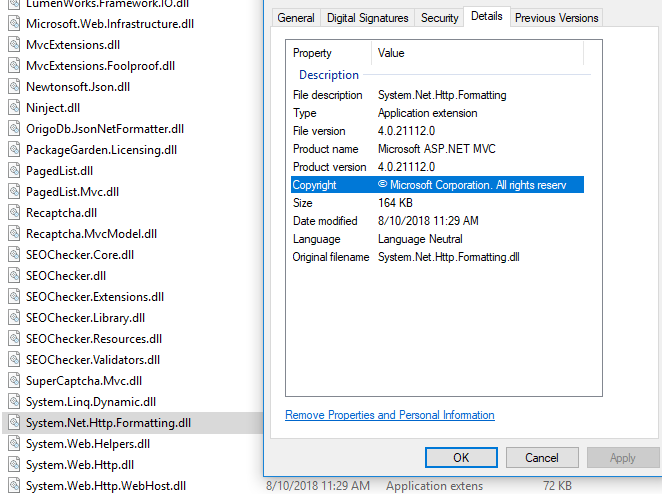
just do this clean project and build
Method 13
For me this issue was caused by having a missing assembly binding entry in Web.config (System.Net.Http.Formatting) after adding the Microsoft.AspNet.WebApi.Client package.
I checked the Microsoft.AspNet.WebApi.Client version I had, and added the following binding to the Web.config:
  <dependentAssembly>
    <assemblyIdentity name="System.Net.Http.Formatting" publicKeyToken="31bf3856ad364e35" culture="neutral" />
    <bindingRedirect oldVersion="0.0.0.0-5.2.7.0" newVersion="5.2.7.0" />
  </dependentAssembly>
Depending on the WebApi.Client version you have, change the version in the binding redirect.
Method 14
In my case, none of the above worked, however, replacing 5.2.3.0 with 4.0.0.0 did solve the problem.
Method 15
VS2019: Tools -> Nuget Package Manager -> Package Manager Setting -> in Package Restore section, check 2 options.
After that, go to project packages folder and delete all child folders inside (for no longer any error)
Then Rebuild solution, Nuget will redownload all packages and project should run without any reference.
Method 16
I had the problem with a ASP.NET project in VS 2019.
Another symptom was, that some references (System.Web.Http) were marked as faulty in the project references list (Solution Explorer)
My solution:
- Delete the faulty references in Project -> References (right click, …)
- Build
- Navigate to the build errors “The type or namespace name […] could not be found” or similar
- Use the “Show potential fixes” -> Install package
The cause:
Looking at the difference in the csproj file I could see the reason for the trouble. Someone managed to reference a DLL in the Windows Program file folder!
<Reference Include="System.Web.Http">
  <HintPath>............Program Files (x86)Microsoft ASP.NETASP.NET MVC 4PackagesMicrosoft.AspNet.WebApi.Core.4.0.30506.0libnet40System.Web.Http.dll</HintPath>
</Reference>
<Reference Include="System.Web.Mvc, Version=2.0.0.0, Culture=neutral, PublicKeyToken=31bf3856ad364e35, processorArchitecture=MSIL">
  <SpecificVersion>False</SpecificVersion>
  <HintPath>............Program Files (x86)Microsoft ASP.NETASP.NET MVC 4PackagesMicrosoft.AspNet.Mvc.4.0.30506.0libnet40System.Web.Mvc.dll</HintPath>
</Reference>
Method 17
Probably you need to set library reference as “Copy Local = True” on properties dialog. On visual studio click on “references” then right-click on the missing reference, from the context menu click properties, you should see copy local setting.
Method 18
For Me adding few below line in WebApi.config works as after updating the new nuget package did not works out
var setting = config.Formatters.JsonFormatter.SerializerSettings;
setting.ContractResolver = new CamelCasePropertyNamesContractResolver();
setting.Formatting = Formatting.Indented;
Don’t forget to add namespace:
using Newtonsoft.Json.Serialization;
using Newtonsoft.Json;
Method 19
What I did to solve this problem is
- Go to NuGet package manager.
- Select Updates (from the left panel)
- Update WebApi components
- After that, the project ran without errors.
Method 20
Check your version matches both –> web.config file and
–> Microsoft.AspNet.WebApi.Client,Microsoft.AspNet.WebApi if not pls update accourdingly
All methods was sourced from stackoverflow.com or stackexchange.com, is licensed under cc by-sa 2.5, cc by-sa 3.0 and cc by-sa 4.0