In my diagnostic view of my build output shows this conflict
There was a conflict between “System.Net.Http, Version=4.0.0.0, Culture=neutral, PublicKeyToken=b03f5f7f11d50a3a” and “System.Net.Http, Version=4.1.1.2, Culture=neutral, PublicKeyToken=b03f5f7f11d50a3a”. (TaskId:20)
“System.Net.Http, Version=4.0.0.0, Culture=neutral, PublicKeyToken=b03f5f7f11d50a3a” was chosen because it was primary and “System.Net.Http, Version=4.1.1.2, Culture=neutral, PublicKeyToken=b03f5f7f11d50a3a” was not. (TaskId:20)
References which depend on “System.Net.Http, Version=4.0.0.0, Culture=neutral, PublicKeyToken=b03f5f7f11d50a3a” [C:Program Files (x86)Reference AssembliesMicrosoftFramework.NETFrameworkv4.6.1System.Net.Http.dll]. (TaskId:20)
I got here by adding the RestSharp nuget package. I was not having an issue until I installed this and I think one of the pieces that came with it may have caused this issue. I tried to uninstall it but that did not work.
Answers:
Thank you for visiting the Q&A section on Magenaut. Please note that all the answers may not help you solve the issue immediately. So please treat them as advisements. If you found the post helpful (or not), leave a comment & I’ll get back to you as soon as possible.
Method 1
Installing Nuget Package: System.Net.Http version 4.3.3 installs the correct Version=4.1.1.2
this will result in the following reference in your project file:
<Reference Include="System.Net.Http, Version=4.1.1.2, Culture=neutral, PublicKeyToken=b03f5f7f11d50a3a, processorArchitecture=MSIL">
      <HintPath>........packagesSystem.Net.Http.4.3.3libnet46System.Net.Http.dll</HintPath>
</Reference>
Method 2
If you using vs2017, some project will force u reference to system.net.http (4.2.0.0)
When you install from nuget (version 4.3.3) and your system.net.http will be 4.1.1.2
-> it will be conflict
So in your web.config or app.config, you can change to 4.1.1.2 or 4.2.0.0 depend on which version was copy to bin folder when runtime
<dependentAssembly>
        <assemblyIdentity name="System.Net.Http" publicKeyToken="b03f5f7f11d50a3a" culture="neutral" />
        <bindingRedirect oldVersion="0.0.0.0-4.2.0.0" newVersion="4.1.1.2" />
      </dependentAssembly>
Method 3
I’m using .NET Framework 4.7.2 and Visual Studio 15.5. When I upgraded System.Net.Http 4.3.3 to 4.3.4, I received the “could not load” error:
{“Could not load file or assembly ‘System.Net.Http, Version=4.2.0.0,
Culture=neutral, PublicKeyToken=b03f5f7f11d50a3a’ or one of its
dependencies. The system cannot find the file
specified.”:”System.Net.Http, Version=4.2.0.0, Culture=neutral,
PublicKeyToken=b03f5f7f11d50a3a”}
I got past that only to get a FileNotFoundException:
System.IO.FileNotFoundException HResult=0x80070002 Message=Could
not load file or assembly ‘System.Net.Http, Version=4.2.0.0,
Culture=neutral, PublicKeyToken=b03f5f7f11d50a3a’ or one of its
dependencies. The system cannot find the file specified.
This thread in the .NET Core project on GitHub discusses this issue, and I found this post in the .NET Core project on GitHub to be very helpful:
https://github.com/dotnet/corefx/issues/25773#issuecomment-350036434
My (poor) summary: Microsoft is trying to eliminate the need for the System.Net.Http NuGet package since it was a workaround for other release issues. .NET Framework 4.7.1 and VS 15.5 have changes that (should?) eliminate the need for it and the associated bindings altogether.
I deleted the System.Net.Http NuGet package from my projects, and added references to the System.Net.Http included with .NET Framework 4.7.2, and everything’s ship-shape again.
Method 4
Root Cause: You normally get such issue when you take the reference of certain third party library in your application.
For example, you took the reference of RestSharp (A third-party library) from NuGet. That RestSharp may have used the reference of System.Net.Http 4.2.0.0 version. And your project has also taken the reference to System.Net.Http 4.0.0.0 (From GAC). Now when you run the application & try to call any method which is using RestSharp, at the same time Runtime (CLR) tries to locate the System.Net.Http assembly with version 4.2.0.0 & when it fails to locate the desired version, it throws System.IO.FileNotFoundException exception with below error message.
Could not load file or assembly ‘System.Net.Http, Version=4.2.0.0,
Culture=neutral, PublicKeyToken=b03f5f7f11d50a3a’ or one of its
dependencies. The system cannot find the file specified.
Here you can see How the Runtime Locates Assemblies?
Solution:
Just add below configuration in the web.config or app.config of your startup project.
<dependentAssembly>
    <assemblyIdentity name="System.Net.Http" publicKeyToken="b03f5f7f11d50a3a" culture="neutral" />
    <bindingRedirect oldVersion="0.0.0.0-4.2.0.0" newVersion="4.0.0.0" />
</dependentAssembly>
This configuration instructs the runtime to resolve System.Net.Http assembly with 4.0.0.0 version only, whenever it looks for this assembly for any version between 0.0.0.0 to 4.2.0.0.
Here is the complete schema:
<configuration>
   <runtime>
      <assemblyBinding xmlns="urn:schemas-microsoft-com:asm.v1">
        <dependentAssembly>
            <assemblyIdentity name="System.Net.Http" publicKeyToken="b03f5f7f11d50a3a" culture="neutral" />
            <bindingRedirect oldVersion="0.0.0.0-4.2.0.0" newVersion="4.0.0.0" />
        </dependentAssembly>
      </assemblyBinding>
   </runtime>
</configuration>
Method 5
After upgrading from 4.6.1 framework to 4.7.2 we started getting this error and the final solution was to go to web config file, find this:
  <dependentAssembly>
    <assemblyIdentity name="System.Net.Http" publicKeyToken="B03F5F7F11D50A3A" culture="neutral" />
    <bindingRedirect oldVersion="0.0.0.0-4.2.0.0" newVersion="4.2.0.0" />
  </dependentAssembly>
and replace it with
  <dependentAssembly>
    <assemblyIdentity name="System.Net.Http" publicKeyToken="B03F5F7F11D50A3A" culture="neutral" />
    <bindingRedirect oldVersion="0.0.0.0-4.2.0.0" newVersion="4.0.0.0" />
  </dependentAssembly>
and the change done above was just this: newVersion=”4.0.0.0″
Method 6
The system.net.http libraries are now distributed as part of the .Net Standard Framework and this can cause issues, generally when you update the Nuget package to a newer version.
The solution that worked for me was to remove the System.Net.Http package (and the Formatters package that depends on it) from Nuget, and delete all references to the system.net.http libraries in app.config (they’ll often be dependantAssemblies).
Lastly, edit your project file to add a reference to http from the framework like this:
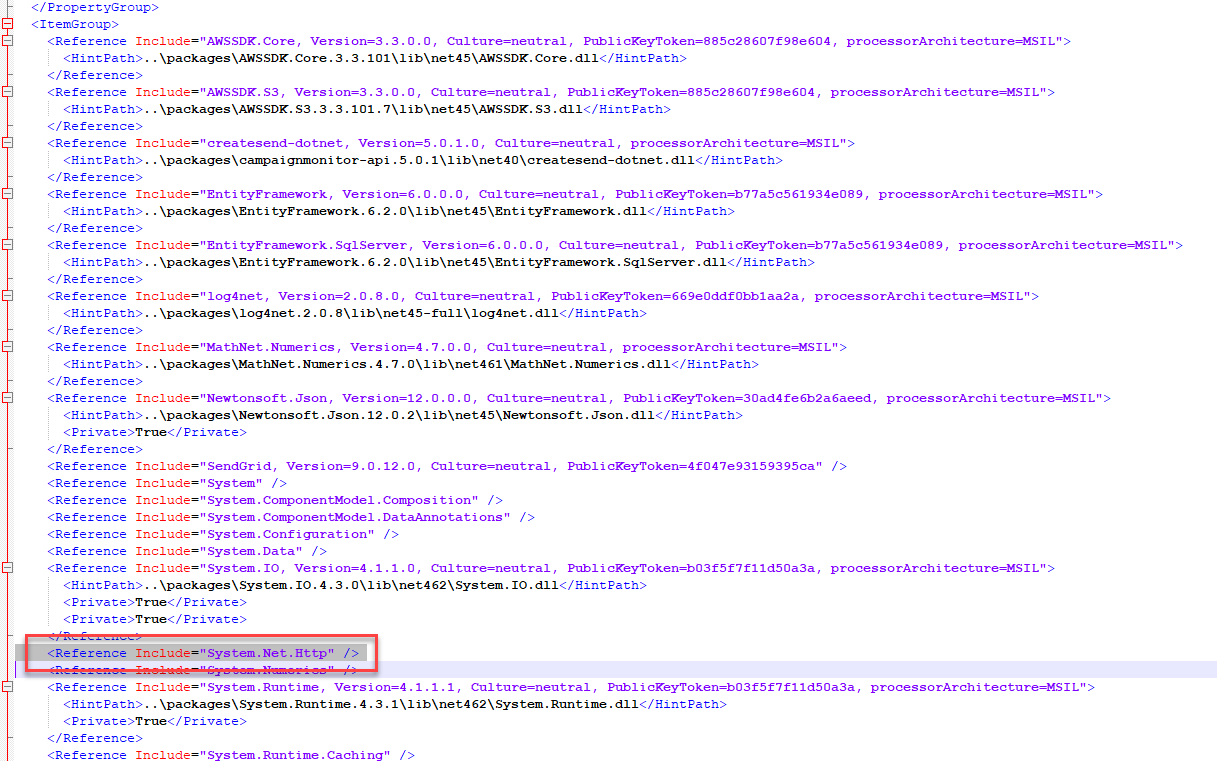
Method 7
Not so good but alternate solution than using bindingRedirect–
If you have-
<startup useLegacyV2RuntimeActivationPolicy="true" >
        <supportedRuntime version="v4.0" sku=".NETFramework,Version=v4.7.1" /></startup>
in App.config, then removing “useLegacyV2RuntimeActivationPolicy” property helps by not reverting to old CLR.
All methods was sourced from stackoverflow.com or stackexchange.com, is licensed under cc by-sa 2.5, cc by-sa 3.0 and cc by-sa 4.0