I have an application built on ASP.NET web forms which also supports MVC 5. I included MVC 5 API controllers in my project for which I had to upgrade Json from version 4.5 to 7.0. After making those changes when I launched the application, I get the following error:
Could not load file or assembly ‘System.Web.Mvc’ or one of its
dependencies. The located assembly’s manifest definition does not
match the assembly reference. (Exception from HRESULT: 0x80131040)
I checked the reference for System.Web.Mvc. In the property dialog run time version is v4.0.30319 and version is 5.0.0.0. In web.config, the assemblies are set as the following:
<assemblyBinding xmlns="urn:schemas-microsoft-com:asm.v1">
  <dependentAssembly>
    <assemblyIdentity name="NLog" publicKeyToken="5120e14c03d0593c" culture="neutral" />
    <bindingRedirect oldVersion="0.0.0.0-2.0.1.0" newVersion="2.0.1.0" />
  </dependentAssembly>
  <dependentAssembly>
    <assemblyIdentity name="AntiXssLibrary" publicKeyToken="d127efab8a9c114f" culture="neutral" />
    <bindingRedirect oldVersion="0.0.0.0-4.3.0.0" newVersion="4.3.0.0" />
  </dependentAssembly>
  <dependentAssembly>
    <assemblyIdentity name="System.Web.Helpers" publicKeyToken="31bf3856ad364e35" />
    <bindingRedirect oldVersion="1.0.0.0-3.0.0.0" newVersion="3.0.0.0" />
  </dependentAssembly>
  <dependentAssembly>
    <assemblyIdentity name="System.Web.WebPages" publicKeyToken="31bf3856ad364e35" />
    <bindingRedirect oldVersion="1.0.0.0-3.0.0.0" newVersion="3.0.0.0" />
  </dependentAssembly>
  <dependentAssembly>
    <assemblyIdentity name="System.Web.Mvc" publicKeyToken="31bf3856ad364e35" />
    <bindingRedirect oldVersion="1.0.0.0-5.2.3.0" newVersion="5.2.3.0" />
  </dependentAssembly>
  <!--<dependentAssembly>
    <assemblyIdentity name="Newtonsoft.Json" publicKeyToken="30ad4fe6b2a6aeed" culture="neutral" />
    <bindingRedirect oldVersion="0.0.0.0-4.5.0.0" newVersion="4.5.0.0" />
  </dependentAssembly>-->
  <dependentAssembly>
    <assemblyIdentity name="Newtonsoft.Json" publicKeyToken="30ad4fe6b2a6aeed" />
    <bindingRedirect oldVersion="0.0.0.0-7.0.0.0" newVersion="7.0.0.0" />
  </dependentAssembly>
  <dependentAssembly>
    <assemblyIdentity name="System.Net.Http.Formatting" publicKeyToken="31bf3856ad364e35" culture="neutral" />
    <bindingRedirect oldVersion="0.0.0.0-5.2.3.0" newVersion="5.2.3.0" />
  </dependentAssembly>
  <dependentAssembly>
    <assemblyIdentity name="System.Web.Http" publicKeyToken="31bf3856ad364e35" culture="neutral" />
    <bindingRedirect oldVersion="0.0.0.0-5.2.3.0" newVersion="5.2.3.0" />
  </dependentAssembly>
</assemblyBinding>
The full error log is shown below:
=== Pre-bind state information === LOG: DisplayName = System.Web.Mvc (Partial) WRN: Partial binding information was supplied for an
assembly: WRN: Assembly Name: System.Web.Mvc | Domain ID: 2 WRN: A
partial bind occurs when only part of the assembly display name is
provided. WRN: This might result in the binder loading an incorrect
assembly. WRN: It is recommended to provide a fully specified textual
identity for the assembly, WRN: that consists of the simple name,
version, culture, and public key token. WRN: See whitepaper
http://go.microsoft.com/fwlink/?LinkId=109270 for more information and
common solutions to this issue. LOG: Appbase =
file:///C:/Users/Ahmed/Documents/Visual Studio
2013/Projects/MediaSoft/Project/c#/YuClone/YuClone/ LOG: Initial
PrivatePath = C:UsersAhmedDocumentsVisual Studio
2013ProjectsMediaSoftProjectc#YuCloneYuClonebin Calling
assembly : (Unknown).
=== LOG: This bind starts in default load context. LOG: Using application configuration file: C:UsersAhmedDocumentsVisual Studio
2013ProjectsMediaSoftProjectc#YuCloneYuCloneweb.config LOG:
Using host configuration file:
C:UsersAhmedDocumentsIISExpressconfigaspnet.config LOG: Using
machine configuration file from
C:WindowsMicrosoft.NETFrameworkv4.0.30319configmachine.config.
LOG: Policy not being applied to reference at this time (private,
custom, partial, or location-based assembly bind). LOG: Attempting
download of new URL
file:///C:/Users/Ahmed/AppData/Local/Temp/Temporary ASP.NET
Files/root/22a49c5f/2f5ffeb9/System.Web.Mvc.DLL. LOG: Attempting
download of new URL
file:///C:/Users/Ahmed/AppData/Local/Temp/Temporary ASP.NET
Files/root/22a49c5f/2f5ffeb9/System.Web.Mvc/System.Web.Mvc.DLL. LOG:
Attempting download of new URL file:///C:/Users/Ahmed/Documents/Visual
Studio
2013/Projects/MediaSoft/Project/c#/YuClone/YuClone/bin/System.Web.Mvc.DLL.
LOG: Using application configuration file:
C:UsersAhmedDocumentsVisual Studio
2013ProjectsMediaSoftProjectc#YuCloneYuCloneweb.config LOG:
Using host configuration file:
C:UsersAhmedDocumentsIISExpressconfigaspnet.config LOG: Using
machine configuration file from
C:WindowsMicrosoft.NETFrameworkv4.0.30319configmachine.config.
LOG: Redirect found in application configuration file: 5.0.0.0
redirected to 5.2.3.0. LOG: Post-policy reference: System.Web.Mvc,
Version=5.2.3.0, Culture=neutral, PublicKeyToken=31bf3856ad364e35 LOG:
Attempting download of new URL
file:///C:/Users/Ahmed/AppData/Local/Temp/Temporary ASP.NET
Files/root/22a49c5f/2f5ffeb9/System.Web.Mvc.DLL. LOG: Attempting
download of new URL
file:///C:/Users/Ahmed/AppData/Local/Temp/Temporary ASP.NET
Files/root/22a49c5f/2f5ffeb9/System.Web.Mvc/System.Web.Mvc.DLL. LOG:
Attempting download of new URL file:///C:/Users/Ahmed/Documents/Visual
Studio
2013/Projects/MediaSoft/Project/c#/YuClone/YuClone/bin/System.Web.Mvc.DLL.
WRN: Comparing the assembly name resulted in the mismatch: Minor
Version ERR: Failed to complete setup of assembly (hr = 0x80131040).
Probing terminated.
Following is the Stack Trace
[FileLoadException: Could not load file or assembly ‘System.Web.Mvc’
or one of its dependencies. The located assembly’s manifest definition
does not match the assembly reference. (Exception from HRESULT:
0x80131040)]
[FileLoadException: Could not load file or assembly ‘System.Web.Mvc,
Version=5.2.3.0, Culture=neutral, PublicKeyToken=31bf3856ad364e35’ or
one of its dependencies. The located assembly’s manifest definition
does not match the assembly reference. (Exception from HRESULT:
0x80131040)] System.Reflection.RuntimeAssembly._nLoad(AssemblyName
fileName, String codeBase, Evidence assemblySecurity, RuntimeAssembly
locationHint, StackCrawlMark& stackMark, IntPtr pPrivHostBinder,
Boolean throwOnFileNotFound, Boolean forIntrospection, Boolean
suppressSecurityChecks) +0
System.Reflection.RuntimeAssembly.nLoad(AssemblyName fileName, String
codeBase, Evidence assemblySecurity, RuntimeAssembly locationHint,
StackCrawlMark& stackMark, IntPtr pPrivHostBinder, Boolean
throwOnFileNotFound, Boolean forIntrospection, Boolean
suppressSecurityChecks) +36
System.Reflection.RuntimeAssembly.InternalLoadAssemblyName(AssemblyName
assemblyRef, Evidence assemblySecurity, RuntimeAssembly reqAssembly,
StackCrawlMark& stackMark, IntPtr pPrivHostBinder, Boolean
throwOnFileNotFound, Boolean forIntrospection, Boolean
suppressSecurityChecks) +152
System.Reflection.RuntimeAssembly.InternalLoad(String assemblyString,
Evidence assemblySecurity, StackCrawlMark& stackMark, IntPtr
pPrivHostBinder, Boolean forIntrospection) +77
System.Reflection.RuntimeAssembly.InternalLoad(String assemblyString,
Evidence assemblySecurity, StackCrawlMark& stackMark, Boolean
forIntrospection) +21 System.Reflection.Assembly.Load(String
assemblyString) +28
System.Web.Configuration.CompilationSection.LoadAssemblyHelper(String
assemblyName, Boolean starDirective) +38
[ConfigurationErrorsException: Could not load file or assembly
‘System.Web.Mvc, Version=5.2.3.0, Culture=neutral,
PublicKeyToken=31bf3856ad364e35’ or one of its dependencies. The
located assembly’s manifest definition does not match the assembly
reference. (Exception from HRESULT: 0x80131040)]
System.Web.Configuration.CompilationSection.LoadAssemblyHelper(String
assemblyName, Boolean starDirective) +738
System.Web.Configuration.CompilationSection.LoadAllAssembliesFromAppDomainBinDirectory()
+217 System.Web.Configuration.CompilationSection.LoadAssembly(AssemblyInfo
ai) +130
System.Web.Compilation.BuildManager.GetReferencedAssemblies(CompilationSection
compConfig) +170
System.Web.Compilation.BuildManager.GetPreStartInitMethodsFromReferencedAssemblies()
+92 System.Web.Compilation.BuildManager.CallPreStartInitMethods(String
preStartInitListPath, Boolean& isRefAssemblyLoaded) +290
System.Web.Compilation.BuildManager.ExecutePreAppStart() +157
System.Web.Hosting.HostingEnvironment.Initialize(ApplicationManager
appManager, IApplicationHost appHost, IConfigMapPathFactory
configMapPathFactory, HostingEnvironmentParameters hostingParameters,
PolicyLevel policyLevel, Exception appDomainCreationException) +531
[HttpException (0x80004005): Could not load file or assembly
‘System.Web.Mvc, Version=5.2.3.0, Culture=neutral,
PublicKeyToken=31bf3856ad364e35’ or one of its dependencies. The
located assembly’s manifest definition does not match the assembly
reference. (Exception from HRESULT: 0x80131040)]
System.Web.HttpRuntime.FirstRequestInit(HttpContext context) +9924184
System.Web.HttpRuntime.EnsureFirstRequestInit(HttpContext context)
+101 System.Web.HttpRuntime.ProcessRequestNotificationPrivate(IIS7WorkerRequest
wr, HttpContext context) +261
How do I upgrade the version of System.Web.Mvc to point to the correct assembly?
Answers:
Thank you for visiting the Q&A section on Magenaut. Please note that all the answers may not help you solve the issue immediately. So please treat them as advisements. If you found the post helpful (or not), leave a comment & I’ll get back to you as soon as possible.
Method 1
Error was caused due to incorrect binding. I changed:
<dependentAssembly>
    <assemblyIdentity name="System.Net.Http.Formatting" publicKeyToken="31bf3856ad364e35" culture="neutral" />
    <bindingRedirect oldVersion="0.0.0.0-5.2.3.0" newVersion="5.2.3.0" />
  </dependentAssembly>
to
  <dependentAssembly>
<assemblyIdentity name="System.Net.Http.Formatting" publicKeyToken="31bf3856ad364e35" culture="neutral" />
<bindingRedirect oldVersion="0.0.0.0-5.2.3.0" newVersion="5.0.0.0" />
and it works now.
Method 2
Well, it’s the version binding concern, and for the users getting into this now as in 2019, with say, VS 2017, (as I ran into) and as the OP mentioned :
How do I upgrade the version of System.Web.Mvc to point to the correct
assembly?
Always let nuget package manager do it for you, to make the correct versions installed according to your project .NET version etc.
Since, I reached here searching for my issue :
Could not load file or assembly ‘System.Web.Mvc, Version=5.2.4.0,
Culture=neutral, PublicKeyToken=31bf3856ad364e35’ or one of its
dependencies. The located assembly’s manifest definition does not
match the assembly reference. (Exception from HRESULT: 0x80131040)
and got the indication of version binding concern, I did the following: 
and it worked quite smoothly thereafter.
@Ahmed, Thanks for pointing to the right direction, though
Method 3
In my case i solved by changing the PageControls and assemblyBinding elements on config to match the current version of `System.Web.Mvc, wich is 5.2.4.0
PageControls
At the PageControls section replace the version in all occurrences of assembly “System.Web.Mvc”, for your current version.:
 <pages controlRenderingCompatibilityVersion="4.0" validateRequest="false" pageParserFilterType="System.Web.Mvc.ViewTypeParserFilter, System.Web.Mvc, Version=5.2.4.0, Culture=neutral, PublicKeyToken=31BF3856AD364E35" pageBaseType="System.Web.Mvc.ViewPage, System.Web.Mvc, Version=5.2.4.0, Culture=neutral, PublicKeyToken=31BF3856AD364E35" userControlBaseType="System.Web.Mvc.ViewUserControl, System.Web.Mvc, Version=5.2.4.0, Culture=neutral, PublicKeyToken=31BF3856AD364E35">
  <controls>
    <add assembly="System.Web.Mvc, Version=5.2.4.0, Culture=neutral, PublicKeyToken=31BF3856AD364E35" namespace="System.Web.Mvc" tagPrefix="mvc"/>
  </controls>
assemblyBinding
At the assemblyBindingelement map all previous versions of the assembly to the current version, like this:
 <dependentAssembly>
    <assemblyIdentity name="System.Web.Mvc" publicKeyToken="31bf3856ad364e35"/>
    <bindingRedirect oldVersion="0.0.0.0-5.2.4.0" newVersion="5.2.4.0"/>
  </dependentAssembly>
This element it is used by any package the references an old version.
How to check the current version of ‘System.Web.Mvc’
You current version of System.Web.Mvc can be seen in properties tab, selecting the assembly from the project references, like this:
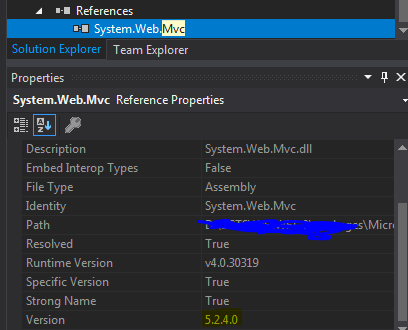
Note: I am answering an 2 years old question, so reasons for this error occur now may be different
Method 4
In my case the application was working fine locally but not on one of the servers. Removing the section for ‘System.Web.Mvc’ fixed the issue for me.
Method 5
Update the version of System.Web.Mvc from NuGet package, it will work properly.
All methods was sourced from stackoverflow.com or stackexchange.com, is licensed under cc by-sa 2.5, cc by-sa 3.0 and cc by-sa 4.0