I have a spreadsheet like this:
Locality    2005    2006    2007    2008    2009

ABBOTSFORD  427000  448000  602500  600000  638500
ABERFELDIE  534000  600000  735000  710000  775000
AIREYS INLET459000  440000  430000  517500  512500
I don’t want to manually swap the column with the row. Could it be possible to use pandas reading data to a list as this:
data['ABBOTSFORD']=[427000,448000,602500,600000,638500]
data['ABERFELDIE']=[534000,600000,735000,710000,775000]
data['AIREYS INLET']=[459000,440000,430000,517500,512500]
Answers:
Thank you for visiting the Q&A section on Magenaut. Please note that all the answers may not help you solve the issue immediately. So please treat them as advisements. If you found the post helpful (or not), leave a comment & I’ll get back to you as soon as possible.
Method 1
Yes, with set_index you can make Locality your row index.
data.set_index('Locality', inplace=True)
If inplace=True is not provided, set_index returns the modified dataframe as a result.
Example:
> import pandas as pd
> df = pd.DataFrame([['ABBOTSFORD', 427000, 448000],
                     ['ABERFELDIE', 534000, 600000]],
                    columns=['Locality', 2005, 2006])

> df
     Locality    2005    2006
0  ABBOTSFORD  427000  448000
1  ABERFELDIE  534000  600000

> df.set_index('Locality', inplace=True)
> df
              2005    2006
Locality
ABBOTSFORD  427000  448000
ABERFELDIE  534000  600000

> df.loc['ABBOTSFORD']
2005    427000
2006    448000
Name: ABBOTSFORD, dtype: int64

> df.loc['ABBOTSFORD'][2005]
427000

> df.loc['ABBOTSFORD'].values
array([427000, 448000])

> df.loc['ABBOTSFORD'].tolist()
[427000, 448000]
Method 2
You can change the index as explained already using set_index.
You don’t need to manually swap rows with columns, there is a transpose (data.T) method in pandas that does it for you:
> df = pd.DataFrame([['ABBOTSFORD', 427000, 448000],
                    ['ABERFELDIE', 534000, 600000]],
                    columns=['Locality', 2005, 2006])

> newdf = df.set_index('Locality').T
> newdf

Locality    ABBOTSFORD  ABERFELDIE
2005        427000      534000
2006        448000      600000
then you can fetch the dataframe column values and transform them to a list:
> newdf['ABBOTSFORD'].values.tolist()

[427000, 448000]
Method 3
Another simple approach is to assign the column to the data frame index
data = {
  'Locality': ['ABBOTSFORD', 'ABERFELDIE', 'AIREYS INLET'],
  '2005': [427000, 534000, 459000 ],
  '2006': [448000, 448000, 448000],
  '2007': [602500, 602500, 602500],
  '2008': [600000, 710000, 517500],
  '2009': [638500, 775000, 512500]
}

df = pd.DataFrame(data)

# set the locality column as the index
df.index = df['Locality']
And if you no longer want the Locality column as a column, you can just drop it
df.drop('Locality', axis=1)
You’ll end up with
              | 2005     | 2006   | 2007   | 2008   | 2009
Locality      |-------------------------------------------
ABBOTSFORD    | 427000   | 448000 | 602500 | 600000 | 638500
ABERFELDIE    | 534000   | 448000 | 602500 | 710000 | 775000
AIREYS INLET  | 459000   | 448000 | 602500 | 517500 | 512500
Method 4
You can set the column index using index_col parameter available while reading from spreadsheet in Pandas.
Here is my solution:
-
Firstly, import pandas as pd:
import pandas as pd -
Read in filename using pd.read_excel() (if you have your data in a spreadsheet) and set the index to ‘Locality’ by specifying the index_col parameter.
df = pd.read_excel('testexcel.xlsx', index_col=0)At this stage if you get a ‘no module named xlrd’ error, install it using
pip install xlrd. -
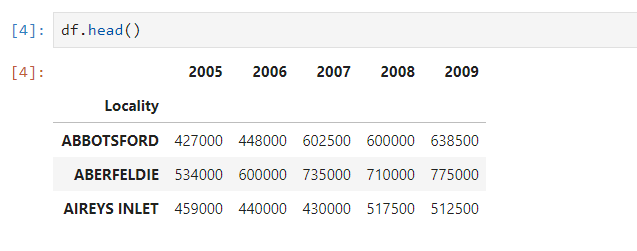
For visual inspection, read the dataframe using
df.head()which will print the following output
-
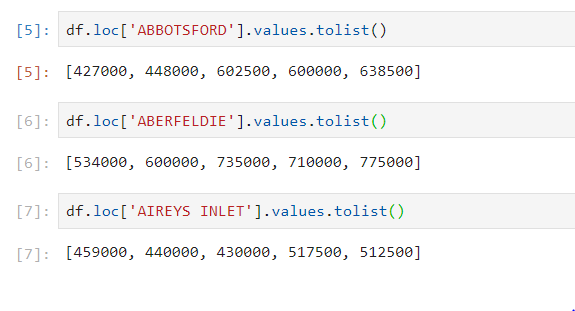
Now you can fetch the values of the desired columns of the dataframe and print it
All methods was sourced from stackoverflow.com or stackexchange.com, is licensed under cc by-sa 2.5, cc by-sa 3.0 and cc by-sa 4.0