I have used these links and got a working code where I can use a template report(containing placeolders) and generate new PPTX report with data I get from database. I have 4 more placeholders where I need to populate 4 different data tables. Currently I am using that template to create new slide and replacing placeholder for text but for tables I couldn’t figure out. I am able to generate the table using below code but not in placeholder’s location. Table always appear in center of screen.
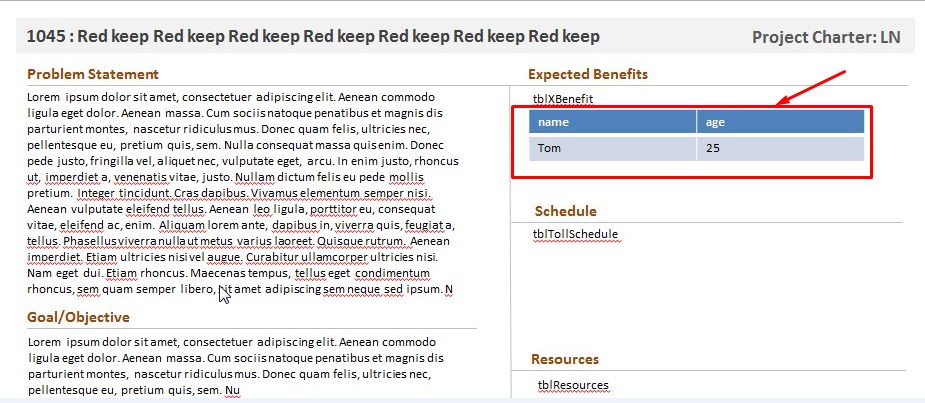
Links used: https://blogs.msdn.microsoft.com/brian_jones/2008/11/18/creating-a-presentation-report-based-on-data/
https://code.msdn.microsoft.com/office/How-to-add-a-table-with-03578dde
Call this from some button click event:
 using (PresentationDocument presentationDocument = PresentationDocument.Open(slideName, true))
            {
                //Get the first slide from presentation
                SlidePart intitalSlide = presentationDocument.PresentationPart.SlideParts.First();
                AddNewSlide(presentationDocument, intitalSlide, 1045);
            }
 private void AddNewSlide(PresentationDocument presentationDocument, SlidePart _slideTemplate, int projectID)
    {
        PresentationPart parent = presentationDocument.PresentationPart;

        System.Data.DataTable dt = GetValueForPPTReport(projectID);

        var newSlidePart = parent.AddNewPart<SlidePart>("newSlide1");

        //copy the contents of the template slide to the new slide and attach the appropriate layout
        newSlidePart.FeedData(_slideTemplate.GetStream(FileMode.Open));
        newSlidePart.AddPart(_slideTemplate.SlideLayoutPart, _slideTemplate.GetIdOfPart(_slideTemplate.SlideLayoutPart));

        //Alter the placeholder text in new slide
        SetPlaceholder(newSlidePart, "txtProjectIDName", dt.Rows[0]["projName"].ToString());
        SetPlaceholder(newSlidePart, "txtProjType", dt.Rows[0]["proj_type"].ToString());
        SetPlaceholder(newSlidePart, "txtProbSt", dt.Rows[0]["proj_problem_state"].ToString());
        SetPlaceholder(newSlidePart, "txtGoal", dt.Rows[0]["proj_goal_obj"].ToString());
        SetPlaceholder(newSlidePart, "txtInScope", dt.Rows[0]["proj_in_scope"].ToString());
        SetPlaceholder(newSlidePart, "txtOutOfScope", dt.Rows[0]["proj_out_scope"].ToString());
        SetPlaceholder(newSlidePart, "txtCustomer", dt.Rows[0]["proj_who_customer"].ToString());
        SetPlaceholder(newSlidePart, "txtCTQ", dt.Rows[0]["proj_critical_to_qlty"].ToString());
        SetPlaceholder(newSlidePart, "txtDefect", dt.Rows[0]["proj_what_defect"].ToString());
        SetPlaceholder(newSlidePart, "txtDate", System.DateTime.Now.ToString("MM/dd/yyyy HH:mm"));

        //Add Tables here
        //tblXBenefit
        System.Data.DataTable dtXb = GetValueForPPTReportBenefit(1045);
        string placeholder = "tblXBenefit";
        List<D.Text> textListExif1 = newSlidePart.Slide.Descendants<D.Text>().Where(t => t.Text.Equals(placeholder)).ToList();
        if (textListExif1.Count == 1)
        {

        }

        List<OpenXmlElement> elements = new List<OpenXmlElement>();
        elements.Add(new P.NonVisualGraphicFrameProperties
            (new P.NonVisualDrawingProperties() { Id = 1, Name = "xyz" }, new P.NonVisualGraphicFrameDrawingProperties(), new ApplicationNonVisualDrawingProperties()));

        // Declare and instantiate the graphic Frame of the new slide
        P.GraphicFrame graphicFrame = newSlidePart.Slide.CommonSlideData.ShapeTree.AppendChild(new P.GraphicFrame());

        // Specify the required Frame properties of the graphicFrame
        ApplicationNonVisualDrawingPropertiesExtension applicationNonVisualDrawingPropertiesExtension = new ApplicationNonVisualDrawingPropertiesExtension() { Uri = "{D42A27DB-BD31-4B8C-83A1-F6EECF244321}" };
        P14.ModificationId modificationId1 = new P14.ModificationId() { Val = 3229994563U };
        modificationId1.AddNamespaceDeclaration("p14", "http://schemas.microsoft.com/office/powerpoint/2010/main");
        applicationNonVisualDrawingPropertiesExtension.Append(modificationId1);
        graphicFrame.NonVisualGraphicFrameProperties = new P.NonVisualGraphicFrameProperties
        (new D.NonVisualDrawingProperties() { Id = 5, Name = "table 1" },
        new D.NonVisualGraphicFrameDrawingProperties(new D.GraphicFrameLocks() { NoGrouping = true }),
        new ApplicationNonVisualDrawingProperties(new ApplicationNonVisualDrawingPropertiesExtensionList(applicationNonVisualDrawingPropertiesExtension)));


        graphicFrame.Transform = new Transform(new D.Offset() { X = 1650609L, Y = 4343400L }, new D.Extents() { Cx = 6096000L, Cy = 741680L });

        // Specify the Griaphic of the graphic Frame
        graphicFrame.Graphic = new D.Graphic(new D.GraphicData(GenerateTable()) { Uri = "http://schemas.openxmlformats.org/drawingml/2006/table" });

        //save the changes to the slide
        newSlidePart.Slide.Save();

        //need to assign an id to the new slide and add it to the slideIdList
        //first figure out the largest existing id
        DocumentFormat.OpenXml.Presentation.SlideIdList slideIdList = parent.Presentation.SlideIdList;
        uint maxSlideId = 1;

        foreach (DocumentFormat.OpenXml.Presentation.SlideId slideId in slideIdList.ChildElements)
        {
            if (slideId.Id > maxSlideId) maxSlideId = slideId.Id;
        }

        //assign an id and add the new slide at the end of the list
        DocumentFormat.OpenXml.Presentation.SlideId newSlideId = new DocumentFormat.OpenXml.Presentation.SlideId { Id = ++maxSlideId, RelationshipId = parent.GetIdOfPart(newSlidePart) };
        slideIdList.Append(newSlideId);

        //Delete first template slide
        SlideId tempSlideId = slideIdList.ChildElements[0] as SlideId;
        slideIdList.RemoveChild(tempSlideId);
    }
    private void SetPlaceholder(SlidePart slidePart, string placeholder, string value)
    {
        List<D.Text> textListExif1 = slidePart.Slide.Descendants<D.Text>().Where(t => t.Text.Equals(placeholder)).ToList();
        foreach (D.Text text in textListExif1)
        {
            text.Text = value;
        }
    }

    #region tables


    /// <summary>
    /// Generate Table as below order:
    /// a:tbl(Table) ->a:tr(TableRow)->a:tc(TableCell)
    /// We can return TableCell object with CreateTextCell method
    /// and Append the TableCell object to TableRow
    /// </summary>
    /// <returns>Table Object</returns>
    private static D.Table GenerateTable()
    {
        string[,] tableSources = new string[,] { { "name", "age" }, { "Tom", "25" } };

        // Declare and instantiate table
        D.Table table = new D.Table();


        // Specify the required table properties for the table
        D.TableProperties tableProperties = new D.TableProperties() { FirstRow = true, BandRow = true };
        D.TableStyleId tableStyleId = new D.TableStyleId();
        tableStyleId.Text = "{5C22544A-7EE6-4342-B048-85BDC9FD1C3A}";


        tableProperties.Append(tableStyleId);


        // Declare and instantiate tablegrid and colums
        D.TableGrid tableGrid1 = new D.TableGrid();
        D.GridColumn gridColumn1 = new D.GridColumn() { Width = 3048000L };
        D.GridColumn gridColumn2 = new D.GridColumn() { Width = 3048000L };


        tableGrid1.Append(gridColumn1);
        tableGrid1.Append(gridColumn2);
        table.Append(tableProperties);
        table.Append(tableGrid1);
        for (int row = 0; row < tableSources.GetLength(0); row++)
        {
            // Instantiate the table row
            D.TableRow tableRow = new D.TableRow() { Height = 370840L };
            for (int column = 0; column < tableSources.GetLength(1); column++)
            {
                tableRow.Append(CreateTextCell(tableSources.GetValue(row, column).ToString()));
            }


            table.Append(tableRow);
        }
        return table;
    }


    /// <summary>
    /// Create table cell with the below order:
    /// a:tc(TableCell)->a:txbody(TextBody)->a:p(Paragraph)->a:r(Run)->a:t(Text)
    /// </summary>
    /// <param name="text">Inserted Text in Cell</param>
    /// <returns>Return TableCell object</returns>
    private static D.TableCell CreateTextCell(string text)
    {
        if (string.IsNullOrEmpty(text))
        {
            text = string.Empty;
        }

        // Declare and instantiate the table cell
        // Create table cell with the below order:
        // a:tc(TableCell)->a:txbody(TextBody)->a:p(Paragraph)->a:r(Run)->a:t(Text)
        D.TableCell tableCell = new D.TableCell();


        //  Declare and instantiate the text body
        D.TextBody textBody = new D.TextBody();
        D.BodyProperties bodyProperties = new D.BodyProperties();
        D.ListStyle listStyle = new D.ListStyle();


        D.Paragraph paragraph = new D.Paragraph();
        D.Run run = new D.Run();
        D.RunProperties runProperties = new D.RunProperties() { Language = "en-US", Dirty = false };
        D.Text text2 = new D.Text();
        text2.Text = text;
        run.Append(runProperties);
        run.Append(text2);
        D.EndParagraphRunProperties endParagraphRunProperties = new D.EndParagraphRunProperties() { Language = "en-US", Dirty = false };


        paragraph.Append(run);
        paragraph.Append(endParagraphRunProperties);
        textBody.Append(bodyProperties);
        textBody.Append(listStyle);
        textBody.Append(paragraph);


        D.TableCellProperties tableCellProperties = new D.TableCellProperties();
        tableCell.Append(textBody);
        tableCell.Append(tableCellProperties);


        return tableCell;
    }


    #endregion
Answers:
Thank you for visiting the Q&A section on Magenaut. Please note that all the answers may not help you solve the issue immediately. So please treat them as advisements. If you found the post helpful (or not), leave a comment & I’ll get back to you as soon as possible.
Method 1
Okay, I can place the table at any location I want to by changing values in this.. for X and Y.. not sure what Cx and Cy values does. So that works
graphicFrame.Transform = new Transform(new D.Offset() { X = 1650609L, Y = 4343400L }, new D.Extents() { Cx = 6096000L, Cy = 741680L });
But now the new issue is I am unable to reduce the font and table row height.
I tried changing this values but nothing works. Will post here when I find out.
D.TableRow tableRow = new D.TableRow() { Height = 370840L };
Method 2
I had to to make this change in createTextCell method: added FontSize=800
D.RunProperties runProperties = new D.RunProperties() { Language = "en-US", Dirty = false, FontSize=800 };
All methods was sourced from stackoverflow.com or stackexchange.com, is licensed under cc by-sa 2.5, cc by-sa 3.0 and cc by-sa 4.0