I’d like users to be able to create and remove additional meta box fields as needed.
For example, say a music podcast with a variable amount of songs played per episode.
The user should be able to click a button that will add additional fields to enter each song as needed.
Ideally this would be done without the use of a plugin, but coded into the functions file.
Answers:
Thank you for visiting the Q&A section on Magenaut. Please note that all the answers may not help you solve the issue immediately. So please treat them as advisements. If you found the post helpful (or not), leave a comment & I’ll get back to you as soon as possible.
Method 1
So you mean something like this?

and when you click on Add tracks it becomes this:
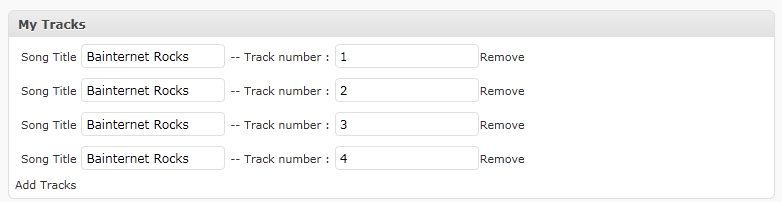
if it is what you mean the its done by creating a metabox that has simple jquery function to add and remove fields in it, and the data is saved as an array in of data in a single meta row, here you go:
  add_action( 'add_meta_boxes', 'dynamic_add_custom_box' );

    /* Do something with the data entered */
    add_action( 'save_post', 'dynamic_save_postdata' );

    /* Adds a box to the main column on the Post and Page edit screens */
    function dynamic_add_custom_box() {
        add_meta_box(
            'dynamic_sectionid',
            __( 'My Tracks', 'myplugin_textdomain' ),
            'dynamic_inner_custom_box',
            'post');
    }

    /* Prints the box content */
    function dynamic_inner_custom_box() {
        global $post;
        // Use nonce for verification
        wp_nonce_field( plugin_basename( __FILE__ ), 'dynamicMeta_noncename' );
        ?>
        <div id="meta_inner">
        <?php

        //get the saved meta as an array
        $songs = get_post_meta($post->ID,'songs',false);

        $c = 0;
        if ( count( $songs ) > 0 ) {
            foreach( $songs as $track ) {
                if ( isset( $track['title'] ) || isset( $track['track'] ) ) {
                    printf( '<p>Song Title <input type="text" name="songs[%1$s][title]" value="%2$s" /> -- Track number : <input type="text" name="songs[%1$s][track]" value="%3$s" /><span class="remove">%4$s</span></p>', $c, $track['title'], $track['track'], __( 'Remove Track' ) );
                    $c = $c +1;
                }
            }
        }

        ?>
    <span id="here"></span>
    <span class="add"><?php _e('Add Tracks'); ?></span>
    <script>
        var $ =jQuery.noConflict();
        $(document).ready(function() {
            var count = <?php echo $c; ?>;
            $(".add").click(function() {
                count = count + 1;

                $('#here').append('<p> Song Title <input type="text" name="songs['+count+'][title]" value="" /> -- Track number : <input type="text" name="songs['+count+'][track]" value="" /><span class="remove">Remove Track</span></p>' );
                return false;
            });
// The live() method was deprecated in jQuery version 1.7, and removed in version 1.9. Use the on() method instead. We can use .on
            $(".remove").live('click', function() {
                $(this).parent().remove();
            });
        });
        </script>
    </div><?php

    }

    /* When the post is saved, saves our custom data */
    function dynamic_save_postdata( $post_id ) {
        // verify if this is an auto save routine.
        // If it is our form has not been submitted, so we dont want to do anything
        if ( defined( 'DOING_AUTOSAVE' ) && DOING_AUTOSAVE )
            return;

        // verify this came from the our screen and with proper authorization,
        // because save_post can be triggered at other times
        if ( !isset( $_POST['dynamicMeta_noncename'] ) )
            return;

        if ( !wp_verify_nonce( $_POST['dynamicMeta_noncename'], plugin_basename( __FILE__ ) ) )
            return;

        // OK, we're authenticated: we need to find and save the data

        $songs = $_POST['songs'];

        update_post_meta($post_id,'songs',$songs);
    }
Method 2
This is done through custom fields BUT you should never use anything that lets users add create or remove meta boxes. These write directly into the database so you could potentially create a whole lot of problems for your site if you give users this kind of control. It’s far safer for you to create the maximum number of custom fields they may need and let them leave some blank where they are not needed.
This is also plugin territory. The functions file is theme-specific whereas plugins are for functions that apply to the site content, especially if you want that content to be available regardless of which theme you use.
Some suggestions:
http://wordpress.org/extend/plugins/verve-meta-boxes/
http://wordpress.org/extend/plugins/more-fields/
All methods was sourced from stackoverflow.com or stackexchange.com, is licensed under cc by-sa 2.5, cc by-sa 3.0 and cc by-sa 4.0