In order to test some functionality I would like to create a DataFrame from a string. Let’s say my test data looks like:
TESTDATA="""col1;col2;col3
1;4.4;99
2;4.5;200
3;4.7;65
4;3.2;140
"""
What is the simplest way to read that data into a Pandas DataFrame?
Answers:
Thank you for visiting the Q&A section on Magenaut. Please note that all the answers may not help you solve the issue immediately. So please treat them as advisements. If you found the post helpful (or not), leave a comment & I’ll get back to you as soon as possible.
Method 1
A simple way to do this is to use StringIO.StringIO (python2) or io.StringIO (python3) and pass that to the pandas.read_csv function. E.g:
import sys
if sys.version_info[0] < 3:
    from StringIO import StringIO
else:
    from io import StringIO

import pandas as pd

TESTDATA = StringIO("""col1;col2;col3
    1;4.4;99
    2;4.5;200
    3;4.7;65
    4;3.2;140
    """)

df = pd.read_csv(TESTDATA, sep=";")
Method 2
Split Method
data = input_string
df = pd.DataFrame([x.split(';') for x in data.split('n')])
print(df)
Method 3
In one line, but first import IO
import pandas as pd
import io

TESTDATA="""col1;col2;col3
1;4.4;99
2;4.5;200
3;4.7;65
4;3.2;140
"""

df = pd.read_csv(io.StringIO(TESTDATA), sep=";")
print(df)
Method 4
A quick and easy solution for interactive work is to copy-and-paste the text by loading the data from the clipboard.
Select the content of the string with your mouse:
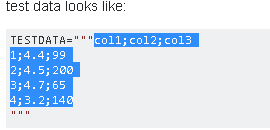
In the Python shell use read_clipboard()
>>> pd.read_clipboard()
  col1;col2;col3
0       1;4.4;99
1      2;4.5;200
2       3;4.7;65
3      4;3.2;140
Use the appropriate separator:
>>> pd.read_clipboard(sep=';')
   col1  col2  col3
0     1   4.4    99
1     2   4.5   200
2     3   4.7    65
3     4   3.2   140

>>> df = pd.read_clipboard(sep=';') # save to dataframe
Method 5
This answer applies when a string is manually entered, not when it’s read from somewhere.
A traditional variable-width CSV is unreadable for storing data as a string variable. Especially for use inside a .py file, consider fixed-width pipe-separated data instead. Various IDEs and editors may have a plugin to format pipe-separated text into a neat table.
Using read_csv
Store the following in a utility module, e.g. util/pandas.py. An example is included in the function’s docstring.
import io
import re

import pandas as pd


def read_psv(str_input: str, **kwargs) -> pd.DataFrame:
    """Read a Pandas object from a pipe-separated table contained within a string.

    Input example:
        | int_score | ext_score | eligible |
        |           | 701       | True     |
        | 221.3     | 0         | False    |
        |           | 576       | True     |
        | 300       | 600       | True     |

    The leading and trailing pipes are optional, but if one is present,
    so must be the other.

    `kwargs` are passed to `read_csv`. They must not include `sep`.

    In PyCharm, the "Pipe Table Formatter" plugin has a "Format" feature that can
    be used to neatly format a table.

    Ref: https://stackoverflow.com/a/46471952/
    """

    substitutions = [
        ('^ *', ''),  # Remove leading spaces
        (' *$', ''),  # Remove trailing spaces
        (r' *| *', '|'),  # Remove spaces between columns
    ]
    if all(line.lstrip().startswith('|') and line.rstrip().endswith('|') for line in str_input.strip().split('n')):
        substitutions.extend([
            (r'^|', ''),  # Remove redundant leading delimiter
            (r'|$', ''),  # Remove redundant trailing delimiter
        ])
    for pattern, replacement in substitutions:
        str_input = re.sub(pattern, replacement, str_input, flags=re.MULTILINE)
    return pd.read_csv(io.StringIO(str_input), sep='|', **kwargs)
Non-working alternatives
The code below doesn’t work properly because it adds an empty column on both the left and right sides.
df = pd.read_csv(io.StringIO(df_str), sep=r's*|s*', engine='python')
As for read_fwf, it doesn’t actually use so many of the optional kwargs that read_csv accepts and uses. As such, it shouldn’t be used at all for pipe-separated data.
Method 6
Object: Take string make dataframe.
Solution
def str2frame(estr, sep = ',', lineterm = 'n', set_header = True):
    dat = [x.split(sep) for x in estr.split(lineterm)][1:-1]
    cdf = pd.DataFrame(dat)
    if set_header:
        cdf = cdf.T.set_index(0, drop = True).T # flip, set ix, flip back
    return cdf
Example
estr = """
sym,date,strike,type
APPLE,20MAY20,50.0,Malus
ORANGE,22JUL20,50.0,Rutaceae
"""

cdf = str2frame(estr)
print(cdf)
0     sym     date strike      type
1   APPLE  20MAY20   50.0     Malus
2  ORANGE  22JUL20   50.0  Rutaceae
All methods was sourced from stackoverflow.com or stackexchange.com, is licensed under cc by-sa 2.5, cc by-sa 3.0 and cc by-sa 4.0