I have my data in an array of the following structure,
[[1293606162197, 0, 0],
 [1293605477994, 63, 0],
 [1293605478057, 0, 0],
 [1293605478072, 2735, 1249],
 [1293606162213, 0, 0],
 [1293606162229, 0, 0]]
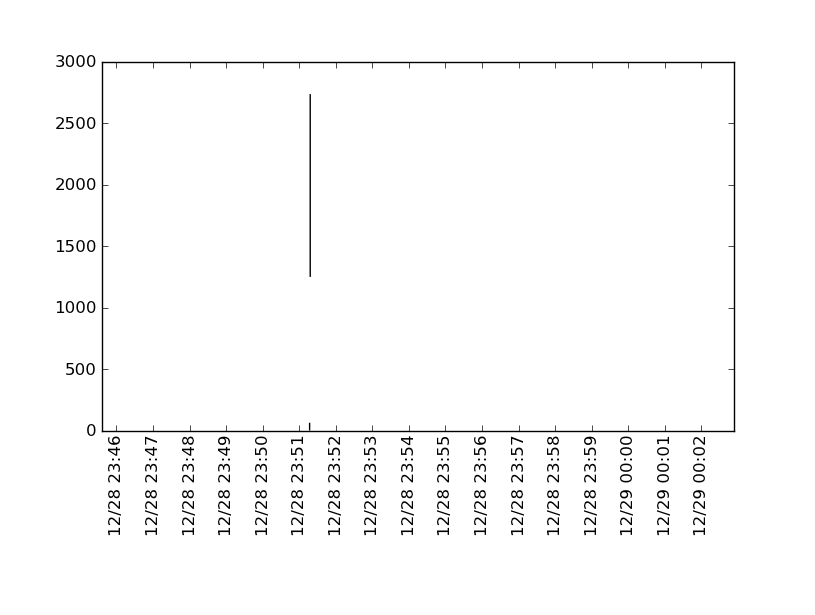
The first column is epoch time (in ms), second is y1 and third is y2. I need a plot with the time on the x-axis, and y1 and y2 on left and right y-axes.
I have been scouring through the documentation but couldn’t find any way to get my x-axis ticks to display both date and time, like “28/12 16:48”, i.e., “date/month hour:min”. All the documentation helps me with is to display dates alone, but that is not what I want. Any help would be appreciated on this.
And, if it may seem like, this is not homework. It is actually a follow up to my previous question, Reading and graphing data read from huge files.
Answers:
Thank you for visiting the Q&A section on Magenaut. Please note that all the answers may not help you solve the issue immediately. So please treat them as advisements. If you found the post helpful (or not), leave a comment & I’ll get back to you as soon as possible.
Method 1
I hope this helps. I’ve always had a hard time with matplotlib’s dates. Matplotlib requires a float format which is days since epoch. The helper functions num2date and date2num along with python builtin datetime can be used to convert to/from. The formatting business was lifted from this example. You can change an axis on any plot to a date axis using set_major_formatter.
import numpy as np
from matplotlib import pyplot as plt
from matplotlib import dates
import datetime

a = np.array([
    [1293605162197, 0, 0],
    [1293605477994, 63, 0],
    [1293605478057, 0, 0],
    [1293605478072, 2735, 1249],
    [1293606162213, 0, 0],
    [1293606162229, 0, 0]])

d = a[:,0]
y1 = a[:,1]
y2 = a[:,2]

# convert epoch to matplotlib float format
s = d/1000
ms = d-1000*s  # not needed?
dts = map(datetime.datetime.fromtimestamp, s)
fds = dates.date2num(dts) # converted

# matplotlib date format object
hfmt = dates.DateFormatter('%m/%d %H:%M')

fig = plt.figure()
ax = fig.add_subplot(111)
ax.vlines(fds, y2, y1)

ax.xaxis.set_major_locator(dates.MinuteLocator())
ax.xaxis.set_major_formatter(hfmt)
ax.set_ylim(bottom = 0)
plt.xticks(rotation='vertical')
plt.subplots_adjust(bottom=.3)
plt.show()
All methods was sourced from stackoverflow.com or stackexchange.com, is licensed under cc by-sa 2.5, cc by-sa 3.0 and cc by-sa 4.0