HttpParseException error CS1061: ‘mcl959.Person’ does not contain a definition for ‘HasEmail’ and no extension method ‘HasEmail’ accepting a first argument of type ‘mcl959.Person’ could be found (are you missing a using directive or an assembly reference?)
I am getting the above Compiler Error CS1061 for my ASP.NET web site build using .NET Framework 4.5.2.
I understand the error, but I do not understand why I am getting it.
Here is my StackTrace, showing that the error occurs in Site1.Master.cs Line 590:
c:Developmentmcl959Site1.Master.cs(590): error CS1061: ‘mcl959.Person’ does not contain a definition for ‘HasEmail’ and no extension method ‘HasEmail’ accepting a first argument of type ‘mcl959.Person’ could be found (are you missing a using directive or an assembly reference?)
Source: System.Web
HResult: -2147467259
HelpLink:
StackTrace:
at System.Web.UI.TemplateParser.ProcessException(Exception ex)
at System.Web.UI.TemplateParser.ParseStringInternal(String text, Encoding fileEncoding)
at System.Web.UI.TemplateParser.ParseString(String text, VirtualPath virtualPath, Encoding fileEncoding)
at System.Web.UI.TemplateParser.ParseFile(String physicalPath, VirtualPath virtualPath)
at System.Web.UI.TemplateParser.ParseInternal()
at System.Web.UI.TemplateParser.Parse()
at System.Web.Compilation.BaseTemplateBuildProvider.get_CodeCompilerType()
at
System.Web.Compilation.BuildProvider.GetCompilerTypeFromBuildProvider(BuildProvider buildProvider)
at System.Web.Compilation.BuildProvidersCompiler.ProcessBuildProviders()
at System.Web.Compilation.BuildProvidersCompiler.PerformBuild()
at System.Web.Compilation.BuildManager.CompileWebFile(VirtualPath virtualPath)
at System.Web.Compilation.BuildManager.GetVPathBuildResultInternal(VirtualPath virtualPath, Boolean noBuild, Boolean allowCrossApp, Boolean allowBuildInPrecompile, Boolean throwIfNotFound, Boolean ensureIsUpToDate)
at System.Web.Compilation.BuildManager.GetVPathBuildResultWithNoAssert(HttpContext context, VirtualPath virtualPath, Boolean noBuild, Boolean allowCrossApp, Boolean allowBuildInPrecompile, Boolean throwIfNotFound, Boolean ensureIsUpToDate)
at System.Web.Compilation.BuildManager.GetVirtualPathObjectFactory(VirtualPath virtualPath, HttpContext context, Boolean allowCrossApp, Boolean throwIfNotFound)
at System.Web.Compilation.BuildManager.CreateInstanceFromVirtualPath(VirtualPath virtualPath, Type requiredBaseType, HttpContext context, Boolean allowCrossApp)
at System.Web.UI.PageHandlerFactory.GetHandlerHelper(HttpContext context, String requestType, VirtualPath virtualPath, String physicalPath)
at System.Web.UI.PageHandlerFactory.GetHandler(HttpContext context, String requestType, String virtualPath, String path)
at System.Web.HttpApplication.MaterializeHandlerExecutionStep.System.Web.HttpApplication.IExecutionStep.Execute()
at System.Web.HttpApplication.ExecuteStepImpl(IExecutionStep step)
at System.Web.HttpApplication.ExecuteStep(IExecutionStep step, Boolean& completedSynchronously)
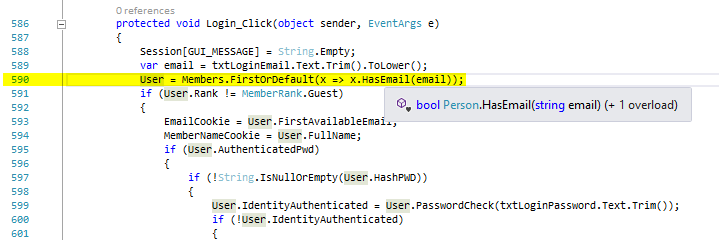
Below is a screenshot including Line 590, highlighted, with Intelliscence showing the definition of HasEmail:
And below is a screenshot showing project mcl959 with class Person and my two (2) versions of the HasEmail function (the top one never got used):
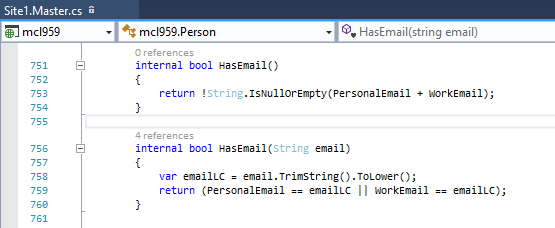
The CS1061 error is caused when you try to call a method or access a class member that does not exist. As I have shown, it does exist in my code.
Why am I getting this error?
Answers:
Thank you for visiting the Q&A section on Magenaut. Please note that all the answers may not help you solve the issue immediately. So please treat them as advisements. If you found the post helpful (or not), leave a comment & I’ll get back to you as soon as possible.
Method 1
If your application is an ASP web forms site (not an asp web forms application), it will compile the webpages only at runtime, on demand. That may be the reason that you’re getting the error only at runtime, not in compilation time.
As of the error itselft, my guess would be that the lambda function is not executing in the same assembly as the class/method is defined. As it’s marked as internal, it will throw that error.
https://docs.microsoft.com/pt-br/dotnet/csharp/language-reference/keywords/internal
Method 2
I used to get this problem when I Developed using WebForms.
This could only be applicable if your web project is a “Web Site” project and not a “Web Application” project. Might even work if it is a web Application project but I doubt it, it is worth a try.
“Web Site” projects normally don’t need compiled dlls when you deploy the site or run it locally while you debug. The site gets compiled on the fly.
The compiled dlls will go to the Temporary ASP.NET Files folder. If you delete these files then it should work. It could be that these compiled dlls is not updated.
Try clearing the files in these folders
c:WindowsMicrosoft.NETFrameworkv4.0.30319Temporary ASP.NET Files
This folder might not exist but if it does clear it
%AppData%LocalTempTemporary ASP.NET Files
You might need to close Visual studio and if you are using IIS then it might also be a good idea to stop IIS.
Read more about dynamic compilation here:
Understanding ASP.NET Dynamic Compilation
All methods was sourced from stackoverflow.com or stackexchange.com, is licensed under cc by-sa 2.5, cc by-sa 3.0 and cc by-sa 4.0