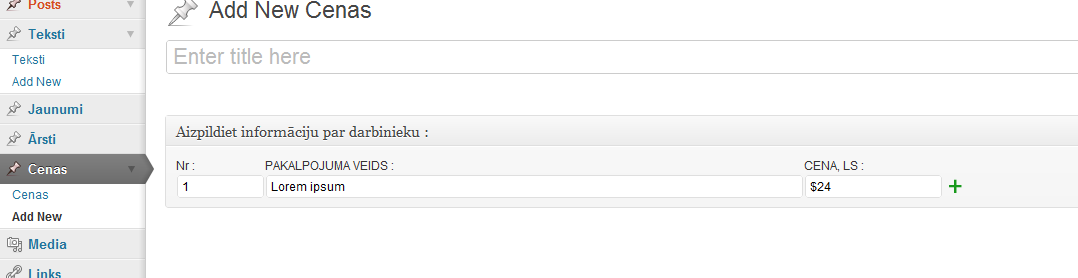
I am trying to create a custom post type with custom metabox array. How can I create this kind a automatic populating post type? I think I have to use two dimension array. But how can I automatically populate my data array? And how can I save this kind array.
Could some one point me to right direction?
Please take a look at the images.
Second img

My code so far :
<?php
//add custom field - price
add_action("admin_init", "price");

function object_init(){
  add_meta_box("price_meta", "Price fields :", "object", "price_meta", "normal", "low");

}


function price_meta(){
 global $post;
  $custom = get_post_custom($post->ID);
  $price = $custom["price"][0];
  ?>

  <p style="float:left;"><label>Nr :</label><br />
    <input type="text" name="priceNr" size="10" value="<?php echo $price; ?>"/>
</p>
  <p style="float:left;"><label>Description :</label><br />
    <input type="text" name="priceD" size="50" value="<?php echo $price; ?>"/>
</p>
  <p style="float:left;"><label>Price :</label><br />
    <input type="text" name="price" size="20" value="<?php echo $price; ?>"/>
</p>

  <?php
}
//Save product price
add_action('save_post', 'save_detailss');

function save_detailss(){
global $post;

$post_id = $post->ID;

// to prevent metadata or custom fields from disappearing...
if ( defined('DOING_AUTOSAVE') && DOING_AUTOSAVE )
return $post_id;

update_post_meta($post_id, "price", $_POST["price"]);

}

?>
Answers:
Thank you for visiting the Q&A section on Magenaut. Please note that all the answers may not help you solve the issue immediately. So please treat them as advisements. If you found the post helpful (or not), leave a comment & I’ll get back to you as soon as possible.
Method 1
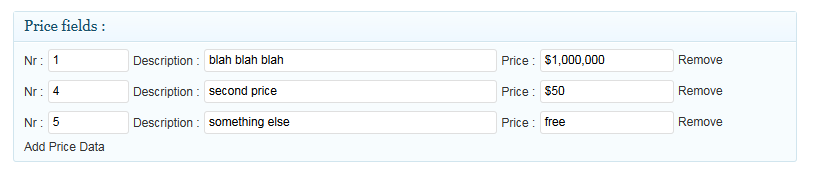
Your code make no sense, anyway here is a nice way to do it and you get:
function Print_price_fileds($cnt, $p = null) {
if ($p === null){
    $a = $b = $c = '';
}else{
    $a = $p['n'];
    $b = $p['d'];
    $c = $p['p'];
}
return  <<<HTML
<li>
    <label>Nr :</label>
    <input type="text" name="price_data[$cnt][n]" size="10" value="$a"/>

    <label>Description :</label>
    <input type="text" name="price_data[$cnt][d]" size="50" value="$b"/>

    <label>Price :</label>
    <input type="text" name="price_data[$cnt][p]" size="20" value="$c"/>
    <span class="remove">Remove</span>
</li>
HTML
;
}


//add custom field - price
add_action("add_meta_boxes", "object_init");

function object_init(){
  add_meta_box("price_meta_id", "Price fields :","price_meta", "post", "normal", "low");

}

function price_meta(){
 global $post;

  $data = get_post_meta($post->ID,"price_data",true);
  echo '<div>';
  echo '<ul id="price_items">';
  $c = 0;
    if (count($data) > 0){
        foreach((array)$data as $p ){
            if (isset($p['p']) || isset($p['d'])|| isset($p['n'])){
                echo Print_price_fileds($c,$p);
                $c = $c +1;
            }
        }

    }
    echo '</ul>';

    ?>
        <span id="here"></span>
        <span class="add"><?php echo __('Add Price Data'); ?></span>
        <script>
            var $ =jQuery.noConflict();
                $(document).ready(function() {
                var count = <?php echo $c - 1; ?>; // substract 1 from $c
                $(".add").click(function() {
                    count = count + 1;
                    //$('#price_items').append('<li><label>Nr :</label><input type="text" name="price_data[' + count + '][n]" size="10" value=""/><label>Description :</label><input type="text" name="price_data[' + count + '][d]" size="50" value=""/><label>Price :</label><input type="text" name="price_data[' + count + '][p]" size="20" value=""/><span class="remove">Remove</span></li>');
                   $('#price_items').append('<? echo implode('',explode("n",Print_price_fileds('count'))); ?>'.replace(/count/g, count));
                    return false;
                });
                $(".remove").live('click', function() {
                    $(this).parent().remove();
                });
            });
        </script>
        <style>#price_items {list-style: none;}</style>
    <?php
    echo '</div>';
}


//Save product price
add_action('save_post', 'save_detailss');

function save_detailss($post_id){
global $post;


    // to prevent metadata or custom fields from disappearing...
    if ( defined('DOING_AUTOSAVE') && DOING_AUTOSAVE )
    return $post_id;
    // OK, we're authenticated: we need to find and save the data
    if (isset($_POST['price_data'])){
        $data = $_POST['price_data'];
        update_post_meta($post_id,'price_data',$data);
    }else{
        delete_post_meta($post_id,'price_data');
    }
}
I keep getting people asking me how to get the data to print in the fronend so:
$data = get_post_meta($post->ID,"price_data",true);
echo '<ul>';
    if (count($data) > 0){
        foreach((array)$data as $p ){
            if (isset($p['p']) || isset($p['d'])|| isset($p['n'])){
                echo '<li>Number: '.$p['n'].' Description: '.$p['d'].' Price: '.$p['p'].'</li>';
            }
        }
    }
echo '</ul>';
All methods was sourced from stackoverflow.com or stackexchange.com, is licensed under cc by-sa 2.5, cc by-sa 3.0 and cc by-sa 4.0